
From the Toysit archive
Kinect for Xbox 360
A black sensor bar turns supported Xbox 360 games toward movement and gestures, with an original paper-card activity about how a pose can change a story.
The play at a glance
The player becomes part of the picture
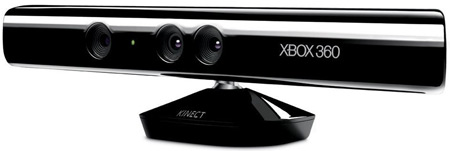
The glossy black bar stretches across a small stand, with a row of round elements facing the room. Its Xbox 360 name sits beside them. The interesting play idea is the space in front of it: a player makes a movement, and a supporting game gives that movement a meaning on screen.
One gesture, many possible stories
A raised hand might select something in one game and belong to an entirely different action in another. Kinect supplies movement input; the particular game supplies the rules and response. Microsoft’s guide directs players to the instructions that accompany each game, making the game itself the best place to learn what a gesture will do.
That relationship is a useful spark for inventing an imaginary game. Begin with a simple drawn pose, then ask what the scene should do in return. A small change to the rule can turn the same pose from a greeting into a way to open a storybook door.
Try gesture-to-scene cards
Fold a sheet into four panels. In each panel, draw a character pose: one arm raised, hands together, a hand pointing sideways or a character sitting with both arms wide. Keep the poses as drawings, so everyone can join by sketching or describing.
On the reverse of each panel, draw an imaginary response. The raised hand might light a lighthouse; the pointing hand might send a cloud toward a thirsty garden. Show a partner only the pose first and invite them to invent a different response before revealing yours.
Choose two cards and arrange them as the beginning and ending of a tiny adventure. Explain the rule connecting pose and response, then change one rule and retell the scene. These are original paper ideas, not commands that the actual sensor or an existing game is expected to recognize.
Make room for the real game
For actual Kinect play, use the matching console, sensor and game instructions together. Microsoft’s guide calls for a clear play area with secure footing, space between people and attention to furniture, pets and overhead objects. An adult can help children stay within comfortable limits and take breaks.
The sensor belongs on a stable surface with its view clear. Move it by the base and let its motor set the viewing angle. The guide distinguishes the Xbox 360 S connection from the USB/power cable used with the original Xbox 360; identify the equipment before connecting it. Its lighting advice includes brightening the play area while keeping direct light off the sensor.
The historical record
Original Toysit coverage
The complete earlier product account and commentary are preserved below as historical coverage.
You are the controller in with this innovate way to connect with video games
Ever since the Wii controller, the other top game systems have been scrambling to catch up with alternative means of input (other than the standard game controller). The Kinect for Xbox 360 controller system looks out at you and figures out what you are doing and maps it to the game. X-box connect puts you in the game and connects you with the virtual world. I heard that adequate lighting is important. There are also specifications for how big the room needs to be. You cannot have too small of a space. Interesting news about this product is that it is amenable to hacking, meaning that the product is being used in numerous ways that were not intended by Microsoft. While often such tinkering is a source of grief for a company, in this case the company has stated that they are not going after and stopping those who innovate. This game hardware system promises to change the way that people interact with the games they play. While the Wii controller was famous for getting people into the action, there were limits on what the controller could do with the game. In the Kinect system, one's entire body is the controller.
The Kinect for Xbox 360 was groundbreaking in that it offered a controller-free gaming and entertainment experience, relying on motion sensing and voice recognition technologies. When it was introduced in 2010, it revolutionized the way people interacted with video games and multimedia content. Using a combination of an RGB camera, depth sensor, and microphone array, Kinect could track the movements and gestures of players in real-time, allowing them to control gameplay through bodily motions. This hands-free approach made the gaming experience more immersive and accessible, inviting a wider range of participants, including those who were not familiar with traditional controller-based systems. Voice commands could also be used to navigate menus or interact with games, making it one of the earliest mass-market implementations of voice-activated UI in the gaming industry. The Kinect transformed passive gaming into an active, engaging experience and set the stage for the development of more intuitive and interactive gaming technologies.
Sources and editorial notes
Microsoft’s 2010 Xbox 360 Kinect sensor manual was reviewed across all nineteen supplied PDF pages, including diagrams and the complete English section. Its regulatory page identifies model 1414; the original photo does not expose a model label. Console-specific power and game-specific play-space requirements matter. The earlier first-person lighting comment and broad immersion, accessibility and historical-first claims remain historical commentary, not new testing or universal findings.
- Original Toysit image — Existing same-site image reviewed and retained unchanged.
- Microsoft Xbox 360 Kinect sensor manual (PDF) — Full supplied English guide reviewed. Printed pages 3–7 cover space, placement and console-specific connections; page 10 covers lighting and sensing troubleshooting. Approximate distances vary with placement and game; this profile makes no tracking-accuracy or exercise-benefit promise. No game-specific manual was reviewed, so no particular game’s gestures or player modes are prescribed.
- Original Toysit coverage — Complete historical account retained, including its original claims and wording.

Images and descriptions are retained as historical material. How Toysit covers toys.
Created for Toysit by Tabbloza — the artwork in our header.