
From the Toysit archive
Dream Life Game
Meet Dream Life’s green game box and palm-size remote, explore its character and room choices, and invent a three-choice diary on paper.
The play at a glance
A small remote opens an imagined daily life
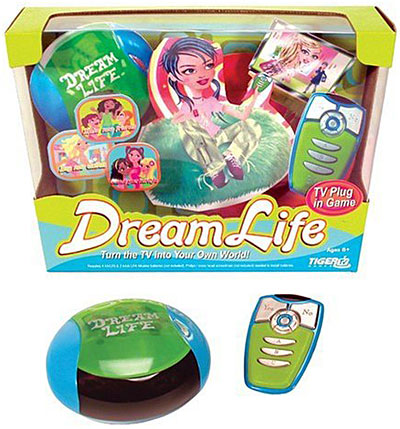
Dream Life pairs a rounded green-and-blue game box with a palm-size remote. The original picture shows a character-filled package, a glossy green lid and a row of long buttons on the controller. On screen, the game’s appeal is choosing how a character looks, where the day leads and what makes a virtual room feel like home.
A room, a town and a set of choices
Hasbro’s guide describes choosing a character’s appearance and personality, then a room style and wall color. The bedroom becomes a home base, with places such as a closet, a bookshelf and an address book giving the screen a lived-in feeling. The town offers places to visit and characters to meet.
The remote uses arrows and Select for choices, with A, B and C for conversation responses. The game tracks Fashion, Friends and Lifestyle across an imagined school year. These are the game’s scoring categories; a player can also supply a personal story about why a character chooses a particular outfit or room.
Try the three-choice diary
Draw an invented character and three cards labeled Room, Outfit and Friendship. Pick one card and draw a choice for the character’s next day. A Room card might add a window seat for watching birds; an Outfit card could choose colors for a rainy-day adventure; a Friendship card might plan a welcome for someone new.
Write a sentence beginning “Because I chose…” and finish it with an imagined consequence. A window seat might lead to discovering a bird’s nest. A cheerful raincoat might become the costume for a puddle parade. A welcome sign might introduce a new character to the story.
Let a second player add the next diary entry. After three entries, look back for a detail that appears twice and bring it into the ending. The diary is a paper storytelling game inspired by Dream Life’s choices; your characters and events are your own.
Returning to an older game
The manual provides A/V connection diagrams and battery guidance for this edition. An adult can match the actual unit and television to those instructions. For keeping progress, the guide distinguishes Save and Quit from automatic shutdown: the latter does not save the game. Follow the save prompt before turning the game box off.
The historical record
Original Toysit coverage
The complete earlier product account and commentary are preserved below as historical coverage.
Interactive role-playing TV plug-in video game
Interactive role-playing video game plugs into your TV and the wireless controller fits in the player's palm. Turn your TV into your own world. Place the videogame unit on the TV, plug the cords into your television, and use the wireless, palm-size remote to personalize your life with a click. Choose new clothes, pick a different hairstyle, make new friends, and decorate your virtual room.
Casual video game systems that plug directly into televisions offer a simplified gaming experience designed for quick setup and ease of use. These systems often come preloaded with a selection of games, eliminating the need for separate game cartridges or discs. Popular among families and casual gamers, these plug-and-play systems can include anything from retro games to basic versions of modern titles. The appeal lies in their accessibility; there's no need for a dedicated gaming console, and the controllers are often intuitive. These systems have evolved over the years to include wireless controllers and better graphics, but their core appeal remains the same: straightforward, hassle-free entertainment that can be enjoyed by players of all ages.
Sources and editorial notes
Hasbro’s complete 13-page PDF for item 42620 was visually reviewed, including printed pages 2–23 and the final remote-placement/storage sheet. Its box and remote diagrams match the pictured form; the photograph does not expose an underside model label. The manual supports the control, room, game-time and saving details here. Historical service offers are not current availability promises. This profile is document-based; the game was not physically tested. The diary is an original editorial activity.
- Original Toysit image — Existing same-site image reviewed and retained unchanged.
- Hasbro: Dream Life 42620 instructions — Complete scan visually reviewed. Printed pages 7–9 cover connections/remote; 10–17 cover choices and saving; 18 warns that automatic shutdown does not save. Final sheet shows remote storage in the box.
- Original Toysit coverage — Complete historical account retained, including its original claims and wording.

Images and descriptions are retained as historical material. How Toysit covers toys.
Created for Toysit by Tabbloza — the artwork in our header.