
From the Toysit archive
Splatster
Paint and play on a television with a wireless brush controller, with the original video connections and save-to-USB workflow explained.
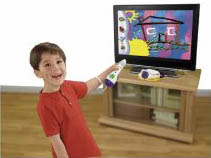
The play at a glance
Move the brush and make a picture on the TV
Splatster uses a brush-shaped controller to turn movement into marks on a television. The base contains the drawing activities and games, while the player points and selects with the wireless brush.
The original Toysit page called it “Splatser.” The title here uses the documented Splatster name, and the full historical text remains below.
A television activity with its own base
The P6843 manual describes themed drawing studios, spin art and arcade games. The brush sends its signal to the base, which connects to a television through yellow video and white audio RCA plugs. The brush’s wireless connection does not make the TV connection wireless.
These are the documented analog connections, not an HDMI output. A newer display needs a compatible input arrangement; this page does not promise that an untested adapter will work.
Saving and printing are separate steps
The manual describes saving a bitmap (.bmp) picture to a separately supplied USB flash drive inserted into the base. The drive is then moved to a computer, where the file can be opened and printed. The USB port is therefore part of the picture-saving route; it is not a direct printer connection.
The documented TV painting activity does not require the computer used later for viewing or printing. Mattel’s support record lists P6843 as released in 2009 and discontinued in 2011.
Check the whole route from brush to screen
- Parts: identify the matching brush, wrist strap, base and attached TV cable.
- Display: demonstrate a picture and sound using the intended television inputs.
- Control: confirm that the brush responds across the drawing area with the base positioned as directed.
- Saving: if keeping pictures matters, demonstrate saving a file and opening it on a computer.
For a simple play session, choose one drawing tool, make a few marks and change the tool to compare the result. That is an activity suggestion, not a report of a Toysit hardware test.
The historical record
Original Toysit coverage
The complete earlier coverage is preserved. Its general discussion of virtual painting includes an infinite palette, online sharing and collaboration; those are not established features of Splatster. The original title misspelling is retained in the historical source metadata, while the visible title and navigation use Splatster.
Creative wireless painting on your TV
Spray it or splatter, make a mess, it doesn't matter. The wildest wireless way to paint and play games right on your TV. The craziest way to create. Plug the Splatster base unit into your TV and use the wireless paint brush controller to paint, draw, splat, spin, spray, and play. Eight different feature themed drawing tools, stencils and stampers, crazy art brushes and fun backgrounds. Play three Splat Arcade games with 5 levels of challenge, and make ten color Splat spin art combinations. Easy pick menus let kids choose colors, tools, games and activities all by themselves and they can even print and save what they make.
The Joy of Virtual Painting Video Games
Video games that combine the tactile experience of physical controllers with the freedom of virtual paint splatter and spray have revolutionized the way we perceive and engage with art. These unique games seamlessly blend the physical and digital worlds, bringing countless benefits and fun factors:
1. Mess-Free Creativity
The most obvious advantage is the lack of real-world mess. Players can unleash their wildest creative impulses, splashing and spraying paint everywhere, without worrying about stains, clean-up, or waste.
2. Immersive Experience
With the use of physical controllers, players can feel more connected to the virtual world. The motions and gestures feel natural and intuitive, bridging the gap between traditional art and digital creation.
3. Limitless Palette
In the virtual realm, players are not limited by the number of paint tubes they have. They can access an infinite range of colors, shades, and textures at their fingertips, broadening the horizon of their artistic expression.
4. Experimentation
The virtual environment is a risk-free zone for experimentation. Players can try various techniques, mix unconventional colors, and even undo mistakes instantly. This freedom promotes unbridled creativity and learning.
5. Interactive Challenges
Many such games incorporate challenges, levels, or missions. This gamified approach encourages players to hone their skills, tackle various artistic challenges, and even compete with others, adding a whole new dimension to the painting experience.
6. Shared Creations
Many of these games offer platforms where players can share their masterpieces, get feedback, or even collaborate on joint projects with players from around the world, fostering a global artistic community.
Video games that merge physical painting actions with virtual canvases have unlocked new frontiers in the world of art and gaming. They offer an inclusive, innovative, and exhilarating platform for both budding and seasoned artists to express, explore, and enjoy the art of painting in a contemporary setting.
Sources and editorial notes
Mattel’s P6843 product record and P6843pr-0920 instructions were checked on October 15, 2026. They match the pictured type of base and brush system; check the actual model number before applying them. No hardware, USB drive, display adapter or printer was tested.
- Mattel: Splatster P6843 instructions (PDF) — Base and brush controls, television inputs, setup and the bitmap save/print pathway.
- Mattel: Splatster P6843 support record — Product identification, historical dates and save-to-USB troubleshooting.
Images and descriptions are retained as historical material. How Toysit covers toys.
Created for Toysit by Tabbloza — the artwork in our header.