
From the Toysit archive
Barbie iDesign Ultimate Stylist
Explore Barbie iDesign’s layered fashion cards, pink portfolio and original computer studio, then invent a one-card costume remix on paper.
The play at a glance
A wardrobe you can build one layer at a time
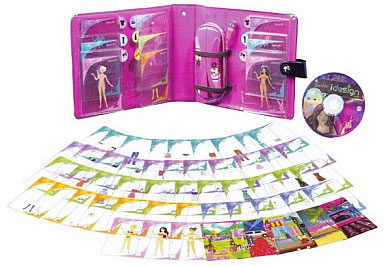
A pink portfolio opens into pockets of fashion cards, with more cards spread out in a colorful fan. Dresses, tops, shoes and accessories become the ingredients of a small design studio. Place one transparent layer over another and a new outfit appears; changing a single detail can suggest a whole new destination for its wearer.
From transparent cards to a virtual runway
The cards make the idea visible before a computer enters the scene: a figure provides the base, clothing layers build the outfit, and accessories finish it. The portfolio gives the collection a place to return after each design session. Try looking for a repeated color across several cards, or choose a surprising pair of patterns and see what kind of occasion they suggest.
Mattel’s original system paired the cards with a USB barcode scanner and CD-ROM software. Scanned fashions entered a design studio; finished outfits could appear in a runway show. The software guide also describes fashion-card games and a magazine-cover layout area. These were parts of the historical computer experience. The cards’ layering idea is equally easy to explore at a tabletop.
Try a one-card costume remix
This original Toysit activity gives one outfit two different stories.
- Choose an invitation. Imagine a rooftop concert, a seaside sketching trip or an opening night at a tiny theater. Give your character one thing to do there.
- Build the first look. Layer suitable cards from your own set. For a paper version, draw a top, a lower outfit and shoes in three aligned panels, with a face above them.
- Change just one part. Swap a shoe card, choose another top, or redraw one panel on a second sheet. Keep the remaining choices the same.
- Tell the difference. Explain how the new detail changes the character’s plan. Perhaps bright shoes become a performer’s signature, while a patterned jacket belongs to the person painting the scenery.
Finish with a two-look show card. Draw each version and add a short, invented caption beneath it. Another player can supply the event announcement while the designer explains the one change that matters most.
Keep a little design archive
Give each paper show card a title and save the pair together. On another day, return to the same character with a different invitation. Use separate paper for notes so the original cards stay available for the next combination.
The historical record
Original Toysit coverage
The complete earlier coverage follows. Its opening paragraph combines iDesign with the separate Candy Glam Style Station, and the later essay concerns lip-gloss mixers. Those historical passages are retained together, with their original wording.
Barbie ultimate stylist design studio
Design cool clothes by layering the cards to design thousands of looks. Swipe the idesign fashion cards to see the look on the runway. Be a Barbie fashion designer. Layer these innovative fashion cards to create lots of great looks on Barbie and her friends, then pop in the CD-ROM to continue the fashion designing fun on your computer. It's fashion play in a brand new way. Girls can create beautiful hair styles and mix their very own yummy candy flavored lip gloss with the Candy Glam Style Station. Girls can make lip gloss using the easy-to-use lip gloss mixer, four different flavored and scented lip glosses (strawberry, blueberry, grape, vanilla) and loose glitter. Girls can then choose their favorite colors to blend and add sparkle from the glitter wand. By simply attaching any of the three sweet treat containers to the mixer, girls spin to create their very own creations. The containers can be used to store the lip gloss or serve as storage for toy jewelry or accessories. Girls can also style the beautiful candy-scented styling head using the hard candy hairclip and the pretty hairbrush included.
The Fun of a Lip Gloss Mixer
A lip gloss mixer that allows for blending different scents and adding glitter presents a unique and delightful experience, especially for those who enjoy creativity and personalization. Here's a glimpse into the allure of such a fun and interactive kit:
- Personal Expression: The ability to mix and match various scents and glitters allows users to create a product that truly reflects their personality and preferences. Every creation becomes a signature blend.
- Sensory Experience: The joy of blending different scents provides a multisensory experience. The process of choosing, combining, and finally smelling the unique concoctions can be incredibly satisfying.
- Experimentation: The mixer kit acts as a mini-lab where users can experiment with different ratios of scents and glitter. This trial-and-error approach can lead to unexpected and delightful results.
- Boosts Creativity: Deciding on the right combination of scents and the amount of glitter challenges the user's creative instincts. It's an artistic endeavor, where the lip gloss becomes a canvas.
- Feeling of Accomplishment: Creating a customized lip gloss from scratch offers a tangible sense of achievement. Using or sharing a self-made product is far more gratifying than simply buying one off the shelf.
- Social Fun: Such kits can become the centerpiece of gatherings or sleepovers. Friends can challenge each other to create unique blends, share their concoctions, or even gift their masterpieces to one another.
- Learning Element: Beyond just fun, the process subtly introduces users to concepts like blending, ratios, and the chemistry of how different ingredients interact. It's experiential learning wrapped in a fun activity.
A lip gloss mixer kit is an avenue for self-expression, creativity, and even scientific exploration. It turns the everyday act of applying lip gloss into a personalized experience, making the end product all the more special.
Sources and editorial notes
Mattel’s L9628 record, product image, two-page setup sheet and complete 19-page software guide support this identification. The original software specified Windows 2000, XP or Vista; present-day compatibility was not established. The preserved account also describes the separate Candy Glam Style Station and discusses lip-gloss mixing; those features do not belong to iDesign. The new activity uses fashion cards or drawings. No physical testing was performed.
- Original Toysit image — Existing same-site image reviewed and retained unchanged.
- Mattel: iDesign Ultimate Stylist L9628 — Official record and product image; released in 2008.
- Mattel: iDesign setup sheet (PDF) — Both pages reviewed, including contents, scanner diagrams and historical computer requirements.
- Mattel: complete iDesign software guide (PDF) — All 19 pages reviewed, including design, runway, card games and magazine layouts.
- Original Toysit coverage — Complete historical account retained, including its original claims and wording.

Images and descriptions are retained as historical material. How Toysit covers toys.
Created for Toysit by Tabbloza — the artwork in our header.