
From the Toysit archive
Computer Pal Electronic Learning Aid
Revisit Computer Pal’s keyboard, mouse and activity cartridges, with guidance for distinguishing toy inputs from PC features and a paper instruction game.
The play at a glance
A little desktop with its own rules
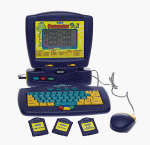
Computer Pal borrowed the shape of a desktop computer: a screen above a keyboard, a mouse beside it and small cartridges nearby. Its interest lies in how those pieces let a child select an activity and respond, rather than in how closely its case resembles a general-purpose PC.
Choose a category, then an activity
The Computer Pal guide groups activities under Language, Math, Music and Logic Games. It describes category keys and using Enter to select an activity. That gives a simple sequence to discuss: decide what kind of task you want, locate it, then confirm the choice.
On a found unit, first compare the keyboard labels with the instructions. A child may know an answer yet be unsure which control enters it. Let them explain the intended choice before treating an unexpected response as a knowledge mistake.
A cartridge is not an ordinary floppy disk
Toysit’s original copy describes the small accessories as resembling floppy disks. The guide calls them cartridges and distinguishes the Cartridge button from Main Unit, which returns to the built-in menu. Appearance alone does not establish compatibility with computer disks or software.
Keep each accessory with a record of its printed name and markings. An old photograph can show the intended arrangement, but it cannot prove that a secondhand set includes those pieces or that a cartridge from a similarly named toy will work.
Look at the response, not just the score
When sharing a word or number activity, ask what the player expects to see after pressing a key. Then compare the result with that prediction. If the response is unclear, stop and describe it before repeating inputs.
The earlier description’s broad audience and learning claims are preserved as historical reporting. They are not a fresh assessment of suitability or learning outcomes. The large technology essay below also belongs to that historical layer, rather than to this toy’s specification.
Be a paper computer
Draw a three-by-three grid and place a paper marker in the center. One person acts as the computer, moving only when given a precise instruction: up one square, left one square, or stay. The other predicts the final square before reading a short sequence.
Try an ambiguous command such as “go over there,” then rewrite it. Swap roles and compare the prediction with the result. This original Toysit activity needs no electronic toy and does not reproduce a built-in Computer Pal game.
The historical record
Original Toysit coverage
The original product description and complete technology timeline are preserved below. The timeline is general background; its discussion of later computers, touchscreens and connected devices does not establish features of Computer Pal.
Arithmetic, spelling, logic, and time
Understandably, kids get frustrated with grown-up computers. They are physically and technologically imposing to small children, despite their interest in them. Now even the smallest kids can have a grown-up machine of their own. The Computer Pal Electronic Learning Aid helps kids learn about math, language, and more, while practicing on a realistic computer. There's a working mouse and keyboard designed with little hands in mind, and games that grow with kids, starting out with the ABC's. Gradually, they'll progress to arithmetic, spelling, logic, and time. There are fun games to play, as well as floppy disk-like activity cartridges.
Evolution of Electronic Learning Toys
Electronic learning toys have come a long way since their inception, evolving with technology's rapid advancements and pedagogical understandings. Their journey reflects both the innovation in the toy industry and the growing appreciation of technology's role in education. Let's explore this evolution:
- 1980s - Beginning: The era saw some of the first electronic learning toys. These were primarily basic handheld devices that quizzed children on math and spelling, with simple LED screens and rudimentary sounds.
- 1990s - Leapfrog & Computer-Based Learning: The decade was marked by the introduction of the LeapPad by LeapFrog. This innovative device used interactive books and a stylus to help kids learn to read, bridging the gap between physical books and digital interactivity. Meanwhile, CD-ROM educational games for personal computers became immensely popular, teaching subjects from history to math in engaging, gamified formats.
- 2000s - Touch and Interactivity: As touchscreen technology became more prevalent, it found its way into children's toys. Devices became more interactive, and designs became more child-friendly. Vtech's InnoTab and LeapFrog's LeapPad Explorer emerged as tablet-like learning devices designed explicitly for kids, packed with apps, games, and e-books.
- 2010s - Integration with Smart Devices: This decade saw a blending of traditional toys with smart device capabilities. Many toys could now be paired with smartphones or tablets, expanding their functionalities. Augmented reality (AR) also began to play a role, turning physical spaces into interactive learning environments. Robotics kits like LEGO Mindstorms and Sphero allowed kids to code and see the results in real-time movements.
- 2020s & Beyond - AI & Personalized Learning: With advancements in artificial intelligence and machine learning, modern electronic learning toys can adapt to a child's skill level, offering personalized learning experiences. Voice-activated assistants and smart toys can answer kids' questions, assist with homework, and provide interactive storytelling.
Throughout their evolution, electronic learning toys have consistently strived to balance education and entertainment. They've transformed from simple quiz-based handhelds to intricate devices capable of adapting to individual learning curves, ensuring that learning remains both fun and effective.
Sources and editorial notes
The manufacturer-authored Computer Pal manual, document 91-01242-000, was consulted through indexed text on ManualOwl. Direct retrieval and diagram inspection were unavailable. The guide’s title is Computer Pal, not Computer Pal In Concert; no In Concert features have been transferred here. Exact physical revision and cartridge operation were not tested.
- VTech Computer Pal manual: activity selection — Manufacturer-authored manual on a third-party host; indexed text verified, direct access unavailable during review.
Images and descriptions are retained as historical material. How Toysit covers toys.
Created for Toysit by Tabbloza — the artwork in our header.