
From the Toysit archive
Fisher-Price iXL
Explore Fisher-Price iXL’s six activities, book-like case and stylus, while separating preloaded play from its old computer-managed content system.
The play at a glance
Open the case and choose an activity
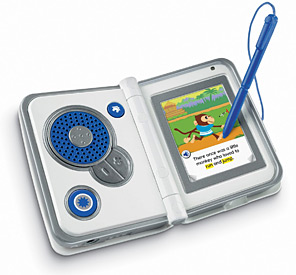
Fisher-Price iXL opens like a small book, with a screen on one side and physical controls on the other. Its six-part menu combines stories, games, writing, art, music and pictures. This is the historical Fisher-Price toy, not the similarly named IXL online learning service.
Six activities, explained plainly
- Digital Reader: listen to a story and explore its pages.
- Game Player: play the supplied game.
- Notepad: trace letters, numbers and words.
- Art Studio: draw with backgrounds and tools.
- MP3 Player: listen to included songs or transferred music.
- Photo Viewer: view supplied pictures or transferred photographs.
The guide uses the stylus for screen selections and identifies separate Home, Action and volume buttons. The six menu areas describe different activities; they are not six promises of personalized teaching.
What was ready on the device?
The guide describes preloaded activities, five songs and a picture slideshow. Personal photographs, music, additional purchased titles and custom profiles used iXL Computer Software and a USB connection. A photo viewer does not mean the toy contains a camera.
For an existing unit, first look at its current Home menu and available content. A working story or drawing activity is useful evidence of what is present, while an empty space in a collection cannot be filled merely by finding the name of an old software title.
The computer requirements are historical
Mattel’s record lists Windows XP, Vista and Windows 7-era requirements. Those listings do not establish compatibility with a current operating system. During this review, the record’s installer link led to a general Fisher-Price shopping page rather than software.
Treat the handheld and its old computer library as separate things to inventory. Preserve any existing content and supporting discs before contemplating changes. This page does not recommend resetting a working unit, promise that downloads can be recovered or offer an unverified replacement installer.
Turn one picture into a small story
Use a family photograph you already have, or draw an imaginary scene on paper. Together invent three sentences: what happened before the picture, what is happening now and what might happen next. Let one person narrate while the other adds a detail to a drawing.
This independent activity connects pictures, storytelling and art without needing the old software. There is no single correct ending, and no need to turn the exchange into a score.
The historical record
Original Toysit coverage
The original introduction and classroom-versus-device essay are retained in full. Broad claims about personalization and educational effectiveness belong to that earlier discussion and are not findings from a new evaluation of iXL.
Six-in-one learning system from Fisher-Price
Handheld learning systems have gone through many iterations over the years. The question always: is this a replacement for classroom or tutor-based learning? The answer is always no: not a replacement, not a substitute, but rather a supplement. What an educational toy like this does is make learning mobile and enjoyable. Thus on a long car ride, a child can learn, rather than simply play a handheld video game system. A learning system is designed with the consultation of experts in the field of effective learning. That is how iXL is built: to create the right connections between patterns and things, whether mathmatical representations or verbal constructs.
Electronic learning systems play a valuable role in enhancing education, but they should be viewed as a supplement rather than a replacement for traditional classroom or tutor-based learning. Here's how electronic learning systems complement and support these traditional methods:
Personalized Learning: Electronic learning systems can adapt to individual learning styles and paces, providing personalized instruction. However, they lack the nuanced understanding and real-time feedback that a teacher or tutor can provide in response to a student's unique needs.
Engagement and Practice: Interactive activities and games in electronic learning systems engage students and encourage practice. While they reinforce concepts, they may lack the depth of explanation and context that a teacher can provide in a classroom setting.
Accessible Resources: Electronic learning systems offer a vast array of resources, allowing students to explore various subjects at their own convenience. These resources can complement classroom lessons by providing additional practice and exploration opportunities.
Supplementary Reinforcement: Electronic learning systems can reinforce classroom or tutor-based learning by providing extra practice and repetition. They can help students solidify concepts learned in a traditional setting.
Visual and Interactive Learning: Many electronic learning systems use visual and interactive elements that resonate well with modern learners. These elements can make learning engaging and enjoyable, but they may lack the interpersonal and social dynamics of a classroom.
Flexibility: Electronic learning systems offer flexibility in terms of when and where students can learn. This flexibility is beneficial, but it doesn't replace the benefits of direct interaction with a teacher or peers in a classroom environment.
Structured Curriculum: Classroom and tutor-based learning provide a structured curriculum and a guided learning path. While electronic systems can offer structured modules, they may not provide the same level of guidance and mentorship as a teacher or tutor.
Real-Time Interaction: In a classroom or tutor-based setting, students can ask questions and receive immediate answers, promoting a deeper understanding of the material. Electronic learning systems may offer FAQs or automated responses, but they can't replicate the personalized guidance of an instructor.
Soft Skills and Social Interaction: Classroom learning fosters the development of soft skills like communication, teamwork, and collaboration. These skills are difficult to acquire solely through electronic systems, as they require face-to-face interactions and real-world experiences.
Critical Thinking and Discussion: Classroom learning encourages critical thinking, analysis, and class discussions. Electronic systems may provide information but lack the depth of discussion and debate that occurs in a classroom setting.
Ultimately, electronic learning systems serve as a valuable tool to supplement classroom and tutor-based learning. They offer flexibility, practice, and engagement, but they can't replace the essential role of teachers, mentors, and peer interactions in creating a holistic and well-rounded educational experience.
Sources and editorial notes
Mattel’s R9703, T2924 and T2925 records all point to the R9703a-0920 guide. Its menu, control diagrams and built-in-versus-transferred content sections were reviewed, with relevant pages inspected visually. The photograph matches the family’s clamshell layout but does not identify its underside product code. Mattel’s linked installer redirected to a general Fisher-Price shopping page during review, not an installer. No software, file transfer or physical unit was tested.
- Mattel iXL product record — Historical product information, manuals and Windows XP/Vista/7-era system requirements.
- Fisher-Price iXL guide (PDF) — Six activity areas, stylus controls, preloaded media and the original computer-management workflow.
Images and descriptions are retained as historical material. How Toysit covers toys.
Created for Toysit by Tabbloza — the artwork in our header.