
From the Toysit archive
MobiGo Touch
Understand original MobiGo touch play, its sliding screen and keyboard, and the difference between cartridge games and historical computer downloads.
The play at a glance
Slide the screen to change how you play
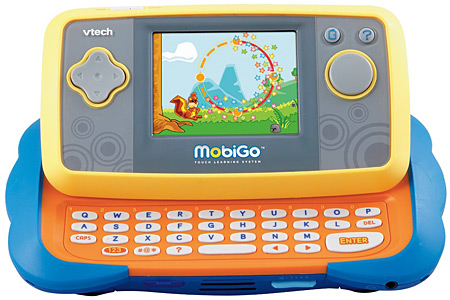
MobiGo’s defining feature is visible in the photograph: its screen slides up to reveal a keyboard. A game can ask for a touch, a directional move or typed letters. Those inputs are worth understanding individually before judging the activity behind them.
Three input methods, three different jobs
The original-generation manual describes finger touch for screen actions, a directional pad for movement in some games and a keyboard for names or letter answers. Its touch examples include tapping, dragging, flicking and circular movement. The sliding screen exposes or conceals the keys.
A useful first session is one action at a time: identify the target, find the relevant control, then try it. If a game asks for a typed letter, touching the picture may not be the response it expects. The distinction is about operating the game, not simply knowing the subject.
Cartridges and downloads are different inventories
The manual describes inserting a MobiGo cartridge with the unit off. It separately describes USB connection to a computer running Learning Lodge Navigator for downloads and online records. A cartridge in the box and a download mentioned in advertising are not interchangeable evidence of included content.
The guide’s computer requirements name Windows XP, Vista and 7, older Mac OS X versions and Flash-era software. Those are historical requirements. This review could not establish a working current MobiGo download service or current-computer compatibility, so the old “Download updates online” line below should not be treated as present setup advice.
Look for the original model’s controls
This page concerns the original MobiGo pictured here. It does not import MobiGo 2 features into that photograph. Check the exact model label, included cartridges, slider movement, keyboard response and screen response when assessing a used set.
Ask the owner to demonstrate the games that are actually on hand. Keep a list of any content already stored before considering changes to the device. Neither an archived manual nor an installer disc proves that a former download can be obtained again.
Choose the easiest way to give an answer
Draw a cat, a dog and a bird on paper. First ask your partner to point to the cat. Next ask them to move a paper arrow toward it. Finally ask them to write its name. Talk about which response was quickest and which needed more explanation.
This is a separate Toysit activity about input choices. Change the pictures or offer spoken answers so the conversation stays enjoyable; it is not a typing or reading assessment.
The historical record
Original Toysit coverage
The original MobiGo paragraph and full VTech reputation essay remain below. Their learning claims and invitation to download updates are historical statements, not confirmation of current services or measured benefits.
Learning system from VTech that features both touchscreen and keyboard
MobiGo touch play learn system from VTech. This electronic learning toy is the latest in this kind of product, whereby educators have informed the design of inputs and outputs that foster learning. An interactive learning device that uses a touchscreen and keyboard encourages learning and the development of dexterity skills. The MobiGo system brings modern handheld technology to the mission of teaching, whether it's addition, spelling, problem solving, or noticing the differences between similar objects. Download updates online.
VTech's Reputation for Educational Electronic Toys
VTech has established a strong reputation for producing educational electronic toys that seamlessly blend technology with learning. Here's why VTech is renowned in this domain:
Interactive Learning: VTech's electronic toys engage children in interactive learning experiences. These toys encourage hands-on exploration and participation, making learning an active and engaging process.
Age-Appropriate Content: VTech designs toys with age-appropriate content and skill levels. The company understands the developmental stages of children and tailors its toys to align with their cognitive, motor, and social abilities.
Learning Through Play: VTech believes in the power of play as an educational tool. Its toys incorporate learning into playful scenarios, ensuring that children acquire knowledge and skills while having fun.
Curriculum Alignment: Many of VTech's electronic toys align with educational curricula, making them complementary tools for formal learning. They support concepts taught in schools and reinforce classroom learning.
Varied Subjects: VTech offers a wide range of electronic toys that cover various subjects, including language development, math, science, creativity, problem-solving, and more. This diversity caters to different learning interests and needs.
Interactive Feedback: VTech's toys provide immediate and constructive feedback to children. This feedback reinforces correct answers, guides them through challenges, and helps them learn from mistakes.
Progress Tracking: Some VTech toys offer progress tracking features that allow parents and caregivers to monitor a child's learning journey, identifying areas of strength and areas that may need additional attention.
Engaging Formats: VTech employs appealing formats such as animated characters, voice interactions, touchscreens, and interactive buttons. These formats capture children's attention and keep them engaged in learning activities.
Technology Integration: VTech effectively integrates technology, such as sound, visuals, and sensors, to enhance the learning experience. This integration makes learning more dynamic and multisensory.
Skill Development: VTech's electronic toys focus on a wide range of skills, from basic concepts like numbers and letters to more complex skills like critical thinking, coding, and problem-solving.
Parental Involvement: VTech recognizes the importance of parental involvement in a child's learning journey. Some toys include features that allow parents to customize content, set difficulty levels, and interact with their child's progress.
Innovation: VTech continuously innovates and evolves its electronic toys to stay current with educational trends and technological advancements. This commitment to innovation keeps its products relevant and effective.
VTech's dedication to creating educational electronic toys that are both engaging and enriching has positioned the brand as a trusted and respected choice for parents and educators seeking tools that support children's learning and development.
Sources and editorial notes
VTech’s original MobiGo Pink manual was reviewed in indexed text, particularly controls, touch operations, cartridge use and computer requirements. Its direct download failed, so no visual manual match or exact regional model identity is claimed for the blue/orange photograph. The original image supports the visible slider, keyboard and controls. Current download availability was not established: an old tutorial remains indexed, but the download-page check failed. No software was installed or account created.
- VTech original MobiGo manual (PDF archive) — Original-generation controls and computer workflow; color/regional version differs and direct download was unreliable during review.
Images and descriptions are retained as historical material. How Toysit covers toys.
Created for Toysit by Tabbloza — the artwork in our header.