
From the Toysit archive
Read With Me DVD
Explore Read With Me DVD’s narrated and self-paced story modes, its shape-button controller and player requirements, plus a shared reading conversation.
The play at a glance
Listening to a story and answering are different choices
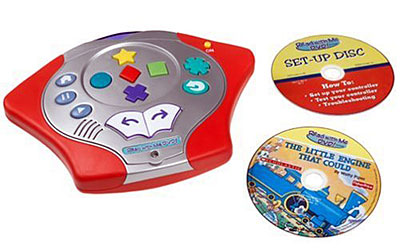
Read With Me DVD combines a story disc with a separate controller. The photographed shape buttons are for responding, while other controls move through the story. A family can choose how much interruption fits the moment: hearing a story, exploring its activities or reading at their own pace.
Choose how the story will unfold
The H4656 guide lists Read & Play, Story Games, Read to Me, My Turn to Read and a Parent Guide. Read to Me supplies uninterrupted narration; My Turn to Read removes narration for reading at the player’s own pace.
Choose the experience before starting. A child following an unfamiliar story may want to listen first and discuss it afterward. Another may enjoy stopping at a picture. Changing the mode changes the activity, not just the amount of sound.
A controller is only one part
The documented setup uses the Read With Me controller, a DVD player, its remote and the setup disc. The manual includes a controller test before story play. Its instructions distinguish the shape answers from page navigation, repeat and pause.
Keep the setup material separate from the story titles when making an inventory. Note the player model as well as the toy model. A familiar story available through streaming is not evidence that the original controller can operate that version, and this review makes no current-player compatibility promise.
Leave space around the answer
A button choice can start a conversation, but it gives only a small part of what a child is thinking. Ask what in the picture or story suggested the answer. Accept a different interpretation as something to discuss rather than immediately repeating the prompt.
If the controls get in the way, separate the story from the response task. Listening together or returning to an ordinary book can still support the conversation the family wanted to have.
Before, during and after a story
With any suitable picture book, look at the cover and make one prediction. During the reading, pause at a point the child chooses and ask what might happen next. Afterward, invite them to retell one favorite moment or draw an alternative ending.
This is an independent Toysit conversation activity. Keep the questions optional and follow the child’s interest; finishing a quiz is not the aim.
The historical record
Original Toysit coverage
The original product description and essay about educational DVDs are preserved below. The claimed comprehension and vocabulary benefits were not tested; the general essay’s discussion of computer DVD drives does not establish toy-controller compatibility.
Fisher Price reading learning system builds story comprehension and vocabulary skills
Story comprehension and vocabulary learning system that brings children's books to life on DVD. The illustrations are animated and the text highlights and animates on screen as the story is being read to the child. Throughout the story, the child is asked comprehension and vocabulary questions that they can answer using the wireless controller. The Read With Me DVD system includes a wireless controller, a DVD featuring a classic book, and a storage case for the DVD. Play story games or answer questions and define words in interactive mode. Builds story comprehension and vocabulary skills. Sturdy console with large buttons easy for toddlers to operate. Kids hear animated story read or turn off narration and read at own pace.
DVDs in Educational Environments
While the proliferation of online streaming and digital downloads has notably diminished the widespread use of DVDs in many sectors, DVDs still have certain roles in educational settings. Here are some reasons why:
- Accessibility: Not every educational institution or home has high-speed internet or sufficient bandwidth to stream videos seamlessly. In such scenarios, DVDs can offer a reliable alternative to online content, allowing educators to present video materials without the need for an internet connection.
- Permanent Collection: For libraries and resource centers, DVDs provide a tangible asset that can be catalogued, rented out, and maintained as part of a permanent collection. This is especially beneficial for classic educational content that might not be readily available online.
- No Subscription Fees: Once a DVD is purchased, there are no additional costs associated with accessing its content, unlike many streaming platforms that require monthly or yearly subscriptions.
- Interactive Features: Many educational DVDs come with interactive menus, quizzes, and supplementary materials that can enhance the learning experience. This can be especially useful for self-paced learning.
- Compatibility: Many educational institutions still have operational DVD players or computers with DVD drives. This makes it feasible to continue using existing equipment rather than investing in new technology.
- Archiving: DVDs serve as a physical backup of content, ensuring its availability even if the original digital source becomes corrupted or is lost.
- Legacy Content: A significant amount of valuable educational content produced in the past was released exclusively on DVDs. Accessing this content might require maintaining the ability to play DVDs, especially if it hasn't been digitized or made available online.
That said, the trend is undoubtedly moving towards digital streaming and online platforms for content delivery. While DVDs have their advantages, educational institutions are gradually transitioning to more modern, digital-first approaches. Nevertheless, until the technological infrastructure globally can support universal online access, DVDs will retain a niche yet significant role in certain educational contexts.
Sources and editorial notes
The H4656 manual’s setup, testing, play and button-function pages were inspected visually. Its controller diagram corresponds to the photographed shape and navigation controls; the exact underside model and bundle contents are unverified. The image visibly includes a setup disc and a story disc, but this does not establish what every package contained. No DVD player, controller or reading outcome was tested.
- Read With Me DVD H4656 user manual (PDF) — Setup dependencies, story modes and controller buttons.
Images and descriptions are retained as historical material. How Toysit covers toys.
Created for Toysit by Tabbloza — the artwork in our header.