
From the Toysit archive
GeoTrax Airport — GeoAir High Flyin’ Airport
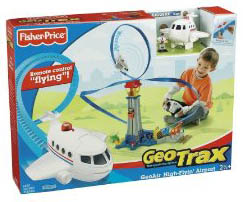
Follow a ground-to-air story with GeoAir High Flyin’ Airport: the remote-controlled airplane follows an elevated track rather than flying freely.
The play at a glance
A flight path you can see
The GeoAir High Flyin’ Airport sends its airplane around an elevated track. It is a guided circuit, not a free-flying remote-control aircraft. That visible route gives an airport story a clear departure and return.
The N0142 set pairs Jumbo the plane and Captain Jim with airport activity areas. Players can invent the reason for a trip while the track determines where the airplane travels.
Understand the ground and air jobs
Mattel describes a tower elevator and three activity bays for fueling, fixing and pilot preparation. Those places provide the ground story. The airplane clips onto the elevated track for the flight.
The main guide shows pressing the plane’s ready button before using the controller’s go and stop buttons. Assemble and support the route according to that guide, with room around the moving airplane. The box photograph identifies the system but cannot replace the assembly drawings.
Distinguish an invented airport service from a supplied mechanism. You can pretend to check a ticket without assuming there is a working ticket machine in the set.
Try a departure and return story
For this original activity, choose one purpose for a trip: visiting a friend, carrying an imaginary message or returning home. No additional passengers or props are required.
- Announce where the trip is going and what needs to happen before departure.
- Choose a ground job such as checking the plane or preparing the pilot.
- When the set is ready, start a circuit and narrate the journey.
- Stop the plane, then describe its arrival and the next ground job.
The physical loop remains the same even when the story destination changes. A player can call one trip a short visit and another a long adventure. The controller changes movement; the player supplies the geography.
With two people, let one announce departures while the other operates the controller. Swap roles between trips so both can choose what happens next.
Make the airport useful between circuits
Pause the flying to invent a ground conversation. What is the pilot waiting for? Who will meet the plane? What should happen before the next departure?
A quiet round can consist entirely of those decisions. Another round can focus on starting and stopping at chosen moments. Neither needs to become a lesson in real aviation procedures or a test of factual airport knowledge.
Check the version and the supports
Use N0142’s parts drawings when checking this version; deluxe and bonus packages may differ. Inspect the elevated track, supports, plane attachment and secured battery covers. Adult assembly and the manufacturer’s operating directions matter more than matching the display photograph.
The separate connection sheet shows specific layouts joining an airport, barn and bridge. Use it for those illustrated combinations. It does not prove that every GeoTrax, GeoAir or unrelated rail component can be connected in any arrangement.
The historical record
Original Toysit coverage
The original airport description and airport-play essay remain below. The essay mentions generic airport features; it should not be read as an inventory of this specific set or as evidence of tested learning outcomes.
You control the jumbo jet in this playset
The playset includes a main tower with a kid-activated elevator, three bays for the plane to fuel up, fix up and board passengers, a security gate, a drop off platform, an RC jet plane and his pilot figure, who can sit and ride inside the plane. All of the new GeoAir remote control planes simply clip onto the flexible GeoAir track and fly around the entire playset performing loops, swoops and dives. The plane and sound effects can be activated using the easy kid-controls on the remote control. The flexible GeoAir track easily connects together and attaches to the tower and runway to form a figure 8. GeoTrax Airport can be expanded by connecting to other track sets.
An airport playset takes imaginative play to new heights, offering children a multi-faceted environment to explore roles, scenarios, and mechanics of air travel. With elements like runways, control towers, airplanes, baggage carousels, and security checkpoints, these playsets allow kids to mimic the bustling life of an airport. Children can pretend to be pilots navigating through the skies, air traffic controllers managing flight patterns, or travelers going on exciting adventures. The airport serves as a gateway to various destinations, and that expands the scope of the storytelling involved. Some playsets even come with interactive features such as lights, sounds, or moving conveyor belts, making the play experience all the more engaging. The process of checking in luggage, going through security, and boarding a flight gives children the opportunity to practice sequencing, organization, and social skills. Whether playing solo or with friends, an airport playset offers endless opportunities for creativity, learning, and, most importantly, fun.
Sources and editorial notes
Reviewed October 16, 2026 using Mattel’s N0142 product record, eight-page main guide and two-page connection supplement. Both guides and their support, attachment and controller diagrams were visually reviewed. The supplement illustrates particular combined layouts, not universal compatibility. The departure story is an original suggestion. No physical airplane or controller was tested.
- Mattel: N0142 GeoAir High Flyin’ Airport — Product identity and airport play areas.
- Mattel: Airport main instructions (PDF) — Assembly, guided airplane attachment and remote operation.
- Mattel: Airport connection supplement (PDF) — Illustrated airport, barn and bridge combinations.
Images and descriptions are retained as historical material. How Toysit covers toys.
Created for Toysit by Tabbloza — the artwork in our header.