
From the Toysit archive
Guess Who? Extra
Guess Who? Extra: the original electronic case, player-operated yes/no buttons, character sheets and a practical deduction example.
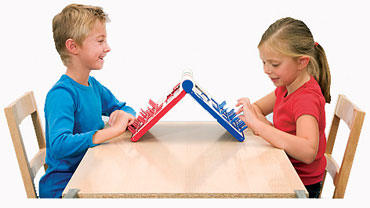
The play at a glance
The players do the deducing
Guess Who? Extra adds sound effects and a timer to a question-and-answer game. A player asks about a hidden character; the opponent presses a yes or no button, and the questioner closes the windows ruled out by that answer.What the electronics actually do
The 14635 instructions show a yes button, a no button and a timer button. The opponent supplies the answer; the case provides the associated sound. It does not listen to a question and work out which character satisfies it.
Each player uses one of the matching red or blue sets of three double-sided sheets, giving six themes. Choose the same theme on both sides and secretly select a character. The sheet and window frame must line up before questions begin.
During classic play, eliminate characters inconsistent with the answer. Guessing takes its own turn. The rules also describe a preliminary-guess variant, a timed game and a two-character challenge; use the matching guide for their scoring details.
Build a question that separates possibilities
Here is a fictional Toysit example, using eight imaginary characters rather than an official game sheet. Four wear hats and four do not. Only one wears a striped scarf. Compare two questions: “Is your character wearing a hat?” and “Is your character wearing the striped scarf?”
- A hat answer leaves four candidates either way.
- A scarf answer could identify one character immediately, but a “no” leaves seven.
Neither question predicts the hidden choice. The comparison shows how much uncertainty can remain after each possible answer. Invite players to explain why they chose a question, then count the surviving candidates together.
For a real sheet, inspect the pictures first. Agree on what counts as a hat, glasses or another visible feature. Avoid a question whose answer depends on guessing a character’s personality or background.
Add time pressure after the routine is clear
The timed mode tracks the players separately and depends on using the answer buttons to move play along. It is worth becoming comfortable with asking, answering and closing windows before adding the clock.
A useful untimed rehearsal is to explain one elimination aloud: “The answer was no, so these characters cannot be the one.” This suggested rehearsal is not a separate scoring mode. It makes an accidental window closure easier to spot and discuss.
When switching themes, revisit the vocabulary as well as the pictures. A question that distinguishes human faces may be less useful on a sheet of household objects. The strongest starting question depends on the actual candidates still visible.
Check a stored or secondhand case
Inventory both colors of sheets, the selection controls, windows and guessing pegs. Check that the two players can use the same theme and see the same candidates. A missing sheet can matter more to a fair game than a cosmetic mark on the case.
Use the product number to choose instructions. The Extra name has appeared on more than one revision, and this page does not establish that sheets, controls or rules interchange. Keep the instructions with the case so the next player can identify the edition too.
The historical record
Original Toysit coverage
The original description is preserved below. Its general reference to voice recognition is unsupported for this game. The documented controls are manually operated yes/no buttons and a timer; the portable case still requires players to choose and load matching character sheets.
Electronic edition of classic game has tons of faces and funny sounds
This additional and deluxe version of Guess Who has six total themes, over a hundred characters to play with, an electric timer, lights and sounds. The electronic board game contained within a new compact case that allows portability and instant play with no set up. It's the same classic game of Guess Who but with tons of fun extras. The new compact case lets kids can bring their gaming fun on the go.
An electronic version of the "Guess Who?" game brings a modern twist to the classic, adding layers of excitement and interaction that aren't possible with the traditional board game. The electronic elements often include lights, sounds, and sometimes even voice recognition, making the game more dynamic and immersive. Some versions offer multiple game modes or difficulty levels, allowing for customization according to the players' ages or experience levels. Timers and sound effects can add a sense of urgency that heightens the excitement of the deductive process. The electronic format is also more portable and easier to set up, making it convenient for on-the-go fun. This digital enhancement keeps the core essence of "Guess Who?" intact while amplifying its entertainment value, making it a hit with both new and returning players.
Sources and editorial notes
The English Hasbro 14635 instruction scan, hosted by TransformerToys, was compared with Hasbro’s 2008 Greek-language 14635 guide and the original photograph. Both describe the red/blue case, matching theme sheets and manual response controls. Later B2226 instructions were not substituted. The eight-character example is original Toysit material, not an official sheet. No physical testing was performed.
- Hasbro: Guess Who? Extra 14635 English instructions (mirrored PDF) — Hasbro-authored scan hosted by TransformerToys; setup, buttons, four modes and timer.
- Hasbro: 14635 instructions in Greek (PDF) — Official-hosted 2008 guide corroborating the case, six double-sided sheets and response controls.
Images and descriptions are retained as historical material. How Toysit covers toys.
Created for Toysit by Tabbloza — the artwork in our header.