
From the Toysit archive
V.Smile Cyber Pocket
Explore the V.Smile Cyber Pocket’s screen, writing pad and reversible controls, then try an original two-path orchard map activity.
The play at a glance
A little screen with room for a drawing hand
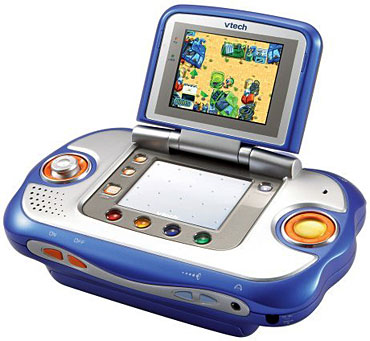
Open the blue-and-silver Cyber Pocket and its screen stands above a broad white writing pad. Orange controls sit to either side, while four colored buttons offer another set of choices. The arrangement gives a player several ways into a game: steer toward something, choose a color, or move the stylus across the pad.
Choose a direction, then make a mark
The Cyber Pocket guide describes a reversible control arrangement: the directional control and Enter button can swap sides to suit the player’s hands. Its stylus works on the separate writing pad, with drawing or writing activities determined by the game. Certain games also use the built-in microphone. Each interface invites a different kind of turn: a quick directional choice, a spoken response, or a more deliberate stroke.
The machine uses V.Smile Smartridges. The guide also describes an AV connection for playing through a television, giving the same small console a shared-screen setting. Imagine two players taking turns choosing a route, with the waiting player describing the next landmark. The particular game supplies the on-screen actions; the players supply their commentary.
Try a two-path orchard map
This original Toysit activity turns directional choices into a paper adventure. Draw a starting gate, three fruit trees and a picnic blanket on an ordinary sheet of paper. Leave generous paths between them, and give the trees names such as Apple Arch, Pear Corner and Plum Hill.
- One player points to the gate. A partner gives one direction at a time to visit two trees and reach the picnic.
- Trace that route with a finger, then mark it in one color. Describe what your imaginary travelers collect along the way.
- Swap roles and find a second route in another color. Add a bridge or a resting spot that makes this trip feel different.
Finish by comparing the journeys: where did they share a path, and where did they separate? The drawing is a game played together on paper, independent of the console’s cartridges.
The historical record
Original Toysit coverage
The complete earlier product account and commentary are preserved below as historical coverage.
CyberPocket with VLink from VTech is on-the-go gaming that now goes online
The new VSmile Cyber Pocket turns game time into learning time by combining a video game platform with educational content in a portable educational system. Take the VSmile Cyber Pocket on the go, or connect it directly to the television for gaming at home. Features include a high resolution screen, touchable writing pad, attached writing stylus, microphone and switchable controls. The battery-operated pocket console allows early school-age learners to play a variety of exciting and imaginative games anywhere they want. With popular characters to guide them through age-appropriate skill levels and developmental activities, children will enjoy learning essential lessons in language, math and science. Students can track your gaming progress and see how they rank against other Cyber Pocket players all while unlocking bonus games online to keep them learning on the fast track.
Portable electronic learning systems that plug into a TV offer a unique blend of education and entertainment, often referred to as 'edutainment.' These systems come with interactive software that transforms the television into a larger-than-life educational platform, making learning subjects like math, science, or language more engaging for children. The portability factor ensures that kids can carry their learning environment with them, be it to a friend's house or on a family vacation, thus ensuring uninterrupted learning. The television interface also provides a communal learning experience, allowing parents and siblings to join in and turn education into a family activity. With vibrant graphics, interactive questions, and real-time feedback, such learning systems offer a multi-sensory educational experience that can be far more engaging than traditional textbooks or classroom lectures.
Sources and editorial notes
VTech’s Cyber Pocket guide supports the controls and historical cartridge/TV features described here. The pictured game is not evidence of every bundle’s contents. V.Link’s online rankings and bonus games belong to the original service account; current availability was not established. The retained learning claims are historical, and no physical testing was performed.
- Original Toysit image — Existing same-site image reviewed and retained unchanged.
- VTech V.Smile Cyber Pocket user’s manual — Manufacturer’s 14-page guide, preserved by VSmile Homebrew. Feature, cartridge and TV text reviewed; control diagrams on PDF pages 5–6 visually matched to the original image.
- Original Toysit coverage — Complete historical account retained, including its original claims and wording.

Images and descriptions are retained as historical material. How Toysit covers toys.
Created for Toysit by Tabbloza — the artwork in our header.