
From the Toysit archive
F.A.M.P.S. Desktop Characters
Explore F.A.M.P.S. expressive figures and their historical desktop world, then draw a three-window character mood gallery.
The play at a glance
A little character with a big expression
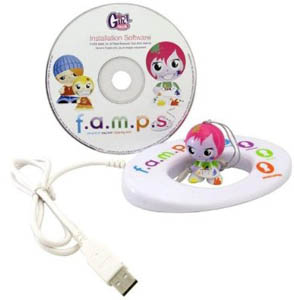
A bright fringe of pink hair, a wide-eyed face and a white circular base give the F.A.M.P.S. figure a miniature-desk-companion look. Toysit’s photograph places it beside its software disc and USB cable. The original idea linked an expressive physical character to a decorated computer world, where pictures, games and greetings could reflect a chosen mood.
A mood becomes a whole scene
The manufacturer guide calls the circular base an Emote Ring and introduces Drew as the creative starter character. In the original software, placing a character in the ring changed the application’s appearance and unlocked its associated content. The idea extended a figure’s expression into backgrounds, mood icons, games and illustrated greetings.
Mattel states that F.A.M.P.S. online features have been unsupported since February 2011. The original installation also depended on an online download. Today, the expressive character-design idea works as a small paper gallery: one familiar face, several moods and a different setting for each.
Try a character mood-window gallery
For this original Toysit activity, draw three window-shaped cards. Put the same invented character in each one, keeping a recognizable feature such as striped hair, round glasses or a leaf-shaped hat. Give the windows three themes: curious, cheerful and thoughtful.
- Curious. Tilt the character’s head toward a small mystery. Draw a trail of dots, a half-open box or an unfamiliar flower behind it. Add a caption such as “What could be inside?”
- Cheerful. Change the pose and add a favorite pattern. Perhaps the character holds an invitation while bright circles fill the background.
- Thoughtful. Give the character a quiet place to pause—a bench, a window seat or a patch of shade. Add a friendly line such as “I’m choosing my next adventure.”
Arrange the cards as an imaginary desktop. A visitor can choose which window to open first and suggest a fourth scene. Let the artist explain what each expression means in their story; a face can suggest more than one feeling. The collection can become a set of small greetings to exchange in person.
The historical record
Original Toysit coverage
The complete earlier product account and commentary are preserved below as historical coverage.
Unlock a world of emotion on your computer
f.a.m.p.s. works with a live internet connection on your PC or Mac. Famps games, emoticons, and screensavers give your desktop a total makeover. Each figure unlocks its own application. Spruce up your desktop, e-mail and IM to express yourself in all kinds of fun new ways with your friends and family. Let your emotions run free with custom wallpapers, e-cards, and avatars.
History of Computer Screensavers
Computer screensavers have a history that dates back to the earlier days of computing, particularly the era of CRT (Cathode Ray Tube) monitors. Originally, screensavers were designed to prevent "burn-in," a phenomenon where prolonged display of a static image could lead to permanent damage on a CRT screen. The screensaver would activate after a certain period of inactivity, displaying moving images or patterns that would keep the pixels on the screen changing, thereby avoiding burn-in.
As technology advanced and LCD screens, which are less susceptible to burn-in, became more common, the practical need for screensavers diminished. However, they didn't disappear; instead, they evolved into a form of digital art and personal expression. Screensavers started featuring complex animations, high-resolution photographs, and even interactive elements. Popular screensavers of the '90s and early 2000s like "After Dark," which featured the famous "Flying Toasters," or the Windows "3D Pipes" and "Maze," are nostalgic icons for many.
Over time, screensavers have also been integrated into larger desktop environment packages and have become platforms for delivering information, such as news tickers or weather updates. With the advent of energy-saving modes and better screen technology, screensavers are less about screen protection today and more about aesthetic choices or information display. In modern operating systems, they are often replaced by simple lock screens or are used for purposes like digital signage. Though their original utility has diminished, screensavers have left a lasting impact on computing culture.
Sources and editorial notes
Mattel’s P9321/P6197/R3522 guide, P/N 823D3000 Rev.A, was read; PDF pages 1, 2, 4 and 6 were visually reviewed for character art, historical requirements, Emote Ring and download dependence. The pictured pink-haired creative character matches Drew’s artwork; the exact retail bundle remains unresolved. The guide supports historical Windows XP/Vista and Intel Mac OS X requirements, not current compatibility. Mattel’s official notice confirms the February 2011 end of online-feature support. No old software was installed or physically tested.
- Original Toysit image — Existing same-site image reviewed and retained unchanged.
- Mattel F.A.M.P.S. Starter Kit record and support notice — Official historical description and February 2011 online-support notice.
- F.A.M.P.S. original manufacturer guide (PDF mirror) — P9321/P6197/R3522, P/N 823D3000 Rev.A; eight PDF pages containing cover and booklet spreads. Selected visual review described above.
- Original Toysit coverage — Complete historical account retained, including its original claims and wording.

Images and descriptions are retained as historical material. How Toysit covers toys.
Created for Toysit by Tabbloza — the artwork in our header.