
From the Toysit archive
FLY Pentop Computer
Discover the original FLY Pentop Computer’s special-paper interface and drawn instruments, then perform a paper sound-town score.
The play at a glance
Draw a little instrument, then give it a voice
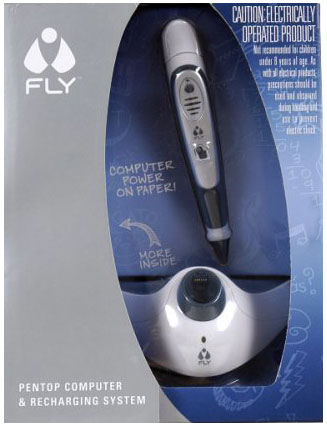
The original FLY puts an unusual idea inside a thick silver pen: marks on special paper become places to tap and hear a response. Toysit’s photograph shows the pen packaged with a rounded recharging base. The attraction is the meeting of two familiar actions—drawing something and then trying to play it.
A paper surface that carries instructions
The guide explains that a camera near the pen’s tip reads the patterned FLY paper, while the pen’s processor and speaker provide responses. Printed activities and the guide’s drawing conventions give those marks meaning. FLY paper and compatible FLYware are part of that system.
One especially playful example is FLYtones. The original guide shows a drawn keyboard and a set of drums: a player makes the specified shapes on FLY paper, then taps them to hear notes or percussion. A page becomes a small performance space, with a melody in one area and a beat in another. The guide’s rhythm and recording features add ways to revisit a musical idea.
Try a paper sound-town score
For this original Toysit activity, ordinary paper and two performers are enough. Draw a station, fountain and clock tower, joined by a winding street. Choose a spoken sound for each place: perhaps a gentle “chuff-chuff,” a bubbling “brrr,” and a clear “ding.” These are sounds supplied by the players.
- One partner traces a route with a finger. The other performs each place’s sound when the finger arrives.
- Add a repeat symbol beside a favorite stop and a quiet square where everyone pauses.
- Exchange roles. Try a slow morning journey and a brisk homecoming using the same drawing.
Give the finished route a title and perform it once more for an audience. Ask which pause or repeated sound made the town easiest to picture. This human-performed score works on ordinary paper; the electronic pen’s own activities use its special paper and instructions.
The historical record
Original Toysit coverage
The complete earlier product account and commentary are preserved below as historical coverage.
Pen computer with built-in processor scans what you write on special paper and performs functions such as math calculation
Computer power on paper. The Fly pen-top computer's power comes from an optical scanner that sees everything you scan and write on special dot matrix paper. The pen computer has a built-in computer processor and a voice. If you have a math problem, the pen top computer can solve it. You can schedule anything and Fly pentop computer will remind you. You can draw drums and keyboards and record your own tunes. Play games with your friends-anywhere, any time. Plus, you can load Fly pentop computer with Flyware cartridges to add new games and adventures.
Pen computers, also known as digital or smart pens, are advanced writing tools that can track and digitize what you draw or write. Unlike a traditional pen that lays ink on paper, a digital pen uses sensors, accelerometers, or a special surface to capture the movements of the pen and convert them into digital data. These devices have gained popularity for their versatility and the array of applications they serve, from artistic endeavors to professional note-taking.
One of the earliest examples of pen computing was the stylus used with graphics tablets. These allowed artists and designers to draw directly into software programs, offering a level of precision that a mouse couldn't achieve. With advancements in technology, pen computers have become more sophisticated and are now capable of capturing not just the lines drawn but also the pressure applied, the angle of the pen, and even the texture of the "stroke." This creates a more natural and expressive drawing or writing experience.
Modern smart pens can work in tandem with specific paper types to capture written notes and sketches, which can then be imported into a digital environment for further manipulation or storage. Some can also record audio synchronously with the writing, a feature that has been beneficial in educational and professional settings for capturing the context of notes. Others have OLED screens or other feedback systems that provide real-time data or even corrections as you write or draw.
Overall, pen computers have transformed the way we think about writing and drawing by bridging the gap between the analog and digital worlds. They offer a seamless way to capture, store, and share handwritten notes and drawings, making them an indispensable tool for students, professionals, and artists alike.
Sources and editorial notes
The original FLY guide, copyright 2005, was recovered and selected feature, instrument and recharging pages reviewed visually. This is the original FLY, not the later Fusion. The broader pen-computing essay preserved above includes ideas such as OLED displays and note uploading that are not established features of this package. No hardware, charging system or old software was tested.
- Original Toysit image — Existing same-site image reviewed and retained unchanged.
- Original FLY Pentop Computer user guide — LeapFrog’s original 40-page guide on an archival mirror; introduction, FLYtones and recharging material reviewed. The pictured package and original-generation guide were matched; later Fusion documentation was excluded.
- Original Toysit coverage — Complete historical account retained, including its original claims and wording.

Images and descriptions are retained as historical material. How Toysit covers toys.
Created for Toysit by Tabbloza — the artwork in our header.