
From the Toysit archive
Leapster 2
Separate Leapster 2 cartridge play and on-device art from its former downloads and online progress features, with the model-specific support notice.
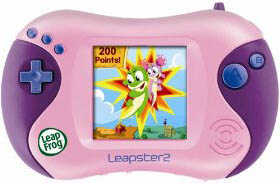
The play at a glance
Handheld play and an online service were different parts
Leapster 2 joined a cartridge handheld to a computer-based service for downloads and learning records. That distinction matters today: a game already running on the device is different from a feature that depended on LeapFrog Connect.
What the handheld guide describes
The parent guide separates cartridge games, downloaded games, a computer connection option and Creativity Castle art. It describes up to three player profiles. Its art tools let a player choose backgrounds, draw and add stamps on the handheld; the advertised online studio was an additional destination for artwork.
The guide supports Leapster cartridges and identifies titles marked “Expanded Play for LEAPSTER2” as enhanced for this handheld. Check the exact cartridge label rather than assuming every later LeapFrog game belongs to the same system.
The online part has a documented ending
LeapFrog’s support notice lists Leapster 2 among products whose Connect software was discontinued on April 1, 2018. It says the devices can continue operating with their last loaded content. This is the relevant model-specific notice; the separate September 2021 notice for Explorer and GS describes different devices.
The old guide’s included downloadable title required a computer connection and selection through Connect. Do not assume an unused old package can still redeem it. Likewise, a library of forty games in the historical copy does not mean forty games were installed or included.
Inventory what is actually there
- Handheld: identify the model and check the stylus, screen response, buttons and battery cover.
- Cartridges: write down the exact titles and ask to see them reach a playable screen.
- Stored content: note the games and artwork already present before considering any reset.
- Cable and discs: regard these as historical accessories, not proof that the former online service is available.
A demonstration of existing play is more informative than a photograph of a USB cable. This review does not establish the condition of any particular secondhand unit.
Compare a menu with its contents
Make a paper menu with three choices: draw, tell a story and play a number game. Under each, list the materials you actually have. Choose one activity together and change it halfway through—for example, turn a drawing into the setting for a story.
This is a Toysit activity about choosing and combining play. It also offers a simple way to discuss why an icon advertising an activity is different from having its content ready to use.
The historical record
Original Toysit coverage
The original description and essay on electronic learning toys are retained below. References to online access and “forty learning games” are historical copy, not a promise of forty included games or working connected services.
Second generation preschool gaming handheld that connects to the online LeapFrog Learning Path
How do you like to play? On the handheld or online. Leapster2 has forty learning games. This is a connected learning handheld that is both mobile and connected (kids connect online for extra activities and rewards). Games teach skills in a range of subjects, such as language arts, reading, mathematics and science.
The evolution of electronic learning toys has been a fascinating journey that mirrors advancements in technology and educational theory. From basic electronic spellers and math toys of the late 20th century to today's sophisticated, internet-connected devices, electronic learning toys have come a long way. The earlier models were often standalone gadgets with limited functions, like basic quizzes and games focused on spelling, counting, or simple problem-solving. The late '90s and early 2000s saw the introduction of more interactive platforms like LeapFrog's LeapPad, which incorporated tactile elements and advanced audiovisual cues. With the rise of smartphones and tablets, apps became the new frontier for electronic learning, offering endless scalability and personalized learning experiences. Now, many electronic learning toys are IoT devices that can be managed via parent-controlled apps, feature augmented reality, or integrate with other smart devices in a home network. These toys have become multi-sensory, adaptive learning environments that can be customized to suit an individual child's learning style and pace.
Sources and editorial notes
All six pages of LeapFrog’s Leapster2 parent guide were reviewed visually, alongside the original image. The controls match the pictured design, though its color differs from the guide’s main illustration. LeapFrog’s Australia/New Zealand Windows-compatibility page explicitly names Leapster 2 in its April 1, 2018 discontinuation notice. No device, installer, account or download transaction was tested.
- Leapster2 parent guide (PDF) — Cartridges, profiles, Creativity Castle and the original computer-connected workflow.
- LeapFrog Connect discontinuation notice — Names Leapster 2 and April 1, 2018; says devices can continue with the last content loaded.
Images and descriptions are retained as historical material. How Toysit covers toys.
Created for Toysit by Tabbloza — the artwork in our header.