
From the Toysit archive
My Toon TV
My Toon TV puts a photographed face on a dancing cartoon character. Explore its camera studio and invent a character premiere.
The play at a glance
Give a familiar face a cartoon entrance
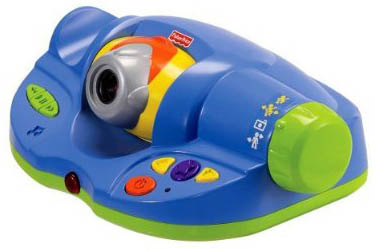
The blue camera base looks like a tiny studio, with lime-green ends and a silver lens set in orange trim. My Toon TV takes a face photograph, places it on a chosen cartoon character and brings that character onto the television for a dance. A player supplies the stage name, the introduction and the applause.A face becomes a performer
The guide organizes play into Photos, Create and Dance. Photos provides six picture spaces. Create pairs a saved face with one of eleven cartoon characters. Dance brings the selected character onto the screen, where the camera can also show the player alongside it. Yellow arrows browse choices and a purple selection button confirms them. Music and character movement have separate pause controls.
An adult handles setup using the matched instructions: the base connects to compatible yellow, white and red audio/video inputs and uses a 4:3 picture. Place it beside the television, with cables out of the play area. The supplied music-input lead accepts sound from a compatible player's headphone jack. Review the guide's screen-play precautions and photo replacement/deletion instructions before a session.
Try a cartoon character premiere
Invite a willing participant to make a character using their photograph. Once a character is ready, invent a stage name and announce one sentence about its first appearance. Perhaps “Captain Wiggle has arrived from the moon's smallest dance hall.” Let the documented animation supply the dance while you supply the occasion.
Pause the character for an imaginary curtain call. Ask where the next show will happen: a cloud-top theater, a garden party or a train station full of waving passengers. Changing the invented venue gives the same dancer a new story.
For a paper premiere, draw a face inside a character outline and hold it up while someone introduces it. A hand-drawn invitation can announce the next performance.
The historical record
Original Toysit coverage
The original product account and commentary are preserved below as historical coverage.
MyToonTV - a cool new thing for your TV - turn anyone into a toon.
Perform on TV with your own funny personalized character. Use the built in camera to take a picture. Then choose from one of eleven characters. Then see your funny personalized character dance on screen with you while music plays. My Toon TV comes with six on-board songs or use the auxiliary plug-in to play your own favorites from any music device CD, MP3 player. Watch as the character breaks out different dance moves across the screen. The role play microphone adds a cool light feature and acts as the remote to switch characters and capture pictures.
The evolution of games that transform photos into on-screen avatars has seen significant strides, largely due to advancements in facial recognition technology, machine learning, and graphics rendering. Early iterations often involved simplistic overlays and crude adjustments, providing a basic, yet engaging, sense of personalization. Over time, these systems have grown remarkably sophisticated, capable of capturing subtle facial features, expressions, and even emotions to create more lifelike avatars. Gamers find immense joy in seeing a digital version of themselves interacting in a virtual environment, as it elevates the level of immersion and engagement. It's no longer just about role-playing; it becomes a personalized experience where the boundaries between the player and the game are blurred. Enhanced by augmented reality (AR) and virtual reality (VR) capabilities, these avatars can now exist in 3D spaces, perform complex actions, and even mimic real-world movements and expressions of the player. Moreover, social features allow these avatars to interact with those of friends and family, extending the communal aspect of gaming. The widespread use of smartphones with high-quality cameras and sensors has also made this technology more accessible, moving it beyond niche applications to mainstream gaming experiences. As technology continues to advance, the fidelity and interactivity of photo-based avatars are expected to reach unprecedented levels, adding a new layer of realism and personal connection to the gaming world.
Sources and editorial notes
Mattel model P6798 and its complete 20-page guide match the pictured base. My Toon TV is the manufacturer’s name; the historic My Tune TV URL and SSI title are preserved. Mattel’s product page says five onboard songs; the original account says six, and the guide supplies no total to resolve the difference. The microphone-shaped remote controls selections and lights but does not amplify or transmit voice. The historical avatar essay discusses broader technologies, not documented facial-recognition, machine-learning, AR/VR or sharing features of this toy. No physical testing; the premiere is an editorial activity.
- Original Toysit image — Existing same-site photograph reviewed and retained unchanged.
- Mattel: My Toon TV P6798 — Official character count, five-song listing and remote description.
- P6798 My Toon TV instructions — Complete 20-page guide reviewed, including connections, six photo slots, replacement and erase-all controls, character creation, dance, external music and remote limitations.
- Original Toysit coverage — Complete original product account and historical commentary preserved.

Images and descriptions are retained as historical material. How Toysit covers toys.
Created for Toysit by Tabbloza — the artwork in our header.