
Play ideas to start with
Make a gentle rhythm, choose a musical part or give an imaginary concert its own setting. These historical profiles distinguish sounds made by the player, prepared performances and original stories supplied around the toy.
Explore earlier toys through their play ideas and historical context. Each article explains its evidence and edition limits; these selections are reading routes, not a current buying list.
Give a rhythm an answer
Historical toy profile and play idea
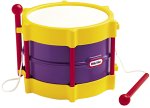
Send a tap-and-pause greeting
Make a short gentle call, leave room for an answer, then give the rhythm to a walking toy character.
Little RhythmMaker Toy Drum
Historical toy profile and play idea
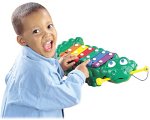
Answer with two chosen notes
Choose two notes for an A-A-B pattern, pause for a reply, and swap who begins the next musical conversation.
Fisher-Price 2-in-1 Crocodile Keys
Hear what changes when someone joins
Historical toy profile and play idea
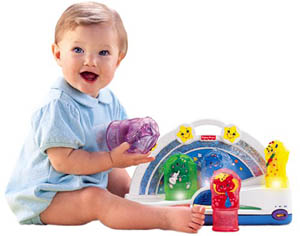
Invite one animal into the ensemble
Begin with one correctly placed figure, add a second, and compare the musical parts before choosing who leaves next.
Fisher-Price Compose ’n Play Orchestra
Historical toy profile and play idea
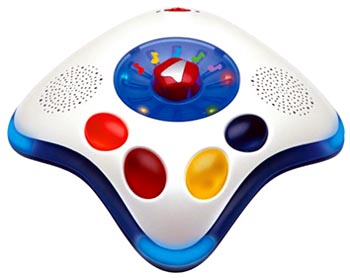
Trade a movement for a musical choice
Let one player choose a setting while a partner tries a small movement nearby, then swap roles and notice the response.
Musini Music Toy
Give the performance a place and a story
Historical toy profile and play idea

Make a welcome-concert program
Draw a performer, an announcer and two audience members, then plan an opening and farewell for an imaginary new neighbor.
Let’s Rock Elmo
Historical toy profile and play idea

Compose a soundtrack for a tiny city
Draw a market, station and parade, give each an original voice sound, and conduct the layers with simple join-and-pause cues.
UCreate Music
Explore the collection
Find a closer look at each toy, activity or historical report, grouped by what you would like to explore. The original index remains below with its earlier titles and wording.
Direct percussion and hand play
- Fisher-Price 2-in-1 Crocodile Keys Historical music toy
- Little RhythmMaker Toy Drum Historical music toy
- Musical Hands Mat
Figures and blocks that arrange music
- Fisher-Price Compose ’n Play Orchestra Historical music toy
- Jumbo Music Block
- Mozart Magic Cube Historical music toy
Guitars and keyboards
- Bach Rock Guitar
- Barbie Jam with Me Electric Guitar
- First Act Student Guitar
- Magical Moves Keyboard
- Paper Jamz Guitar
Movement and musical characters
- Dance Star Mickey
- iDog Music Toy
- Let’s Rock Elmo
- Music ’n Lights Sit ’n Spin
- Musini Music Toy Historical music toy
- Rock Star Mickey
- Zizzle iZ: A Creature for Mixing Music
Rhythm games and controllers
Microphones and karaoke
- Barbie Karaoke Machine
- e-kara Karaoke
- Jamming Band Musical Microphone
- Singing Starz Video Karaoke Machine
- SpongeBob SquarePants Singing Machine
Recording, mixing and screen performance
Find out who is making the music
Does the player produce a sound, choose a note, trigger a recorded song or follow a game? These can all be enjoyable, but they offer different kinds of control. Choose the interaction first, then check volume, handling, space and equipment.
Compare what an action changes
A keyboard-shaped toy may play individual notes, complete melodies or both. A pretend guitar may reward a gesture with a recording rather than respond like a stringed instrument. Read the modes and controls instead of assuming capability from the shape of the toy.
| Type of activity | What to look for | A useful check |
|---|---|---|
| Shake, tap or strike | A direct sound response and comfortable handling | Can the player make both a quiet sound and a pause? |
| Choose notes | Clearly described keys, strings or other note controls | Does changing the action change the pitch as expected? |
| Trigger a song | Selection, stopping, repetition and volume controls | Can you hear the song choices before committing? |
| Sing or record | Microphone, playback, saving and deletion functions | Where does a recording go, and what equipment is needed? |
| Follow a rhythm game | Feedback, difficulty settings and supported hardware | Can the player start at a manageable pace? |
On a narrow screen, scroll the table sideways.
Some products combine several modes. Check how easily they switch between them and whether a player can return to simple sound-making without a long sequence of prompts.
Make control and quiet part of the choice
Locate the volume and stop controls before comparing the number of songs. If a toy has no volume adjustment, consider whether it suits the room and the people sharing it. A pleasant demonstration in a shop may feel different after many repetitions at home.
The National Institute on Deafness and Other Communication Disorders recommends reducing exposure to loud sound, increasing distance or turning the volume down. Apply that principle when choosing a musical toy; do not hold its speaker next to an ear or rely on a toy's name as proof of a safe listening level.
Headphones need their own check. Follow the device and headphone instructions, use a low listening level and allow breaks. A headphone socket is a feature, not a guarantee about the level reaching the listener. This guide does not assign a safe loudness score to products we have not measured.
Try a short musical conversation
Two taps, then a turn
With an age-appropriate sound-making toy, one player makes a short, gentle pattern and pauses. The other can copy it or answer with a different pattern. Swap who begins. Keep the sound comfortable, allow silence and stop whenever either player wants. The game does not need a correct answer or a recorded backing track.
A small set of controls can be enough for this kind of play. If the recipient instead wants to learn a particular instrument, ask an appropriate teacher about fit and construction before assuming a toy version will serve that purpose. A musical-looking object and an instrument suited to lessons are not necessarily the same purchase.
List the equipment beyond the toy
- Power: required batteries, permitted power supply or approved charger.
- Sound output: built-in speaker or a separate device; any required cable or adapter.
- Playback: dependence on cartridges, discs, downloads or a continuing subscription.
- Software: supported devices, current app availability, accounts and offline functions.
- Recording: storage location, sharing controls, deletion and who can operate those settings.
- Parts: availability of the exact mallet, microphone, controller or other essential accessory.
Older music games in the archive may depend on a particular console, television connection or cartridge. Identify the exact edition and read its instructions before assuming it will work with current equipment. For connected features, use the broader checklist in Kids Electronics.
If the activity depends on a game console and a special instrument controller, Game Hardware helps build the complete equipment list and check the exact connections.
Choose something worth playing again
Watch what draws the recipient back: choosing a sound, repeating a favorite tune, accompanying a story or making up a pattern. A long song list is useful only if those songs and the controls appeal to the player. Plan a place to keep parts together and check the maker's cleaning directions.
Follow age guidance and warnings for small parts, cords and batteries. The AAP's toy-buying guidance also advises avoiding loud toys. Check recall information when identifying an older model.
For choosing recordings, formats and listening activities, visit Kids Music; its earlier product coverage remains separately labeled. For a toy character that moves to music, compare Robotic Pets. These are choosing ideas, not promises of improved musical ability or therapeutic benefits; the historical descriptions below keep their original context.
From the Toysit archive
Earlier coverage, with original titles and descriptions preserved as historical material. These descriptions include the promotional wording and claims of their time; they are not current operating instructions, safety assurances or product recommendations. Availability, pricing and app support have not been reverified. Identify the exact model and consult its current instructions and recall information.
- Air Snares Drumming Game - Drums you can pay anywhere - the more you play the better you get.
- Baby Smartronics Nursery Rhymes Bus - Learning nursery rhymes bus.
- Bach Rock Guitar - Even little musicians will find that it's simple to switch from classical violin to rock guitar with a quick tug on the neck.
- Barbie Jam with Me Electric Guitar Barbie karaoke pretend guitar with vocal tracks cartridge, whammy bar and headset microphone.
- Compose and Play Orchestra - Fisher Price - An orchestra for baby.
- Crocodile Xylophone - 2-in-1 Crocodile Keys Musical Instrument by Fisher-Price.
- Donkey Konga Nintendo Game Cube bongo drum music rhythm game is played to the beat through a drumming controller interface.
- Taiko Drum Master Namco Playstation 2 Japanese drum rhythmic skills drumming game includes popular hits and orchestral classics.
- E-kara Karaoke - Ekara - Plug e-kara into your TV, pop in a cartridge and you can live out your Pop Diva fantasies every day!
- Ekara Pro Headset - Promoted by Jamie Lynn Spears.
- Ekara Real Karaoke - Includes new cartridges and duet headset system.
- Let's Rock Elmo - Monster of Rock takes it to the streets.
- First Act Student Guitar - Good first guitar.
- Groove It dance toy from the makers of Bop It senses your motion as you follow lights to the rhythm of the music.
- Disney Princess Music and Magic Instruments Chirp and chime flute, royal rhythm five piece percussion set, and spinning starlight guitar.
- iZ Interactive Music Toy DJ animatronic poseable music character plays songs and responds to the rhythm and tracks of any music source.
- iDog Music Toy listen to your songs while connected responsive toy pet rocks out with lights and motion, moving and grooving to the beat.
- Jumbo Music Block - Helps children learn shapes, colors, and dressing skills.
- Kick and Play Piano - This soft, fabric-covered keyboard is alive with color, lights, sounds, and friendly animal faces.
- Leap Frog Learning Drum - LeapFrog learning drum toy.
- Learn through Music Pad - Through rhyme, rhythm, and repetition, chose from dozens of songs, karaoke style, for learning that is both fun and educational.
- Learn Through Music features children's favorite characters such as Barney, Blue's Clues, Dora the Explorer, and Sesame Street's Elmo.
- Light and Music Mat - Gymini Super Deluxe Light and Music Mat.
- Magical Moves Keyboard - Make music using infraraed technology.
- Dance Star Mickey - Interactive Mickey Mouse walks, talks, dances, and sings.
- Mozart Magic Cube - Create millions of Mozart musical masterpieces.
- Music and Lights Sit and Spin - Your kids will love taking this whirling wonder for a spin just as much as you'll enjoy watching them.
- Jamming Band Musical Microphone - Real working microphone built into a sit-to-stand musical activity center.
- Musical Hands Mat - The Musical Hands Mat helps develop coordination and teaches cause-effect principles.
- Musini Music Toy - The simple vibrations and movements that children make are converted to music.
- My Tune TV - MyToonTV - a cool new thing for your TV - turn anyone into a toon.
- New Jam Guitar Game - Nu Jam Guitar from the makers of Bop It : Hasbro Games and Tiger Electronics.
- Paper Jams Guitar - Instant rock star stringless guitar.
- Play It Now digital audio recorder from Tiger Electronics lets you record music from any headphone jack - just plug, record, and play.
- Rock Star Mickey - Musical plush toy from Disney and Fisher Price.
- Singing Starz Video Karaoke Machine - Stars - Karaoke machine with video camera.
- Toy Drum - Little RhythmMaker Toy Drum.
- UCreate Music - You create digital music mixing system.
A guide to evaluating toys, not a hands-on product test. Read our editorial approach.
Created for Toysit by Tabbloza — the artwork in our header.