
From the Toysit archive
PixOs Ultimate Design Station: sketch a small scene with depth
Explore the green-and-purple PixOs Ultimate Design Station and sketch a tiny stage or garden cart from the front and side.
The play at a glance
A little scene that has more than one side
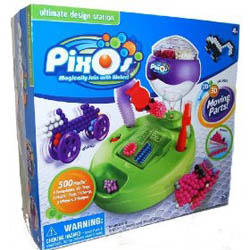
The Ultimate Design Station box shows a green base beneath a purple-and-clear upper section, with colorful bead rows and dimensional examples around it. The packaging advertises both flat and three-dimensional creations. Imagine taking that design idea to a tiny garden cart or a miniature stage: what would someone see from the front, and what would appear when they walked around the side?Think about the front and the side
The original account describes a design station with separate 2D and 3D trays, templates and examples incorporating a wheel or hinge. The pictured green-and-purple station has a different appearance and design emphasis from the blue Super Studio featured on its companion page.
A flat picture presents its idea all at once. An imagined three-dimensional scene asks another question: what happens beyond the front edge? A cart needs somewhere for its gardener to stand. A stage needs a place where the performer enters. Sketching those spaces can be a satisfying part of the play before any model is made.
Try a mini-scene design desk
Choose an imaginary garden cart or a tiny performance stage. Use two small pieces of paper and two main colors to plan a scene with depth.
- Draw the front view. Show the detail a visitor notices first: the cart’s flower display or the stage’s opening curtain. Add a sign with a name.
- Draw the side view. Decide how far the scene extends behind the front. Show a place for the gardener, a backstage doorway or a shelf holding a pretend delivery.
- Give the scene an event. Write one sentence: “The last flower arrives before opening time,” or “A tiny singer is waiting for the curtain.”
- Stand the drawings together. Fold a narrow tab along the bottom of each sheet so it can stand. Arrange the views at a right angle, then place a drawn character nearby to explain what is happening.
Try a visitor’s tour. Approach from the front, move around the side and describe one new detail that appears. A second player can propose a change—more room for parcels, a larger entrance or a different sign—and you can redraw that view.
Let the drawing carry the design
Wheels and hinges can be drawn as part of the scene; their construction belongs to a positively matched kit guide. Keep the paper views as the complete project while the station and supplies are being identified. They also make a useful design conversation: which feature belongs at the front, and which is best discovered around the corner?
The CPSC’s November 7, 2007 Aqua Dots recall applies to all models of that named product and directs owners to remove the recalled toy from children. Package colors cannot identify loose beads. Keep unidentified or mixed old supplies out of play; actual bead work requires confirmed Pixos materials and the matching directions, with small pieces kept away from mouths and younger children.
The historical record
Original Toysit coverage
The original product account and commentary are preserved below as historical coverage.
Complete art activity center lets you design and build 2D and 3D creations
Make a bike, choosing your color from the fun funnel. Use sticks, and dry your creation. Make 2D and 3D creations that incorporate a moving wheel or hinge. Design studio comes with five hundred Pixos, one 2D design tray, one 3D design tray with four 3D shapes, and double-sided templates. Also comes with instruction booklets.
The PixOs Ultimate Design Station taps into a child's inherent desire to create and build, offering an engaging platform for both 2D and 3D artistic projects. The station provides various templates, colors, and tools that allow children to turn small beads into intricate designs. By spraying water, these designs become permanent, giving kids a tangible product of their creativity. The 3D aspect takes this a step further, encouraging spatial reasoning and complex planning as youngsters construct multi-layered creations. This fusion of art and engineering serves as an excellent educational tool, honing fine motor skills, boosting creative thinking, and providing a satisfying, hands-on experience that children find endlessly entertaining.
Sources and editorial notes
The original package image and complete two-paragraph account are preserved. Front-panel artwork supports the station identity and advertised 2D/3D theme, not detailed assembly or bead formulation. Exact instruction booklets and materials were not recovered; wheels, hinges and drying details remain attributed to the original account. No strength, permanence, compatibility or safety test is claimed. The CPSC Aqua Dots notice was reviewed separately; it does not clear unidentified supplies. This original activity uses paper.
- Original Toysit image — Existing same-site photograph reviewed and retained unchanged.
- CPSC Aqua Dots recall 08-074 — Reviewed for the named recalled product and all-model scope. The station photograph does not establish bead identity, condition or recall clearance.
- Original Toysit coverage — Complete original product account and historical commentary preserved.

Images and descriptions are retained as historical material. How Toysit covers toys.
Created for Toysit by Tabbloza — the artwork in our header.