
From the Toysit archive
Nintendo e-Reader for Game Boy Advance
Discover how Nintendo’s e-Reader turns dotted cards into Game Boy Advance content, then build an original five-card story game on paper.
The play at a glance
A game hidden along the edge of a card
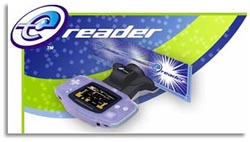
The e-Reader’s purple body and narrow card slot give it an unusual role beside a Game Boy Advance. A printed card becomes the starting point for something on screen. Its dotted strip carries information, so collecting and arranging cards can be part of the anticipation before a game begins.
From a printed strip to a screen
Nintendo’s guide explains that special dot-code cards can load games, display information or animation, or unlock content. Some programs require several cards. The small ritual of choosing a card, following its instructions and watching the result gives the accessory a different feel from simply inserting a game cartridge.
The retained review describes an NES game spread across five cards and imagines further uses for the format. Its enthusiasm captures the surprise of finding a playable program in something that looks like a trading card. The new paper game below borrows the idea of separate cards contributing to one whole adventure.
Try a five-card tiny game
Number five paper cards and label them Hero, Place, Obstacle, Helpful Object and Ending. Draw one picture on each. A cheerful beetle, a lantern garden, a closed gate, a silver key and a moonlit picnic make one possible set.
Reveal the cards one at a time. Each player adds a sentence connecting the new picture to the story so far. The helpful object must solve the obstacle in an imaginative way: perhaps the silver key rings like a bell and wakes the gardener who opens the gate.
Replace just one card and tell the story again. A bridge instead of a gate may call for a different use of the key. After two rounds, compare which single change made the biggest difference. These are ordinary story cards; keep them separate from the e-Reader and its encoded cards.
Keep each connection matched
The e-Reader manual distinguishes a Game Boy Advance Game Link cable from the Nintendo GameCube Game Boy Advance cable. Connecting games must support the feature. The GameCube cable guide also notes that the handheld needs its own power; the cable does not supply it.
For an original card collection, preserve the printed code area and use the matching instructions. Store your drawn story cards as a separate little deck, ready for the next adventure.
The historical record
Original Toysit coverage
The complete earlier reviewer passage and later Game Boy Advance commentary are preserved below. Firsthand impressions belong to the historical reviewer; they are not new Toysit testing.
E-reader with Donkey Kong.
The Nintendo eReader is the latest in a line of scanning devices for kids. The e-Reader is about the size of an N64 Transfer or Rumble Pak, and plugs directly into the cartridge port of the GB Advance. As the e-Reader also plugs into the Game Boy Advanced's Game Link port, a replacement port is provided on the e-Reader itself, so you can continue to use Link Cables and some (not all) GBA lighting products. The key to the e-Reader system is its data cards, which are basically another family of trading cards, a la Magic The Gathering and Pokemon (more on this in a moment). Cards designed for use with the eReader are distinguised by rows of dots along their length. These dots are the basis of Dot Codes, a proprietary format that the e-Reader sees as digital data. By swiping a compatible card through the e-Reader, you are loading data into the Reader. What kind of data, you ask? Depends on the cards. The e-Reader comes packaged with two 5-card booster packs. The first contains the complete Nintendo Entertainment System (NES) port of Donkey Kong Junior ... you read that right, an NES cartridge stored on five trading cards. Other NES games, similarly translated, are available from retailers now, with many more to come. The second pack contains an assortment of other e-Reader cards, including three from the Pokemon Trading Card Game. These three cards are the first in a new line of Dot-Code-bearing Pokemon cards. Along with being used in the Pokemon card game, these cards hold (in their Dot Codes) extra data on the particular Pokemon (readable on the Game Boy Advanced screen), and even mini-games you can play. A fourth card includes a sample Nintendo Game-and-Watch game (old pre-GB handheld games). However, it is the fifth card that really can open up doors in how you play games. This card contains bonus items that can be used with the Nintendo GameCube title Animal Crossing. By connecting your e-Reader-equipped Gameboy Advance to a GameCube via the appropriate Link Cable (with a compatible title, like Animal Crossing), you can upload new information to the GC game. Just imagine ... you could update the stats of your favorite football or baseball player simply by swiping his compatible trading card through the e-Reader. How does the system work in practice? Actually pretty well. It takes about 60 seconds to completely load a game like DK Junior, for example. Unlike ATM or credit cards, an e-Reader card needs to be swiped slowly. Like credit cards, you need to treat them somewhat gently; any stray marks (such as writing something on the card) in the Dot Code area could mess up the data, rendering the card useless. Younger kids may need some assistance at first with swiping, but they'll get the hang of it quickly. The e-Reader has a small amount of internal memory, so if you load a game/program you like, you can keep it, at least until you want to swipe something else into it. - Reviewer
Innovations of the Game Boy Advance
The Game Boy Advance (GBA), released by Nintendo in 2001, brought several innovative features and advancements to the world of handheld gaming, making it a significant milestone in portable gaming history:
Advanced Graphics and Display: The GBA introduced a high-quality 32-bit color screen, a substantial upgrade from the monochrome screens of its predecessors. This allowed for more vibrant and detailed visuals, enhancing the overall gaming experience. The screen resolution and clarity were impressive for a handheld device at the time.
Horizontal Layout: Unlike its predecessors, the GBA featured a horizontal layout with a wider screen. This design choice not only provided a better aspect ratio for gaming but also allowed for more comfortable gameplay and better visibility of in-game content.
Backward Compatibility: The GBA retained compatibility with Game Boy and Game Boy Color games. This feature allowed gamers to continue enjoying their existing game libraries on the new device, enhancing the value of the GBA for those who owned previous Game Boy consoles.
Shoulder Buttons: The GBA was the first handheld console to feature shoulder buttons, which expanded the range of gameplay possibilities. These buttons enabled developers to create more complex and diverse game mechanics, providing players with greater control and interactivity.
Link Cable and Multiplayer: The GBA continued the tradition of allowing multiplayer interactions through a link cable. However, the GBA's link cable introduced improved data transfer speeds, allowing for smoother multiplayer experiences and making games like "Pokémon" even more engaging with battles and trades.
Hardware Expansion: The GBA included a cartridge slot on top that allowed for various hardware expansions, such as the Nintendo e-Reader accessory. This peripheral enabled players to scan cards containing additional content, such as mini-games, extras, and even level packs, expanding the gameplay possibilities.
Classic Titles and New Experiences: The GBA featured a strong library of both classic franchises and new intellectual properties. Players could enjoy familiar titles like "Super Mario," "The Legend of Zelda," and "Metroid," while also exploring new and innovative games tailored to the GBA's capabilities.
Compact and Portable: The GBA's compact size and portability made it easy to carry around, enabling players to enjoy console-quality gaming experiences on the go. Its ergonomic design and lightweight build contributed to its comfort during extended play sessions.
The Game Boy Advance's combination of technical advancements, enhanced graphical capabilities, innovative design, and backward compatibility solidified its place as a beloved handheld gaming device. Its influence continues to be felt in the handheld gaming landscape, leaving a lasting legacy for future generations of portable gamers.
Sources and editorial notes
Nintendo’s USA booklet 48637A was reviewed in full, including scanning and connection diagrams; its cable guides were also reviewed. Cards and connecting games must match the region and feature requirements. The archive’s Donkey Kong headline differs from its reviewer’s Donkey Kong Junior bundle account; exact pictured contents remain unconfirmed. Timing and testing belong to that historical reviewer. In the later GBA essay, 32-bit describes the processor, not screen color depth; its first-shoulder-buttons claim is not established here. No physical testing was performed.
- Original Toysit image — Existing same-site image reviewed and retained unchanged.
- Nintendo: e-Reader instruction booklet — Both PDF sheets, sections 1–8, reviewed; USA edition 48637A. Exact retail bundle is not specified.
- Nintendo: GameCube Game Boy Advance cable — Both sheets reviewed, including English instructions and connection diagrams; game-specific compatibility and separate handheld power.
- Nintendo: Game Boy Advance Game Link cable — Both sheets reviewed; this cable has different system/game requirements from the GameCube cable.
- Nintendo: Game Boy Advance instruction booklet — Both supplied PDF sheets reviewed. Introduction distinguishes the 32-bit ARM processor from the color LCD.
- Original Toysit coverage — Complete historical account retained, including its original claims and wording.

Images and descriptions are retained as historical material. How Toysit covers toys.
Created for Toysit by Tabbloza — the artwork in our header.