
From the Toysit archive
XaviXPORT
Explore XaviXPORT’s low silver base and cartridge platform, then direct a paper sports broadcast that switches between baseball, bowling and tennis.
The play at a glance
One silver stage for a change of sport
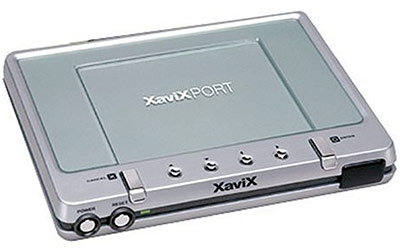
XaviXPORT looks like a low silver platform with a row of small controls along its front. The broad top is the place where a matching system cartridge belongs. Baseball, bowling and tennis provide three ways to imagine its purpose: the base stays beside the television while the cartridge and sports accessory give the session its particular character.
The base, the cartridge and the gesture
SSD’s guide distinguishes three parts: the PORT connected to the television, a System Cartridge containing the game’s processor, and a matching Interface used by the player. That division explains the broad empty stage in the photograph: the silver base is one part of the arrangement.
The front controls give the base the appearance of a small command desk. Directional buttons sit between larger controls, and the dark window at the front belongs to its infrared connection system. The original photograph shows the PORT alone; the separate sports profiles explore the bat-and-ball, bowling and tennis accessories.
Picture a pretend sports broadcast moving from one venue to another. A baseball field has a diamond and a distant fence; a bowling scene has a long lane; a tennis court divides the action with a net. Changing the sport changes the shape of the scene and the kind of event the commentator expects.
Try the sports-switch director
Make three paper studio cards labeled Baseball, Bowling and Tennis. Draw the playing space on each and add two small boxes below it: “Player gesture” and “Screen event.” Sketch a gesture in the first box and an imagined result in the second, such as a bat meeting a ball and the ball sailing toward a fence.
One player becomes the director and points to a card. The commentator introduces that sport and narrates the drawn event. Then the director switches cards: “Across to the bowling lane!” The commentator changes the setting and supplies a new ending.
For a playful finale, give every venue the same weather or theme. A moon tournament might have star-shaped lane markers and a silver tennis net. Keep the gestures as drawings on the cards; the broadcast works with voices, pictures and pointing at the table.
Match the parts before real play
For a surviving system, use the original instructions matched to the actual PORT, regional power adapter, cartridge and accessory. Each sports set has its own handling and space requirements. The paper studio can switch among all three scenes independently of working hardware.
The historical record
Original Toysit coverage
The complete earlier product account and commentary are preserved below as historical coverage.
Interactive virtual reality television interface supports video games that respond to your physical movements
Interactive television computing with technology that enables you to interact with your television as never before. From interactive video games that respond to your physical movements, the applications are limitless. Your television will never be the same; what you do with is up to your imagination. Enjoy interactive virtual reality from your television. Supports interactive video games that respond to your physical movements. XaviX multiprocessor chips are located in the individual game cartridges, so upgrades are easy. Enjoy bowling, tennis, and baseball in your own home. Step into the action as never before.
Video game systems that use controllers based on physical movement have revolutionized the gaming industry by making gameplay more interactive and engaging. Systems like the Nintendo Wii, PlayStation Move, and Xbox Kinect have brought a whole new dimension to gaming, allowing players to use their bodies as the controller. These motion-sensitive systems often come with a range of games that encourage players to jump, swing, and move in order to accomplish tasks or achieve goals within the game. Not only do these systems make gaming more immersive, but they also have the added benefit of encouraging physical activity, making them popular choices for family-friendly entertainment and even for fitness-oriented games.
Sources and editorial notes
SSD’s manufacturer-authored guide transcript was reviewed for the PORT/cartridge/interface distinction. Complete scan diagrams were not recovered: the manual listing and direct mirror requests returned access failures. The transcript describes a North American NTSC/120-V edition; the pictured underside label is unavailable. Adapter ratings and cartridge installation steps are not supplied here. Earlier Baseball, Bowling and Tennis research limits remain in force. No universal compatibility, current support or fitness benefit is claimed; no physical testing was performed.
- Original Toysit image — Existing same-site image reviewed and retained unchanged.
- SSD: XaviXPORT user-guide transcript — Manufacturer text read through the web reader for component roles and regional context. Direct access returned HTTP 403; complete scan diagrams were not recovered.
- Original Toysit coverage — Complete historical account retained, including its original claims and wording.

Images and descriptions are retained as historical material. How Toysit covers toys.
Created for Toysit by Tabbloza — the artwork in our header.