
From the Toysit archive
Game Boy micro
Game Boy micro frames a tiny backlit screen in a silver body, with an original miniature-window gallery to draw on paper.
The play at a glance
A miniature picture in a silver frame
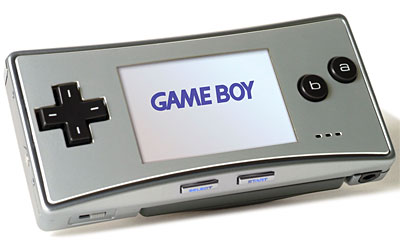
The silver body puts the little screen at the center of a neat horizontal shape. A black direction pad sits to one side, two round buttons to the other, and Start and Select tuck beneath the display. The image makes the game window feel almost like a tiny framed picture, ready to reveal a much larger imagined place.
Choose what fills the little window
A small frame makes a single detail feel important: the doorway at the end of a path, a character’s silhouette or the outline of a distant hill. The micro’s backlit screen has adjustable brightness, and its removable faceplate changes the frame around that picture. Nintendo’s guide directs owners to keep a faceplate fitted to protect the display.
The micro plays Game Boy Advance cartridges. Original Game Boy and Game Boy Color cartridges do not work with it. Multiplayer needs compatible games and the micro-specific accessories described in its manual; older cables and the e-Reader cannot simply be moved across from an SP. Check the actual system and regional power supply before using surviving equipment.
Try a miniature-window gallery
Draw three small windows on paper, leaving room for a colored border around each. Put a character close-up in the first, a wide landscape in the second and an intriguing doorway in the third. Keep the pictures simple enough to recognize at a glance.
Give the windows a shared world. Perhaps the character is a moon-garden keeper, the landscape is their hillside and the door leads to a room where lost stars are stored. Add a one-line gallery label below each picture. A companion can put the three labels into a different order and tell a new version of the story.
Now change only the drawn borders: silver lines for a quiet collection, bright zigzags for a lively one or little leaves for an outdoor exhibition. Decide which frame suits each picture best. Keep all drawing on paper; these invented borders are an art activity, not a proposal to decorate the actual screen or faceplate.
Give the smallest scene a title
Choose one window as the cover of an imaginary game. Name it and write the first thing a player would see upon entering. A title such as “The Door Beneath the Orchard” can suggest a whole adventure from a very small picture.
The historical record
Original Toysit coverage
The complete earlier product account and commentary are preserved below as historical coverage.
Small sleek portable game player has 2-inch brightness-adjustable backlit screen and rechargeable lithium-ion battery
The original Game Boy Advance fits comfortably into the pocket of a backpack. The retooled Game Boy Advance SP fits into a coat pocket. Now Nintendo takes aim at the pocket of your tightest jeans with the tiny Game Boy Micro system, quite simply the smallest and sleekest Game Boy product that Nintendo has ever created.
The silver metal Game Boy Micro measures 4 inches wide, 2 inches tall, and 0.7 inches deep. weighs an astonishing 2.8 ounces. Yet Game Boy Micro has the same processing power and plays the same games as Game Boy Advance SP models, complete with standard face controls and gleaming shoulder and Start/Select buttons.
A removable face plate gives owners the option to buy replacements to customize the look of their systems again and again with new colors and designs. Most notably, its 2-inch backlit screen shines with incredible power, rendering games in startling clarity with fantastic colors on the best Game Boy screen ever. For the first time, users can adjust the brightness of the screen to adapt to indoor lights or outdoor sunshine.
"We're making the gorgeous Game Boy Micro for image-conscious folks who love video games, the ones who want the look of their system to be as cool as the games they play on it," says George Harrison of Nintendo. "Because of its diminutive size and industrial-hip look, Game Boy Micro immediately identifies the person playing it as a trendsetter with discriminating style."
Game Boy Micro, to be released this fall, represents the latest evolution in the image of the Game Boy Advance line.
Sources and editorial notes
Nintendo booklet 58485A was reviewed across all six supplied PDF sheets, covering the complete English section through printed page 29 and the opening French material. It supports the backlit display, brightness control and removable faceplate. The May 18, 2005 preview’s “same games as SP” needs the cartridge and accessory limits stated above; its superlatives, dimensions and future launch wording remain historical. The gallery is an original paper activity. No physical testing was performed.
- Original Toysit image — Existing same-site image reviewed and retained unchanged.
- Nintendo Game Boy micro instruction booklet (PDF) — 58485A: compatibility page 10, brightness pages 7–9 and 15, multiplayer pages 17–19 and faceplate page 20. Charger and battery instructions are specific to this hardware and region; historical battery estimates are not measurements of an aged unit.
- Original Toysit coverage — Complete historical account retained, including its original claims and wording.

Images and descriptions are retained as historical material. How Toysit covers toys.
Created for Toysit by Tabbloza — the artwork in our header.