
From the Toysit archive
LeapFrog Mind Station
Picture LeapFrog’s silver-and-green Mind Station cartridge dock, follow its historical activity-transfer idea, and create a paper puzzle post office.
The play at a glance
A little dock with somewhere for a cartridge to go
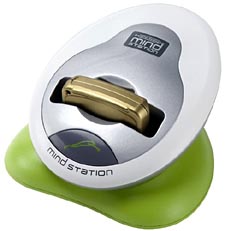
Mind Station has a silver oval face leaning above a bright green base. In the original photograph, a gold-colored cartridge sits across the middle, making the docking point the center of attention. Its historical job was to move new activities from a computer to a compatible learning toy, using a cartridge that could travel between them.
An activity makes a round trip
LeapFrog’s guide shows a simple sequence: choose an activity on the computer, transfer it to a cartridge through the dock, then move that cartridge to the learning toy. It also describes a return journey for recorded play information. The connector is the stop between the two places.
The guide illustrates iQuest, Turbo Twist, LeapPad and Imagination Desk as parts of that period’s system, with cartridge choices depending on the product. What makes the idea easy to picture is the physical handoff: a small object leaves one station carrying something new for another.
That journey suggests a pretend post office where puzzles are the letters. A sender thinks of a question, a carrier chooses its destination, and a receiver sends an answer back. Each new delivery changes what happens at the far end of the route.
Try an activity-post office
Draw a computer on one side of a large sheet and three imaginary learning stations on the other. Name them Word Woods, Number Harbor and Pattern Palace. Connect each destination to the computer with a drawn road.
Make three paper delivery cards. Word Woods could receive “Draw something that rhymes with cat.” Number Harbor might receive “Three boats arrive and two more follow—draw the fleet.” Pattern Palace could receive a red-blue-red-blue sequence with a blank space at the end.
One player delivers a card along the matching road. The receiver draws an answer, then adds a fresh puzzle to the back and sends it home. Swap jobs after each round. Finish by arranging the cards as a little exhibition of questions and replies.
For another round, invent a new station devoted to animal sounds, shapes or silly stories. The entire exchange uses paper; players supply the messages and the responses.
Read the dock as a piece of learning-toy history
The cartridge, connector and host toy were distinct parts of the system. The old download-and-report instructions below preserve how that arrangement was presented at the time. For a surviving unit, match its revision and accessories to the original guide before considering any setup.
The historical record
Original Toysit coverage
The complete earlier product account and commentary are preserved below as historical coverage.
Download additional games and educational curriculum
The Mind Station connector is a revolutionary device that extends the life of any Internet- enabled Quantum Leap or LeapFrog toy. Use it to link to the Internet where you can get new activities for your toy. The Mind Station connector provides access to the LeapFrog Never-Ending Learning Club which allows you to get new activities for your products and see progress reports. The Mind Station also allows you to customize your child's learning experience. How does it work? Plug the Mind Station connector into your PC Pop a cartridge into the Mind Station connector Download new activities from Leapfrog.com onto the cartridge Put the cartridge into your Quantum Leap or LeapFrog toy and play Remember, you'll need an internet connection to make it all work. What toys work with the Mind Station? LeapPad and LeapPad Pro Learning System Imagination Desk Turbo Twist Spelling Turbo Twist Math Turbo Twist Vocabulator Turbo Twist Fact Blaster School-Time LeapTop This product allows you to download additional games and educational curriculum from leapfrog.com. After playing, upload results for an on-line progress report and customized recommendations. Download additional content for each of your Quantum Leap LeapFrog Mindstation products.
The evolution of Internet-connected learning systems has significantly transformed education by making it more accessible, interactive, and personalized. Beginning in the late 1990s and early 2000s, the internet began to be integrated into classrooms, initially through computer labs and eventually through Wi-Fi-enabled devices. This led to the advent of Learning Management Systems (LMS) like Moodle and Blackboard, which centralized course materials and facilitated online assessments. The mid-to-late 2000s saw the rise of Massive Open Online Courses (MOOCs), offering education from top institutions to learners around the world. These platforms use data analytics to adapt to individual learning styles. As mobile technology became more prevalent, learning apps and mobile-friendly platforms emerged, allowing learners to access educational content anytime, anywhere. More recently, the integration of Artificial Intelligence and machine learning has further personalized education by adapting to each student's needs in real-time. The COVID-19 pandemic accelerated the adoption of these systems, making remote learning a new normal and pushing for more innovative and effective ways to educate via the internet.
Sources and editorial notes
LeapFrog’s six-page parent guide, part 600-01813, was reviewed completely, including diagrams and cartridge chart. Its USB/serial and older-computer requirements describe a historical service. Current download availability was not established; surviving support pages are not proof it works today. The pictured hardware revision is unconfirmed, and compatibility is not extended to later LeapPad/Leapster families. Original broader compatibility and learning claims remain historical. No accounts, software installation or physical testing were used.
- Original Toysit image — Existing same-site image reviewed and retained unchanged.
- LeapFrog: Mind Station parent guide — All six pages visually reviewed; diagrams show the cartridge transfer and USB/serial connections. Historical service and membership terms.
- LeapFrog: connector indicator lights — January 15, 2016 support article distinguishes USB Mind Station, serial Mind Station and LeapLink. It does not confirm present service availability.
- Original Toysit coverage — Complete historical account retained, including its original claims and wording.

Images and descriptions are retained as historical material. How Toysit covers toys.
Created for Toysit by Tabbloza — the artwork in our header.