
From the Toysit archive
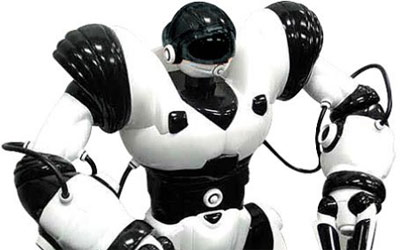
Robosapien
Explore direct commands, recorded sequences and touch or sound triggers on the original WowWee Robosapien 8081.
The play at a glance
A command, a sequence, or a response to a trigger
The original Robosapien offers several ways to make the same robot act. You can send a command from its infrared controller, record a sequence, or arrange for a sensor to trigger a stored response.
Separate those ideas before trying a long routine. A useful first session asks who starts each action and what the robot has been told to do next.
Begin with a direct command
The guide places the infrared receiver in the head. Point the controller there and check its command layer: the normal red labels, green after one Select press, or orange after two. The normal-layer Stop command ends an action; that button has different functions in the other layers.
Start with a clear space and one deliberately chosen movement. Watch where it ends before sending another command. Put the controller down afterward and describe the result in ordinary words. This separates finding the right control from planning an entire performance.
Three ways to start an action
- Direct control
- You press a command and observe its action.
- Recorded sequence
- You enter steps, then play them back in order.
- Sensor-triggered routine
- A touch or sound supplies the starting event for a prepared response.
The guide provides six-step left, right and sonic routines and a 14-step master program. The master can call sensor routines. These are different levels of organization, not one long list of interchangeable entries. Switching the robot off clears its programming.
Draw those three starting points on paper. Under each, write what the player supplies and what they expect to see. If a result surprises you, check the mode and stored instructions before assigning the robot an intention.
Plan a short sequence before entering it
Choose a small routine you can explain from beginning to end. Write a numbered list, leaving space next to each step for what actually happens. Follow the matching manual’s entry and playback procedure rather than guessing from the button colors.
Watch one complete playback before revising it. Change one step and compare the result with your first record. A partner can describe what they saw without choosing the next instruction for you.
This gives the activity a purpose beyond making the longest possible routine: the player can connect a planned order with an observed order.
Observe a trigger without calling it understanding
For sonic play, the manual’s Listen mode waits for a sharp sound or body tap before starting the stored routine. Touch programs use the documented hand and foot sensors.
Predict the response before trying a trigger, then compare it with the playback you prepared. A response to sound does not by itself establish that the robot understood a sentence. Keep character voices and invented motives in the story you tell around the toy, while describing its controls plainly.
The historical record
Original Toysit coverage
The original product paragraph and NASA essay remain below. The NASA and Canadarm attribution has not been independently reverified for this renovation. The archived 84-step description should not be read as 84 independently entered master-program commands; the matching guide describes a 14-step master program that can call shorter sensor routines.
Fast moving, fully functional humanoid robot toy can walk, run, turn, pick-up, throw, and kick by remote control
The Robosapien Robot is a full function fast moving robot. Designed by a NASA scientist, the robot is simple enough for kids and advanced enough for adults. Features include real, multi-speed fast dynamic walking, running and turning; fast, full function arms with two types of grippers; 67 pre-programmed functions including pick-up, throw, kick, and sweep. Programmable reflexes to touch, pickup, kicks or sound; and up to 84 program steps, with 4 program modes for advanced operations. No computer required, all functions handled by an ergonomic remote control. This is like a robotic video game character for the home. He's fast moving, fully functional and comes to life at a touch of the remote.
NASA has been a pioneer in the field of robotics, particularly in applications designed for space exploration and research. Robots such as the Mars rovers—Spirit, Opportunity, Curiosity, and Perseverance—have become invaluable tools for studying the Martian surface, soil, and atmosphere. These robotic systems are designed to withstand extreme conditions, navigate challenging terrains, and carry out complex scientific experiments. NASA's contributions aren't limited to planetary exploration; they also include the development of robotic arms like the Canadarm used on the Space Shuttle and the International Space Station. The technologies created have often found applications on Earth as well, in fields ranging from medicine to manufacturing. Overall, NASA's work in robotics has dramatically advanced our understanding of the universe and has paved the way for future innovations in both space exploration and terrestrial applications.
Sources and editorial notes
Reviewed October 16, 2026 against the original image, retained ASIN B000161RFA and WowWee’s original 8081 guide, copyright 2004 (WS8081US02). The manufacturer-authored PDF is preserved on Hackaday rather than hosted by WowWee. Relevant controller, sensor and programming diagrams were visually reviewed. The article concerns the original infrared robot, not V2, X, Blue or app editions. Activities are editorial suggestions; no physical unit was tested.
- WowWee: original Robosapien 8081 manual (PDF, archived on Hackaday) — Manufacturer-authored guide to command layers, sensors and programming; third-party archival host.
Images and descriptions are retained as historical material. How Toysit covers toys.
Created for Toysit by Tabbloza — the artwork in our header.