
From the Toysit archive
Alphabet Apple
Explore the older Alphabet Apple’s letter-button idea, separate names, sounds and alphabet order, and identify the edition before using a manual.
The play at a glance
A keyboard organized around the alphabet
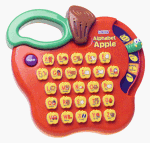
The red Alphabet Apple pictured here gives each letter its own button. Toysit’s earlier coverage describes changing activities to hear letters, explore sounds, answer questions and play music. Its useful organizing idea is that one keyboard can support several different kinds of choice.
Three questions hiding in one keyboard
The earlier account describes letter recognition, sounds and alphabet-order questions. Those tasks should be distinguished. Naming a printed B asks for a label. Making the opening sound in “ball” asks for a sound. Identifying what comes after B asks about the alphabet’s sequence.
When sharing a letter toy, say which kind of answer you are looking for. If the child answers with a sound when you expected a name, clarify the question before treating the response as wrong.
Identify the edition before following instructions
The historical page describes five activities and nine melodies, but it also alternates between a bird selector and a worm selector. The photograph shows a red apple-shaped body with a green handle and a curved control area on the right. These details do not establish that every part of the old description refers to one edition.
Record the model number from the unit itself and compare its control layout with the matching manual. A guide for an apple-themed toy with a different selector or extra features should not supply this unit’s setup instructions. In particular, the battery statement in the original text below has not been independently confirmed for the pictured unit.
Make a three-question letter strip
On paper, write A B C D with enough space to point to each letter. Choose B and try three separate prompts: “What is this letter called?”, “What sound starts ball?” and “Which letter comes after B on this strip?” Keep the strip visible so the sequence question can be answered by looking.
Then invite the child to ask you a question. Add a picture of a ball, or choose a different familiar word together. This is a conversation using letters, not a reproduction of the toy’s activities or a measure of reading readiness.
Keep the useful idea, qualify the promises
A row of letter buttons can make it easy to choose and repeat a response. That is a concrete feature to observe. Claims that the toy develops coordination or provides a foundation for reading need more evidence than a product description. The old wording remains available below, while this profile concentrates on the choices a family can actually discuss and explore.
The historical record
Original Toysit coverage
The original two paragraphs remain below, including inconsistent descriptions of the selector as a bird and a worm. Their battery, melody and educational claims are preserved as history, not silently reconciled into a single verified model specification.
Beginning reader skills toy
This is a great tool to introduce your preschooler to letters and basic phonics. The adorable apple tree design and friendly worm make learning these Beginning Reader skills fun. Your child selects from one of five activities by sliding the bird left and right. Younger children enjoy learning to recognize each letter and its name. As children develop, they move on to learning the basic sounds of each letter, a critical step on the path to reading. Another activity helps children learn alphabet order by asking questions about which letter comes before another. Kids will love exploring music with the letter keys. The tree's trunk is actually a carrying handle so your busy Beginning Reader can take this learning toy everywhere! The Alphabet Apple by V-tech is designed to let preschoolers take a good bite out of learning their letters. Insert two AA batteries (not included) into the sturdy-plastic, portable unit, and youngsters can slide the worm in the apple to select one of five settings. The first four settings instruct kids in letter recognition and sounds, complete with letter-finding games using the push buttons. A fifth option offers nine different melodies that play (regrettably, at a nonadjustable volume) at the press of a key. With its colorful, kid-friendly design, the Alphabet Apple provides the seed for a solid core of learning.
In order to read, a child must first learn to recognize and identify the letters of the alphabet and then match the letters with their respective sounds. The Alphabet Apple can help with this challenging process. It has a keyboard made up of all 26 letters arranged in alphabetical order. A child simply touches any one of the keys to elicit the names and sounds of each letter (including short- and long-vowel sounds). Children can develop hand-eye coordination, fine motor skills, and letter-identification abilities by finding each letter on the keyboard. Each key has an uppercase letter and a picture of an object starting with that letter (for example, A for ant).
Sources and editorial notes
The retained photograph and original Toysit prose are the primary evidence for this profile. VTech’s Alphabet Apple Tree guide was located and its text reviewed, but a reliable visual and model-number match to this older red unit was not established. Later Alphabet Apple products also use different features. This renovation therefore does not assign a model number, battery specification or current age grade from another edition. The paper activity is an original Toysit suggestion; no physical testing was performed.
Images and descriptions are retained as historical material. How Toysit covers toys.
Created for Toysit by Tabbloza — the artwork in our header.