
From the Toysit archive
Barbie Laptop Computer
Revisit the Barbie learning laptop, distinguish the archived description from other B-Book models, and try an independent word-pattern activity.
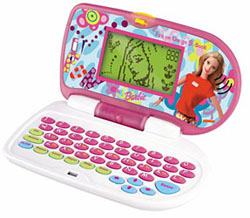
The play at a glance
A familiar character around a learning activity
The Barbie laptop combined a recognizable character with a small keyboard and screen. The original description emphasizes word, arithmetic and logic activities. A useful way to approach it is to look beyond the theme and ask what the player chooses, enters and hears or sees in response.
Read the model name carefully
Oregon Scientific’s 2002 announcement lists B-Book, B-Bright and several other Barbie devices as different products. A shared character or pink case is therefore not enough to transfer an activity count, control sequence or accessory requirement from one to another.
The original page describes a compact device with eight word, five math and four logic activities, plus music and a calculator. Its stated dimensions and the photographed keyboard have not been independently matched to one exact model. Keep those details attached to the original account rather than treating them as a verified checklist for every Barbie laptop.
Choose by the task
When comparing learning toys, ask what the player will actually do. A word activity might ask for a missing letter; a number activity might ask for an answer; a logic activity might ask for a pattern. Those examples help frame questions to investigate, but are not a newly verified game list for this unit.
Consider whether the child enjoys reading a prompt, locating keys, listening to feedback or sharing a problem. A theme can invite interest, while the activity itself determines what happens next. Any child who enjoys the character or the task can take part.
Keep the original in view
The historical image is preserved at its original proportions. For a found unit, compare the screen surround, keyboard labels and underside model marking before seeking instructions. Do not infer a complete accessory set or ordinary computer capabilities from the photograph.
The longer essay below discusses the evolution of Barbie laptops in broad terms. It is retained as part of the page’s history, not as evidence that this particular toy has later connectivity, software or touchscreen features.
Design a word-pattern challenge
Write c_t, h_t and m_p on paper. Choose a vowel for each gap and say the resulting word. More than one answer may work: a hat and a hut are different things. Draw a tiny picture beside each completed word.
Take turns designing a new gap and explaining an answer. This original Toysit activity uses no device and can be decorated with any favorite character or theme.
The historical record
Original Toysit coverage
The complete original description and broader Barbie-laptop essay are retained below. Dimensions, age range and activity totals remain historical claims; the later discussion of modern technology does not establish features of the pictured model.
Compact interactive teaching games
Lots of games and activities are packed into this mini laptop that's pure Barbie with its pink cover and pastel keyboard. The 6-by-3-inch electronic toy computer offers tons of games with a learning focus. There are eight different word activities (e.g., hangman, word scramble, spelling), five math activities (e.g., adding, subtracting, numerical ordering), four logic activities (e.g., pattern sequences, matching, memory), several music activities and games, and a handy calculator. Even better, this small, portable device can entertain a 5- to 10-year-old for hours and teach them something along the way. It will also give kids the chance to feel like a grownup working on the computer. This Barbie toy with substance will be a hit with the technically savvy younger set. Barbie compact learning computer goes everywhere. It can interact directly with children using digital sound.
Evolution of Electronic Learning Devices
Over the decades, electronic learning devices have undergone significant transformation, adapting to advancements in technology and changing educational needs. The journey from simple electronic toys to sophisticated e-learning platforms showcases a blend of innovation, design, and educational pedagogy. Here's a glimpse into their evolution:
- 1970s & Early 1980s: Pioneering Days: The initial phase saw devices like the Speak & Spell by Texas Instruments, which utilized synthesized speech for teaching spelling and pronunciation. Simple in design, these devices laid the groundwork for more complex electronic learning aids.
- Late 1980s & 1990s: Handheld Electronic Games: Leapfrog and other companies introduced handheld educational games that focused on math, spelling, and other subjects. Devices were often portable, battery-operated, and combined learning with gameplay elements.
- 2000s: Interactive & Multimedia Learning: With the rise of personal computers, CD-ROM educational games became popular. Companies like The Learning Company and Broderbund released series like "Reader Rabbit" and "The ClueFinders," emphasizing interactive learning and rich multimedia experiences.
- 2010s: Tablets & Apps Era: The launch of the iPad and the proliferation of Android devices revolutionized e-learning. App stores offered thousands of educational apps, catering to all age groups and subjects. Devices became more touch-friendly, with intuitive interfaces allowing even toddlers to interact and learn.
- Adaptive Learning & AI Integration: Modern e-learning tools started leveraging Artificial Intelligence to offer personalized learning experiences. Systems could now assess a student's progress and adapt content accordingly, ensuring more targeted and efficient learning.
- Augmented Reality (AR) & Virtual Reality (VR): By integrating AR and VR, electronic learning devices provided immersive experiences. For instance, exploring the solar system in VR or using AR to visualize historical events brought subjects to life in unprecedented ways.
- Connectivity & Cloud-Based Learning: The integration of cloud technology allowed students to access learning material from anywhere, facilitating collaborative learning and ensuring that content remained updated.
- 2020s & Beyond: Holistic Learning Platforms: The focus has shifted from isolated apps to comprehensive platforms offering a range of resources, including video lessons, interactive exercises, and assessments. These platforms, like Khan Academy and Coursera, allow for a blended learning experience, combining self-paced study with structured lessons.
The evolution of electronic learning devices mirrors the broader technological advancements of each era, but with an added emphasis on pedagogy and learner engagement. As we move forward, the potential for more immersive, personalized, and globally connected learning experiences continues to grow, reshaping education in profound ways.
Sources and editorial notes
An Oregon Scientific announcement dated November 20, 2002, preserved by Toymania, names several distinct Barbie electronic products. It is used only as evidence of that varied product family, not as instructions for this laptop. An exact manual matching both the archived photograph and compact-device description was not established. No hardware or learning outcome was tested.
- Oregon Scientific’s 2002 Barbie product-family announcement — Period manufacturer press release hosted by Toymania; contextual evidence, not this model’s manual.
Images and descriptions are retained as historical material. How Toysit covers toys.
Created for Toysit by Tabbloza — the artwork in our header.