
From the Toysit archive
Barbie Karaoke Cam
Meet the pink Barbie Karaoke Cam and its microphone, then storyboard a three-moment music-video postcard from an imaginary place.
The play at a glance
A camera, a microphone and a tiny music video
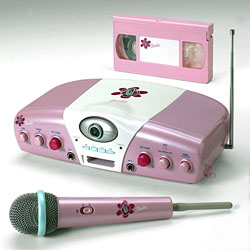
The Barbie Karaoke Cam looks ready for its close-up: a camera lens sits in the middle of a pink-and-white base, with knobs across the front and a matching microphone nearby. Toysit’s original image includes a pink videotape behind it, a reminder of the home-video setting in which this little performance studio appeared.
Sound and a picture in the same show
The original BE-826 instructions describe a base that sends pictures and sound to a television or VCR with audio/video inputs. A wireless microphone puts the performer’s voice into the scene. Microphone and master-volume controls shape the level, while echo and pitch controls change the voice’s sound. The guide also describes connecting an external CD player.
The earlier Toysit account places the recording job with a connected VCR. For an existing unit, an adult should check the model, its instructions, power supply and compatible equipment, with the base on a level surface and cords clear of the performers. A live family audience can be the whole occasion; recording is a separate choice to agree on together.
Try a one-line music-video postcard
This original Toysit activity starts with an imaginary destination. Draw a postcard background for a place such as Lantern Lake, the Button Museum or a town where every roof has a garden. Invent one short greeting that could be spoken, hummed or sung.
- Show the title. Hold up the place-name card while a partner gives a gentle three-count introduction.
- Deliver the postcard. Say or sing your original greeting: “Hello from Lantern Lake, where the boats glow at bedtime!” Add one comfortable gesture that belongs to the scene.
- Sign off. Wave, turn the card to a small drawing of a stamp and let the partner announce the next destination.
Rehearse the three moments as a miniature stage show. If an adult-prepared camera system is used, agree on who appears and whether the result will be saved or shared. A drawn screen works for pretend versions, and a seated storyteller can supply the whole postcard with a voice and a picture.
The historical record
Original Toysit coverage
The complete earlier product account and commentary are preserved below as historical coverage.
Barbie Karaoke Cam Music Video Maker
Record and star in your own music video with this Barbie Karaoke Cam. Sing along to your favorite tunes with the wireless microphone, and watch the live action on the TV while your VCR records it. Follow the lyrics in the karaoke songbook as you sing along with 6 major hits on the music cartridge, including Baby One More Time and Bye, Bye, Bye. Karaoke controls let you change and manipulate your voice, and the adjustable camera lens can create a special multi-image effect. Quick and easy to connect to your TV or VCR, you can even hook up your own CD player with the included cords. Includes wireless microphone, music cartridge and songbook, blank videotape, A/V cord, special effects lens and adjustable camera lens. Other karaoke cartridges sold separately. Imported.
The Evolution of Portable Karaoke Systems
Karaoke, a beloved pastime that originated in Japan, has undergone significant transformation, especially in its portability. From large, bulky machines to today's sleek, mobile designs, portable karaoke systems have evolved to accommodate the ever-changing demands of tech-savvy consumers and enthusiasts alike. Let's trace the journey of these systems over the years:
- Early Beginnings: The initial karaoke systems were anything but portable. Mostly found in specialized karaoke bars or booths, these setups consisted of large machines with limited song selections, connected to a monitor that displayed lyrics.
- LaserDiscs and CDs: As the LaserDisc and CD technologies emerged, the first semblance of portability in karaoke began. Users could buy dedicated karaoke machines for home use, which came with specific LaserDiscs or CDs loaded with tracks and corresponding lyrics.
- Graphics and Video: With the advancement in technology, karaoke discs began incorporating music videos or graphical backgrounds, enhancing the visual experience of karaoke.
- MP3 and Digital Era: The advent of MP3 players and the shift from physical to digital storage transformed the karaoke experience. Karaoke machines became more compact and could store more songs, eliminating the need for multiple discs.
- Connectivity Boost: Modern portable karaoke systems began featuring connectivity options like Bluetooth and USB. This allowed users to connect their devices and access a vast library of songs online, breaking the barriers of limited song selection.
- App Integration: With smartphones becoming ubiquitous, karaoke apps emerged. Portable karaoke systems integrated with these apps, allowing users to select songs, control pitch, and even record performances.
- Battery and Wireless Advancements: Improvements in battery technology enabled longer singing sessions without needing a power source. Moreover, wireless microphones provided more freedom and mobility.
- Advanced Audio Features: Modern systems come with features like voice effects, pitch control, sound equalization, and more, catering to both casual users and serious karaoke enthusiasts.
- Streaming and Cloud Integration: The latest iterations of portable karaoke systems offer cloud integration, allowing users to stream tracks directly, ensuring they always have access to the latest hits.
The journey of portable karaoke systems mirrors the broader trajectory of technological advancement. From space-consuming setups to pocket-sized gadgets, karaoke systems have continuously evolved, ensuring that the joy of singing along to one's favorite tunes can be experienced anytime, anywhere.
Sources and editorial notes
All three pages of the original KIDdesigns BE-826 user manual were read and visually reviewed through its FCC filing mirror. The text supports TV/VCR audio-video connections, microphone volume, echo, pitch and external music input, but contains no product photograph. The archive supplies the six-song cartridge inventory, songbook, lens accessory and VCR-recording account. Its later karaoke-history essay describes a broader category, not this model’s features. No physical testing was performed.
- Original Toysit image — Existing same-site image reviewed and retained unchanged.
- KIDdesigns BE-826 user manual (PDF mirror) — Three-page original manufacturer submission in the 2003 FCC equipment filing; text and all pages reviewed.
- Original Toysit coverage — Complete historical account retained, including its original claims and wording.

Images and descriptions are retained as historical material. How Toysit covers toys.
Created for Toysit by Tabbloza — the artwork in our header.