
From the Toysit archive
B.I.O. Bugs
Revisit the four B.I.O. Bugs characters, their sensors and simulated development, with the September 2003 coverage preserved and a cue-response activity.
The play at a glance
Creature-like behavior built from cues and states
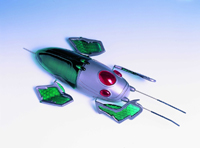
B.I.O. Bugs presents mechanical insects as creatures with personalities and developing skills. The preserved September 16, 2003 article is unusually substantial, including species descriptions and detailed play instructions.
The matching manufacturer guide helps explain the fiction: sensors, infrared signals and stored game states produce the responses. Simulated feeding changes the play state; it does not recharge the batteries.
Four characters, described by the maker
- Predator
- Presented as the more aggressive character.
- Stomper
- Distinguished by its clambering and hopping style.
- Destroyer
- Characterized by its protective body.
- Acceleraider
- Presented around speed.
These are manufacturer characterizations, not a Toysit performance ranking. The names invite stories; the mechanical distinctions invite closer observation.
Separate a cue from a state
The guide describes touch-sensitive antennae and infrared interaction, autonomous exploration and direct control. It also describes progression through stored skill levels, from a baby stage onward.
A cue is something that happens now. A state is part of the toy’s current condition in the game. The same cue can therefore be worth describing alongside the state, rather than assuming every response must always be identical.
This distinction is useful beyond the insect story: record what changed before deciding why a different action appeared.
Keep the creature story and the mechanism visible
“Hungry” makes sense within the story. Electrical power is a separate question. Likewise, a rising skill level belongs to a designed progression; it does not demonstrate biological growth or open-ended reasoning.
The guide specifies indoor, dry play and restrictions on surfaces, bright light and nearby hazards. An observation activity does not require provoking combat, bending antennae or improvising obstacles around a surviving toy.
Create a cue-response notebook
- Draw an imaginary insect with two possible states: exploring and resting.
- Choose two fictional cues, such as a sun symbol and a moon symbol.
- Write one response for each cue in each state.
- Ask a partner to reveal a cue while you follow your written rules.
- Record the starting state, cue, response and ending state. Change one rule and compare.
This independent paper model is not a reconstruction of B.I.O. Bugs software. It gives the player a way to make a creature seem responsive while keeping the rules explainable.
The historical record
Original Toysit coverage
The substantial September 16, 2003 text remains below, including its species descriptions and instructions. Its language of living organisms, evolution and feeding is part of the toy’s presentation, not biological fact or evidence of modern machine learning. Some species identifiers in the original differ from the manual, so the new comparison uses names rather than combining conflicting codes. Historical procedures remain an archive; consult the matching guide for an actual unit.
Bio-Bugs are Bio-mechanical Integrated Organisms, a new breed of artificial intelligence
Take command of the Bio-Bugs using the hand controller or just leave them to roam independently and discover their new environment. The longer a Bio-Bug stays alive, the more they learn from exploration and interaction. Let your Bio-Bugs roam free and be a part of a Revolution in Evolution. The various species of Bio-BUGS:
XP.01 Bio-Predator - As the most aggressive of all Bio-Bugs, it may even attack its own species.
XS.02 Bio-Stomper - The most flexible Bio-Bug clambers and hops over obstacles.
XT.03 Bio-Destroyer - This big Bio-Bug has a supreme defensive exterior.
XD.04 Bio-Acceleraider - This speedy Bio-Bug quickly scampers across surfaces.
Wowee.com - Wowwee.com - Hasbro
Bio-BUG OVERVIEW
Your Bio-Bug is a complex living organism that interacts with its
own environment. It reacts randomly, so see what the Bio-Bug will
do next!
First Stage of Life:
Your Bio-Bug first starts life as a baby, gradually maturing as it
learns new skills to survive. As a baby Bio-Bug, it acts in special
ways different from adult Bio-Bugs. So watch and be a part of the
changes your Bio-Bug experiences, as it advances through a maximum
life range of 12 Skill Levels.
Like a real insect, your Bio-Bug will go off on its own to explore
and discover the new surroundings. Look how the Bio-Bug climbs over
small obstacles or roams around in its unique meandering walk. While
as a baby or mature Bio-Bug, it travels by feeling objects in front
or behind with its touch sensitive antennas. If an obstacle is in the
way, watch how it gets out of the situation or make the Bio-Bug charge
forward by flicking its rear antenna continually.
By starting life at Skill Level 1, the primary need for the baby Bio-Bug
is to be fed ‘energy’. To feed, take the hand controller and
point it towards the Bio-Bug’s eyes. Press the FEEDING button
and a red light in the hand controller’s center will flash. The
Bio-Bug will search out this unique signal in a slight zig-zagging
walk. When it receives the feeding signal, it shivers and make an “ee-ee”
sound. Press the FEEDING button again to quit. After the baby Bio-Bug
receives its first ‘energy’ feeding, it will quickly mature
to Skill Level 2. See if you can notice any changes in your Bio-Bug!
Left on its own, the Bio-Bug will mature naturally to Skill Level
2, through interaction and teaching itself new skills after a short
period.
Life as an Adult Bio-Bug:
The Bio-Bug is now fully mature at skill level 2 and ready to take
on any situation or encounter. It walks at a normal or running pace,
makes mature ‘chit-chit’ sounds, blinks its eyes less frequently
and it makes a long ‘tweeting’ sound when it wants an energy
feeding. Also, its skill levels increase or decrease through manual
Training or B.I.O. Combat , a fight against another Bio-Bug (not through
feeding)! The higher a Bio-Bug’s skill level, the more strength
and combat endurance a Bio-Bug will have.
When two Bio-Bugs come into contact, they exchange information through
Infra-red signals and feeling each other’s antennas. Then they
react. Depending on their species type (same or different species) and
skill level, each Bio-Bug can respond in a friendly, scared or aggressive
way. Watch out when both Bio-Bugs start charging forward, engaging
in B.I.O. Combat!
If B.I.O. Combat begins, the outcome is unpredictable. Both Bio-Bugs
will try to stomp on the other’s head or just keep ramming forward.
One or even both Bio-Bugs can emerge as the winner or loser. You will
hear a victory cry from the winner, while the loser will rapidly retreat
with a squelling alarm sound. As a “last resort” defense strategy,
a defeated Bio-Bug will broadcast out a short range Panic Signal to
other Bio-Bugs of the same species to come and help!
Increase Your Bio-Bug’s Strength and Skills:
Give Bio-Bug a better fighting chance in B.I.O. Combat by manually
training your Bio-Bug to increase its strength and combat ability.
To train, point the hand controller towards the Bio-Bug’s eyes.
Press and hold the TRAINING button until you hear a loud fighting roar
and growl. Then take hold of the Bio-Bug and stimulate its front antennas
just enough to gain strength for one skill level. If you stimulate the
antennas too much, the Bio-Bug will be overworked and decrease by
two skill levels. At the end of every Training practice, your Bio-Bug
will make a victory cry or a squealing alarm sound.
You can easily check the Bio-Bug’s skill level by pressing and
holding the SKILL LEVELS button on the hand controller, its eyes will
blink once for every skill level.
Be aware that a Bio-Bug is vulnerable during Training and B.I.O. Combat,
when its skill level may decrease to below skill level 1. If the Bio-Bug
falls below skill level 1, it will have a full system shut down and
become inactive, a condition called B.I.O. Failure. Re-active by pressing
the RESET button on the underside of the Bio-Bug’s body and your
Bio-Bug will begin a new life!
Sources and editorial notes
The complete manufacturer-hosted B.I.O. Bugs guide, twelve PDF pages including spreads, was located and visually reviewed. It resolves the operating-guide gap in the renovation plan. Its diagrams and descriptions were compared with the original image and text. The source uses legacy numeric punctuation references, which have been preserved; no missing wording was reconstructed. No bug, sensor, development state or performance ranking was physically tested.
- Hasbro B.I.O. Bugs instruction guide — Complete manufacturer-hosted guide to species, sensors, play states and care.
Images and descriptions are retained as historical material. How Toysit covers toys.
Created for Toysit by Tabbloza — the artwork in our header.