
From the Toysit archive
InteracTV
Identify the pieces of Fisher-Price InteracTV: a programmed controller, matching activity card and disc, and a separate DVD player, with a prompt-to-button walkthrough.
The play at a glance
The card connects an on-screen choice to a button
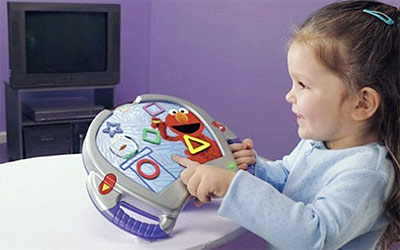
InteracTV uses a large controller with an illustrated card over its buttons. The matching DVD supplies the activity on a television; the child selects the picture or symbol on the card that corresponds to an answer on screen. Understanding that connection is more useful than treating the toy as a general-purpose computer.
Check the whole set
The B9376 setup list includes the controller, a DVD player and its remote, the setup disc, and three different cards: setup, code-entry and test. Regular play then uses an InteracTV disc and a corresponding activity card.
Lay out those categories separately when assessing an old set. A recognizable character card may belong to an activity but cannot stand in for every setup item. Record disc titles and card labels together so that a matching pair stays together in storage.
Establish the controller response first
The manual gives remote-learning, manufacturer-code and manual-search setup methods. Its test uses all nine letter buttons and both arrows. It also tells the player to aim the controller at the DVD player with no obstacle in between.
Use the instructions that match the controller revision and player. A player starting a disc does not establish that every toy button is mapped correctly. This review does not establish compatibility with a current player, computer, console or streaming service.
From the question to the card
During documented play, the activity asks a question and presents possible answers. The child finds the corresponding picture or symbol on the card and presses it. Separate three possible difficulties: hearing the prompt, deciding on an answer, and locating its control.
An adult can demonstrate the mapping once and then wait. If a child explains the answer but cannot find the button, more repetition of the question may not address the problem. The controller’s response should not be treated as a complete measure of understanding.
Make a paper choice panel
Draw three large pictures on paper and ask a question that points to one of them. Let the other person answer aloud, then point to its picture. On the next turn, rearrange the pictures and notice that the same answer can move to a different place.
This original activity explores the answer-to-control connection without requiring a working disc or television. Let the child create the next question.
The historical record
Original Toysit coverage
The original description and later essay about interactive video are retained below. The essay’s AI, personalization, analytics, VR and AR discussion does not document features of this InteracTV controller.
Fisher Price InteracTV DVD System allows children to interact with their favorite television shows and characters
A groundbreaking system that enhances the learning experience of kids' favorite programs by enabling them to interact with their favorite television shows and characters. The hardware includes a child-friendly remote, a bonus DVD, three activity cards, and a DVD case. The infared remote control is compatible with most DVD players. The activity cards overlay on the remote and contain nine potential touch points and act as the interactive mechanisms that allows the child to navigate through the footage and game play screens that are contained within each title. Additional software titles are sold separatley and include Dora the Explorer, Sesame Street, Spongebob, Barney, and Blues Clues.
The world of educational interactive video systems for children has evolved remarkably over the years, adapting to technological advancements and educational needs. Initially limited to simple games and instructional videos, these systems have matured into comprehensive learning platforms that offer a blend of education and entertainment. With the advent of Artificial Intelligence (AI) and machine learning, interactive video systems now have the capability to adapt to individual learning styles, offering personalized challenges and feedback. Companies are increasingly integrating subjects like math, science, language arts, and even social and emotional learning into their content. Virtual reality (VR) and augmented reality (AR) are the latest additions, offering immersive experiences that can make learning truly captivating. These systems are no longer just a supplement to traditional education; they are becoming integral tools that can offer detailed tracking and analytics on a child's learning journey, helping parents and educators fine-tune their approach. The future promises even more convergence of technology and pedagogy, making interactive video systems a cornerstone of modern childhood education.
Sources and editorial notes
The official B9376 manual’s setup, controller-test and play sections were inspected, including their diagrams. The archived photograph corresponds to that controller family with an activity overlay; the underside revision is not visible. This profile explains dependencies and the documented play sequence rather than providing a tested setup for a particular DVD player. No hardware or disc was operated.
- InteracTV B9376 user manual (PDF) — Setup materials, controller testing and activity-card play.
- Mattel InteracTV product record — Manufacturer archive with additional setup and code-list documents.
Images and descriptions are retained as historical material. How Toysit covers toys.
Created for Toysit by Tabbloza — the artwork in our header.