
From the Toysit archive
Kasey the Kinderbot
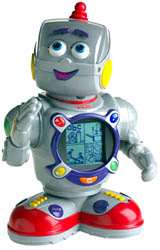
Explore Kasey’s screen menus, four selection buttons and animated character, with clear distinctions between built-in activities and cartridge expansion.
The play at a glance
Choose beside the screen, then watch the response
Kasey turns a menu of activities into an encounter with a robot character. The child chooses with buttons around the chest display while Kasey talks and moves. Understanding that relationship makes the toy easier to assess than a list of promised learning benefits.
Understand the controls first
The 77899 guide directs players to the four colored buttons beside the display, rather than the screen itself. Those buttons select activities and answers. The Home button steps back through menus. Separate rear dials control volume and display contrast.
The main menu leads to ABC Farm, Counting Kitchen, Playground and Game Room. Their activities include letter choices, number and shape tasks, music, movement and matching. The menu is a practical starting point: choose one area and learn how to return before exploring more.
Built-in play and the backpack
The guide identifies a rear cartridge location for additional content sold separately. Its built-in menus are described independently of those expansions. If comparing old sets, record the exact cartridge titles that accompany each robot; do not count an empty slot as included content.
For model 77899, the guide specifies three D alkaline batteries across two compartments. It also explains that lifting or tilting the robot pauses movement. Use the model label and the corresponding guide to distinguish expected behavior from a fault.
Let the child choose the next question
Try this separate conversation game with a sheet of paper divided into four boxes: a letter, a number, a shape and a musical note. Let one person point to a box and ask the other to invent a related question. For a shape, that might be “Can you draw something round?” For music, it could be “Can we clap the same pattern?”
Switch roles after a few turns. Allow an answer in words, a drawing or a gesture. This borrows the idea of choosing an activity without pretending to reproduce Kasey’s software.
Count skills and activities separately
Mattel’s product record describes more than 40 developmental skills. The original Toysit copy says more than 40 activities. Those are different claims, so this profile does not turn either into an exact count of games. A further claim that a robot personalizes teaching needs evidence about how its responses change; an animated face and encouraging speech alone do not demonstrate that capability.
The historical record
Original Toysit coverage
The two original paragraphs are retained, including their descriptions of movement, activities and personalized learning. These historical claims are kept distinct from the documented controls and menus described above.
Learning Robot from Fisher Price
An interactive electronic learning robot that helps prepare preschoolers for school by teaching cognitive, social and physical skills. Kasey features more than 40 activities including pre-reading, math, music, and manners. Kasey also encourages physical play like dancing and stretching. This robotic friend truly comes to life through animated motion (his antenna, eyes, hear, arms, and waist all move), flashing mouth, and interactive display screen. Additional ROM packs are available to increase the learning and fun.
An interactive electronic learning robot offers a captivating blend of education and entertainment, captivating learners with its innovative features and engaging interactions. With its interactive nature, these robots encourage active participation, stimulating children's curiosity and fostering a love for learning. Through a variety of activities, quizzes, games, and interactive lessons, these robots provide a personalized learning experience tailored to each child's pace and preferences. The combination of technology and educational content promotes essential skills like problem-solving, critical thinking, and creativity, all while keeping kids thoroughly engaged. The robot's dynamic responses and real-time feedback provide a sense of accomplishment, boosting confidence and motivation to explore further. As a result, these interactive learning companions offer a valuable tool for both formal and informal learning, turning education into an exciting adventure filled with discovery and growth.
Sources and editorial notes
Mattel’s 77899 record and its ten-page parent guide were reviewed. The body and control layout match the historical photograph, although a photograph cannot establish the unit’s underside model number. The guide documents operation; manufacturer educational claims are not independent evidence of results. The conversation activity is a Toysit suggestion, and no physical testing was performed.
- Mattel Kasey the Kinderbot 77899 record — Manufacturer record: released in 2003, discontinued in 2005, with an age grade of 3–7.
- Kasey parent guide (PDF) — Illustrated buttons, menus, cartridge location and setup for model 77899.
Images and descriptions are retained as historical material. How Toysit covers toys.
Created for Toysit by Tabbloza — the artwork in our header.