
From the Toysit archive
LeapPad Plus Writing
Revisit the paper-book LeapPad Plus Writing: its dual-function pencil, matching books and cartridges, and the difference between pointing to a word and writing one.
The play at a glance
A book you could listen to and write in
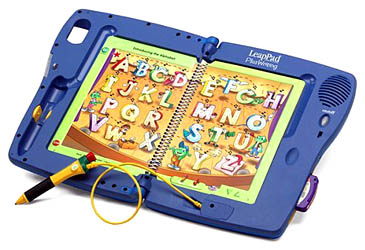
The LeapPad Plus Writing in this photograph belongs to the earlier paper-book family. Its distinctive tool combined an electronic pointer with a pencil. The interesting change was physical: an activity could ask a child to make a mark on a suitable page, as well as point to something already printed there.
Pointing and writing are different actions
LeapFrog’s 2003 filing describes a stylus/pencil that switches between writing and non-writing modes, with specially designed books for writing activities. That is the useful meaning of Plus Writing: it added a way to put a response on the page.
When looking at an activity, separate three questions: what does the child hear, what are they asked to notice, and what do they put on paper? Following a spoken instruction, choosing a printed answer and forming a letter involve different actions. A short shared example can make the task clearer than repeating the prompt.
Keep the book, cartridge and tool together
- The book: identify its title and whether it is a writing activity book.
- The cartridge: compare its title and platform markings with the book.
- The pencil: identify the supplied tool and check the instructions for that edition before changing parts or materials.
The old claim about working with the entire LeapPad library belongs to its period. It is not a promise about later LeapPad tablet apps, every language edition or every similarly named accessory. Keep book-specific instructions with the set; avoid treating an ordinary pencil or a different stylus as an established replacement.
What an old set can tell you today
Begin with the materials already present. Record which book and cartridge go together, which pages are intact, and which responses an existing working unit produces. This makes a useful inventory without assuming that missing content can still be downloaded.
LeapFrog’s current legacy notice says parts and support are no longer available for the original LeapPad and Quantum Pad book-and-cartridge systems. An old product description therefore needs to be read alongside the condition and completeness of the particular set.
Trace, change and tell
On a separate sheet of paper, draw a large circle together. Trace it once, then make a second circle and change it into a face, wheel or planet. Ask what was copied and what was added. Let the child suggest a new starting shape for the adult.
This is an independent Toysit activity, not a LeapPad instruction. It explores copying and making choices without marking a collectible book or needing an electronic response.
The historical record
Original Toysit coverage
The original product description and later discussion of educational benefits are preserved below. Claims about development, adaptability and learning effectiveness are historical commentary, not results of a new evaluation.
Writing Learning System
LeapPad Plus Writing Learning System teaches fundamental reading skills, plus writing and math. By using the dual-function, interactive Magic Pencil to switch from writing mode to non-writing mode, children can sound out letters and words, read stories AND write. Includes 2 books. The Interactive Book teaches reading, phonics, vocabulary, science, foreign languages and geography. The Interactive Writing Book teaches writing letters and numbers, phonics, writing words, addition and subtraction and drawing shapes. The LeapPad Plus Writing Learning System works with the entire LeapPad Library.
The LeapPad Plus Writing Learning System offers a multifaceted educational experience that combines technology and interactivity to boost early childhood development. Its electronic pen feature engages children in a tactile way, enhancing fine motor skills while making the learning process more interactive. The system is designed to teach crucial foundational skills such as letter and number recognition, phonics, and even basic math like addition and subtraction. The drawing shapes module adds a layer of creative expression and helps in understanding geometry at a basic level. All these elements are seamlessly integrated to make learning feel like play, thereby retaining a child's interest for longer periods. Moreover, the LeapPad Plus Writing System is often designed with adaptability in mind, allowing for customized learning experiences that can grow with the child. It's a comprehensive educational tool that offers both breadth and depth in early learning objectives.
Sources and editorial notes
LeapFrog’s 2003 annual filing documents the dual-function pencil and purpose-made writing books; its product section was reviewed through indexed text because direct retrieval returned HTTP 403. This is period manufacturer evidence, not an operating manual. An exact Plus Writing hardware guide was not secured, so pencil servicing, replacement materials and detailed setup instructions are not supplied. The current official support notice concerns the original book-and-cartridge LeapPad family. No physical unit was tested.
- LeapFrog 2003 annual filing — Period description of Plus Writing; direct access was restricted during review.
- LeapFrog original-system support notice — Manufacturer notice about parts and support for the original LeapPad and Quantum Pad systems.
Images and descriptions are retained as historical material. How Toysit covers toys.
Created for Toysit by Tabbloza — the artwork in our header.