
From the Toysit archive
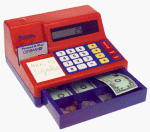
Learning Resources Calculator Cash Register
Set up a pretend checkout, enter simple totals and take turns as shopper and cashier with this working calculator toy.
The play at a glance
Turn a few play items into a small shop
The calculator gives a pretend sale a visible total, while the drawer and play money give the cashier something to sort, count and hand back. Begin with just a few items and prices that are easy to keep track of.
The archived red-and-purple register matches the layout illustrated in Learning Resources’ LER 2629 activity guide. That guide documents a solar-powered calculator and a separate battery-powered beep; the exact accessory revision in Toysit’s photograph remains uncertain.
Make the first sale easy to follow
Put a play apple and another pretend item on the counter. Give them simple whole-number prices, such as 2 and 3. Enter 2 + 3 = 5, then count out five pretend one-unit bills or five matching counters. Keep this first game in one unit rather than mixing dollars and cents.
Swap shopper and cashier after the sale. A handwritten receipt with the two prices and total gives both players something to check. The manufacturer’s activity guide also suggests simple shop prices and taking turns.
Count pieces, then compare their values
Sorting the drawer by denomination is a different activity from counting how many pieces are in it. Two pretend bills can have different values even though there are two pieces in each pile. Start with matching denominations, then introduce a second value when it helps the game.
For a change-making turn, a pretend purchase costing 3 can be paid for with a 5-unit bill and two 1-unit bills returned. Check that the labels on your play money actually match the units being used. Regional editions and mixed secondhand collections may contain different currencies.
The calculator and the beep use different power sources
The LER 2629 guide describes a solar-powered calculator; a separate button cell supplies its beep. A silent register therefore does not by itself establish that the calculator is broken.
For an older unit, compare its markings and battery compartment with the matching instructions before choosing a replacement. Battery access belongs to an adult, and the cover and retaining screw must be secure before play. Keep loose button cells away from children.
Use the card as a story prop
The original description names both VISA and Citibank, while the guide pictures a Citibank pretend card. The exact branding is not needed for the checkout game. A toy card can simply stand for paying, followed by handing over a receipt.
Keep the activity grounded in what the players are doing: reading a number, checking a total or taking a turn. Playing shop offers opportunities to practise those actions without demonstrating that a child has mastered real-world money management.
The historical record
Original Toysit coverage
Both original paragraphs remain below, including their quantities, award claims and references to VISA and Citibank pretend cards. Those details should not be treated as a verified checklist for every edition. The broader financial-literacy claims are part of the old account, not measured outcomes from this renovation.
Built-in solar calculator as keypad
Well-designed with lots of terrific detail, Learning Resources' Calculator Cash Register completely satisfies a young child's hunger to play with bills, coins, cash drawers, and big numbers. The chiming cash register features a built-in solar calculator as its keypad, thus allowing kids to act as bankers, shopkeepers, and accountants all at once. A large cash drawer holds life-sized bills in four denominations (1, 5, 10, and 20), and four coin holders make room for embossed plastic pennies, nickels, dimes, and quarters. There is even a credit card slot that dings when you correctly slide the faux VISA card through it. A suggested-activities booklet is included. Requires a 1.5V button cell battery (included) to make the chiming noise. No assembly required. Winner of awards from Dr. Toy, FamilyFun Magazine, and Oppenheim Toy Portfolio. Winner of 15 awards for excellence, this working cash register is the perfect addition to any pretend store. Complete with solar powered calculator, 30 life-size play money bills, 40 plastic coins and pretend Citibank credit card.
A learning cash register toy offers a dynamic and practical way for children to develop essential skills in understanding currency and making change. Through interactive play, children engage with the toy's features that mimic real-world transactions, allowing them to practice counting money, identifying various denominations, and calculating change. The toy often includes play money and coins that resemble actual currency, enabling hands-on learning. As children ring up items and process transactions, they reinforce their mathematical abilities and gain a tangible grasp of addition, subtraction, and basic arithmetic. Many learning cash register toys also incorporate digital displays and audio cues to guide children through each step, enhancing their confidence and accuracy. This immersive play experience not only cultivates financial literacy but also encourages important life skills like problem-solving, decision-making, and social interaction as children take on the roles of both cashier and customer.
Sources and editorial notes
The retained image and Learning Resources’ LER 2629 activity guide, document LRM2629-MTG hosted by EAI Education, were compared on October 15, 2026. The guide’s photograph supports the model-family match and shows a Citibank-branded pretend card. It does not resolve the precise card, currency package or production revision originally supplied with Toysit’s pictured unit. No register or learning outcome was physically tested.
- Learning Resources: LER 2629 activity guide (PDF) — Manufacturer-authored guide hosted by EAI Education; calculator features, play activities and separate sound battery.
Images and descriptions are retained as historical material. How Toysit covers toys.
Created for Toysit by Tabbloza — the artwork in our header.