
From the Toysit archive
Lights Out 2000
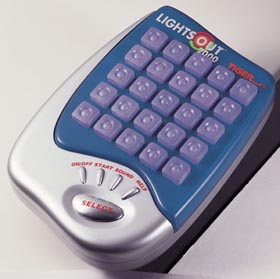
Observe one press, compare classic and three-state puzzles, and record what changes on the Lights Out 2000 grid.
The play at a glance
Look at the whole change, not just the button you press
Lights Out 2000 asks you to change a pattern of lights. A press affects a small cross of positions, so switching off one light can also change its neighbors.
The important first choice is the game type. Classic puzzles use on and off; the three-color puzzles add a green state. Learn that distinction before borrowing a familiar Lights Out shortcut.
Name the mode before the move
The guide distinguishes 3-Color Puzzles, Action, 2-Player and Classic Puzzles. Use its selection diagrams to identify the game you have chosen. For an observation session, choose a puzzle game rather than the timed Action challenge.
Before pressing anything, sketch the grid on paper. Record each position as off, red or green as applicable. Words or initials make the record usable without relying on colored ink.
Follow the cross-shaped effect
A puzzle press changes the selected position and its immediate neighbors above, below, left and right where they exist. Diagonal positions are outside that cross. A corner therefore affects fewer positions than the center.
Choose one button, predict which positions will change, then make one press and compare. Keep the rest of the grid in view: a move that improves one part can complicate another. Describe the actual change before making another prediction.
A small example of the color cycle
In the three-color puzzle, an affected light cycles off → red → green → off. Classic instead alternates on and off. Here is a paper example, starting with an off center and four off neighbors; all other positions stay unchanged:
- Before a press
- Center, above, below, left and right: all off.
- After one center press in 3-Color
- Those five positions are red.
- After a second center press
- Those five positions are green.
- After a third center press
- Those five positions are off again.
This illustrates a cycle, not a puzzle to solve. It explains why the classic trick of pressing the same button twice to undo its effect does not carry over to three-color play.
Keep a useful record of an attempt
Write the mode at the top of your sketch and give each move a row and column. When you lose track, that record lets you discuss what happened without pretending you remember every press. For a shared practice, let one person predict and the other record, then swap.
The separate two-player game has its own objective and legal moves; it is not simply two people solving the same puzzle. Use the complete guide for it. You can also share a solo puzzle as an agreed house activity, taking time to explain each suggestion.
Finish by noting one relationship you observed. A clear account of one move can be worthwhile even when the whole puzzle remains unsolved.
The historical record
Original Toysit coverage
The original product description and general puzzle essay remain below. Its binary on/off explanation describes only part of this edition’s play. The archived age-eight statement differs from the reviewed 68376 guide, whose cover says nine and up; follow the label and instructions belonging to your actual unit.
The frenzy's on
Here's a new twist on the classic game Lights Out. This brain-teaser includes a new 2-player battle mode, multi-colored lights, and digitized sound effects. If you liked the original Lights Out, you'll love Lights Out 2000. Ages 8 and up.
Lights Out is a captivating brain teaser game that challenges players' problem-solving skills and strategic thinking. The game revolves around a grid of lights, with the objective of turning off all the lights to solve the puzzle. The catch is that each time a player toggles a light, it affects the adjacent lights, either turning them on or off. The intricate interplay of these lights creates a puzzle that requires careful analysis and a keen understanding of patterns. Players must experiment with different combinations of light toggles to find the correct sequence that extinguishes all the lights. Lights Out not only exercises logical reasoning but also encourages patience and persistence as players work to unravel the puzzle's complexity. Its simple yet deceptively challenging mechanics make it a timeless and addictive brain-teasing experience enjoyed by puzzle enthusiasts of all ages.
Sources and editorial notes
Reviewed October 16, 2026 using the original image, ASIN B00004TCCM and Tiger’s Lights Out 2000 instructions hosted by Hasbro, item 68376. All twelve PDF pages were visually reviewed; grid and control diagrams correspond to the photograph. The paper example is an editorial illustration of the documented state cycle, not a numbered built-in puzzle or a tested physical demonstration. Historic online score posting and warranty offers are not presented as current services.
- Tiger/Hasbro: Lights Out 2000 instructions (PDF) — Game selection, cross-shaped effects, three-color and classic puzzles, Action and two-player rules.
Images and descriptions are retained as historical material. How Toysit covers toys.
Created for Toysit by Tabbloza — the artwork in our header.