
From the Toysit archive
Magical Moves Keyboard
Explore a colorful Sesame Street keyboard with light-up keys and character sound areas, then make a three-panel weather sound postcard.
The play at a glance
A Sesame Street desk for little sound scenes
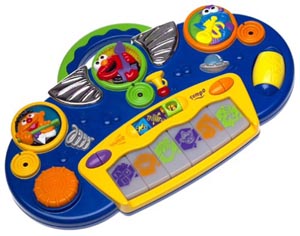
Ernie, Elmo and Cookie Monster sit above a row of colored keys on this rounded blue-and-yellow keyboard. Large circular controls and a yellow drum roller make its surface look like a small sound desk, ready for a player to choose the next musical moment.
The Magical Moves Keyboard’s manufacturer sheet describes light-up keys that start familiar tunes and three character sensor areas that add musical riffs, sound effects or a change of style. A wave of the hand becomes part of the performance.
Choose a sound, then change its character
The guide’s three modes offer musical riffs and phrases, silly effects, or different styles of music. In the instrument mode, Ernie supplies flute sounds, Elmo guitar and Cookie Monster trumpet. The style choices are classical, rock and roll, and jazz.
Keys begin the supplied songs; waving over the matching sensor areas changes what happens around them. Separate controls adjust tempo and volume, while the drum roller and effect dial add other sounds. Follow the illustrated sheet when choosing a mode, and begin at a comfortable volume.
Try a weather sound postcard
This original Toysit activity turns three drawings into a short sound sequence. Fold a sheet into three broad panels or draw two dividing lines.
- Draw sunshine in the first panel, a little rain in the second and a clearing sky in the third.
- Choose a short sound for each picture. It might come from the keyboard, a hummed phrase or a spoken word.
- Ask a partner to point to the panels in order. Play or voice each part, leaving a small pause between pictures.
- Give the postcard a place name, such as “Cloud Garden” or “Sunshine Street.”
- Change one panel and decide how its sound should change. A rainbow might need a new ending; a second cloud might invite a repeat.
The weather sounds are choices made by the players. A fully vocal version can use a gentle hum for sunshine, little “tip-tap” sounds for rain and a rising phrase for the clearing sky.
Let a listener direct the story
Give the pointer to someone else and let them linger over a favorite picture or return to the beginning. The performer can respond with another short phrase. A slow tour through the three panels can be just as satisfying as a quick one.
After the scene, ask which drawing everyone would like to keep for the next postcard. Add a new setting around it and give that place its own sound.
The historical record
Original Toysit coverage
The original product account and commentary are preserved below as historical coverage.
Make music using infraraed technology with Sesame Street Magic Moves Keyboard
Magical Moves Keyboard lets children make music with innovative infra-red technology. Children can play familiar preprogrammed songs, explore 3 different instruments, change tempo, and hear different styles of music and sound effects. Features include 6 favorite children's tunes, tempo and volume control buttons, scratch pad with different sounds, spinner ball for drum roll effects, lights, and 3 modes of play for hours of fun.
The evolution of musical keyboards for children reflects not only advancements in technology but also a deeper understanding of child development and educational methods. Gone are the days of basic, monophonic keyboards with limited capabilities. Today's children's keyboards are feature-rich, offering a wide range of sounds, rhythms, and interactive lessons that can grow with a child's musical abilities. Early versions primarily focused on mimicking the look and feel of adult keyboards but in a simplified manner. However, modern iterations often include educational software, light-up keys for guided learning, and even connectivity options for smartphones and tablets. This allows kids to engage with music on multiple levels—whether they are mimicking songs, composing their own tunes, or diving into the world of music theory. Some advanced models also offer recording capabilities, encouraging children to critique and improve their performances. The portability and affordability of these keyboards have made them more accessible, ensuring that children from various backgrounds can explore the joys of music-making. In short, the evolution of children's musical keyboards represents a harmonious blend of entertainment and education, offering a versatile platform for creative and cognitive growth.
Sources and editorial notes
The original text and photograph are preserved. The one-page Fisher-Price sheet for item 93521 was rendered and visually read; it is an image-only PDF, and its diagram matches the console. It identifies Cookie Monster at upper right. The later historical essay’s recording, app and smartphone examples describe keyboards generally and are not specifications for this toy. The weather activity is original editorial work, not a tested learning exercise.
- Original Toysit image — Existing same-site photograph reviewed and retained unchanged.
- Fisher-Price: Magical Moves Keyboard instruction sheet — Item 93521; complete one-page image-only sheet and control diagram visually reviewed.
- Original Toysit coverage — Complete original product account and historical commentary preserved.

Images and descriptions are retained as historical material. How Toysit covers toys.
Created for Toysit by Tabbloza — the artwork in our header.