
From the Toysit archive
Mozart Magic Cube
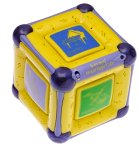
Listen to one musical part, add another and compare the arrangement with the older Munchkin cube pictured in Toysit’s archive.
The play at a glance
Hear what one added part changes
The Mozart Magic Cube makes changing an ensemble as simple as choosing an instrument panel. The musical material is already in the toy; the player decides which parts are heard together.
The archived yellow-and-purple cube belongs to the older design illustrated in Munchkin’s 2009 instruction sheet. Its add-and-remove controls make a good listening activity: keep one musical piece going while changing one part.
Listen to one part, then two
Choose an instrument panel and listen for a short phrase. Add a second part, then take it away again. Ask a simple question: what became easier to hear when there was less going on?
One player can choose the change while another listens. Swap roles, and allow different answers: someone might notice a repeated sound while someone else follows a higher or lower line.
Use the instrument buttons for the comparison
In Munchkin’s older instruction sheet, an active instrument panel flashes; pressing that panel during playback removes its part. An unselected instrument can be added during the piece. The orchestra button also advances to another of the eight pieces when music is already playing.
For a comparison within one piece, keep to the instrument buttons. Changing the piece at the same time introduces another difference and can make the original change harder to hear.
Arrangement is a useful creative choice
The original headline promises millions of masterpieces. A more concrete description is choosing combinations of prepared musical parts. That can be creative listening without claiming that the toy records a newly played melody or lets the user edit individual notes.
Try naming two arrangements: a sparse one with fewer parts and a fuller one with more. Draw a little symbol for each choice on paper, then see whether another player can recreate the contrast. The paper is your record; the archived documentation does not establish a save-your-own-song function.
Keep the cube’s revision in mind
The pictured cube has flatter faces and rounded purple corner pieces. Later products can have different housings or controls, so compare the actual unit with its own instructions before changing batteries or troubleshooting it.
Finish with the power switch rather than assuming quiet music means the toy is fully off. Start the next session with a familiar piece and a new listening question, not a requirement to recognize every instrument.
The historical record
Original Toysit coverage
Both earlier paragraphs are preserved below, including the eight-composition description, developmental marketing and later discussion of sampling software. The cube’s preset arrangements do not establish audio recording, sample importing or the editing functions of a music workstation. The broad all-ages safety language is not a current assessment of an individual toy.
Create millions of Mozart musical masterpieces.
Create millions of Mozart musical masterpieces. Start with the flute and add in the piano. Drop the piano and bring in the violin. It's that simple! Add or subtract instruments while the music plays without missing a single beat. With a push of a button, your child can compose an endless number of musical arrangements. The cube features six colorful buttons that light when selected. One orchestra and five individual instrument buttons allow your child to add or subtract instruments while the music plays. Includes 8 Mozart compositions by a Grammy award-winning arranger. Developmentally appropriate compositions selected by a leading neurobiologist. Instrument buttons flash in time with the music when activated - teaching sound recognition and rhythm concepts. High quality speaker for superior sound. Soft rubber corners for safe play for all ages. Teaching tips included to help children understand four major classes of instruments (woodwinds, strings, percussion, brass), rhythm, and five different musical instruments.
The evolution of electronic means for playing and combining musical samples has been a transformative force in the music industry, opening doors for artists and enthusiasts alike to explore sound in new and inventive ways. Beginning with early sampling keyboards and drum machines in the late 1970s and 1980s, this technology provided a way to integrate pre-recorded sounds into new compositions. As computers became more powerful, software like digital audio workstations (DAWs) emerged, enabling more intricate manipulation and layering of sound samples. The rise of the internet facilitated easier access to a plethora of sounds and loops, allowing for a democratization of music production. Fast forward to today, and we see gadgets like pad controllers, sample manipulation software, and mobile apps that offer unprecedented control and flexibility, even enabling real-time sampling and manipulation during live performances. These advancements have not only influenced genres like hip-hop, electronic, and pop music but have also expanded the creative possibilities for musical expression across a broad spectrum, from amateur creators to professional artists.
Sources and editorial notes
The photograph and Munchkin instruction sheet CCD-0072-000 Rev1, copyright 2009, were compared on October 15, 2026. The sheet is reproduced by ManualShelf and depicts the older cube design; its date does not establish the Toysit article’s publication date or the exact production revision pictured. No cube, sound quality or developmental benefit was physically tested.
- Munchkin: Mozart Magic Cube instructions, CCD-0072-000 Rev1 — Manufacturer-authored 2009 sheet reproduced by ManualShelf, covering instrument toggles and changing pieces.
Images and descriptions are retained as historical material. How Toysit covers toys.
Created for Toysit by Tabbloza — the artwork in our header.