
From the Toysit archive
Quantum Pad Learning System
Understand Quantum Pad’s paper books, audio cartridges and attached pen, with a component checklist and context for its old write-on and downloadable-content claims.
The play at a glance
The page is paper; the response is audio
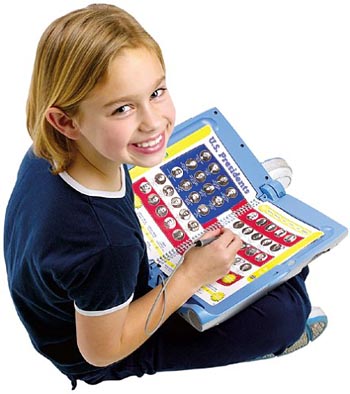
Quantum Pad put a printed book on an electronic base. The archived photograph shows that physical arrangement clearly: pages to turn, pictures and words to point at, and an attached pen. Understanding the book and its matching content is more useful than treating this as an early version of a modern tablet.
Three parts of one activity
LeapFrog’s period report describes content supplied as an audio cartridge with a corresponding printed book or activity material. For a found set, check the platform label, book title and cartridge title together. A pile of books is not necessarily a complete playable library.
Ask what is happening on one page: is the child locating something, listening to an explanation or choosing a response? You can discuss the picture and the question even when the hardware is unavailable. The printed material still gives you something concrete to explore together.
A separate write-on feature
The company’s 2002 description specifies writing on erasable transparent plastic pages. That is different from the dual-function pencil described for LeapPad Plus Writing. It also does not establish that every Quantum Pad book should be written on.
Check the instructions supplied with the particular book and writing surface before adding a marker or trying to clean old marks. If those instructions are missing, move the activity to ordinary paper instead of guessing which material belongs on an original page.
Check what exists, not what was once advertised
- Keep each matching book and cartridge together, including any accompanying guide.
- Notice missing pages, loose components and mismatched titles before judging the activity.
- Separate content already present from references to former websites or download services.
LeapFrog now says parts and support are no longer available for the original LeapPad and Quantum Pad systems. This review did not establish a current download route. The older claims about library compatibility and additional content remain historical claims, not a recovery service or a promise that any used set can be completed.
Make a page with two questions
Draw a small imaginary park with a tree, pond and path. Take turns asking one question answered by pointing, such as finding the pond, and one answered by explaining, such as choosing where to sit and why. Add a new detail after each turn.
This original paper activity contrasts finding an answer with explaining a choice. Either person can change the drawing; it needs no cartridge or score.
The historical record
Original Toysit coverage
The original product description and learning-system essay are retained in full. Their claims about animations, learning styles and adaptive learning should not be read as newly verified features or outcomes.
Games and activities to help teach kids school subjects like math and spelling
Quantum Pad is the first educational system designed to make learning fundamental grade school subjects fun and easy. The system is compatible with the Quantum Pad library of books, which is designed to encourage children to learn fundamental grade school skills, explore new topics and master skills related to reading. Each book is packed with interactive audio, games, quizzes and activitites. Includes a 32-page interactive book. Similar to its LeapPad sibling, this electronic book comes with a permanently attached interactive 'magic pen' that works like a handheld computer mouse pointer. Kids place a paper book and its compatible cartridge into the Quantum Pad, then use the pen to hear word pronunciations and definitions, answer quiz questions, play games, and more. Geared specifically for students, the Quantum Pad comes with one book (others are sold separately) that has a sampling of every subject: math, geography, science, history, and language arts. Also included is a parent guide that explains how to set up the book properly and download additional content. This 15-by-12-inch learning aid shuts like a laptop for better portability, has volume control, and even offers a headphone jack for quiet play. All LeapPad books are compatible with the Quantum Pad system.
The Quantum Pad Learning System presents a unique blend of traditional and modern learning tools, combining paper books, cartridges, and an interactive pen to create a comprehensive educational experience. This multimodal approach appeals to different learning styles—visual, auditory, and kinesthetic—making it more likely for the child to retain information. The paper books provide the tactile experience of flipping through pages, while the interactive pen adds a layer of engagement that brings the material to life with sounds, animations, or additional facts. Cartridges can be swapped to cover a variety of subjects, ensuring the system stays relevant as the child's educational needs evolve. Overall, the Quantum Pad creates an interactive and adaptive learning environment that is both fun and effective.
Sources and editorial notes
LeapFrog’s 2002 annual report documents the book-and-audio-cartridge family and Quantum Pad’s write-on feature; the relevant product pages were inspected visually. It is not an operating guide. The planning lead called Quantum parent guide v4 proved to concern the separate 3rd Grade Science book and was not used as a hardware manual. An exact hardware guide and current downloadable-content route were not established. No unit, pen, cartridge or writing material was tested.
- LeapFrog 2002 annual report (PDF) — Period product descriptions, including Quantum Pad and its transparent write-on pages.
- LeapFrog original-system support notice — Current manufacturer notice that parts and support are unavailable for the original book-and-cartridge systems.
Images and descriptions are retained as historical material. How Toysit covers toys.
Created for Toysit by Tabbloza — the artwork in our header.