
From the Toysit archive
Rescue Heroes URV
Explore Rescue Heroes URV through its tethered controls, manual rescue tools and Voice Tech figure responses, then match a tool to a story problem.
The play at a glance
One rescue vehicle, several kinds of control
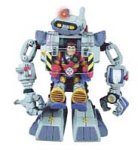
The Ultimate Rescue Vehicle combines a robot-shaped body with driving controls and rescue tools. Its tethered controller handles movement and the powered right arm; other features are operated by hand. That mix is more useful to understand than treating every action as automatic.
Its Voice Tech feature adds programmed exchanges with compatible figures. A response that uses a character’s name is a recorded toy interaction, not open-ended conversation or present-day conversational AI.
Ask what moves each feature
The controller’s arrows direct travel, and its joystick moves the powered right arm. A hand lever operates the gripping hand. Other body features have their own controls and resets. The winch supplement specifies moving a lever back and forth to rewind.
These distinctions give a reader a useful way to inspect the design: identify the player’s action, then the part that responds. They also explain why a motorized vehicle can still have several manually operated tools.
Separate riding from talking
The manual distinguishes a figure riding in the vehicle from a Voice Tech figure participating in its voice feature. Compatibility with older Rescue Heroes figures does not establish voice compatibility, nor does it establish compatibility with every later figure bearing the brand.
For storytelling, a player can supply the dialogue. The crew might ask what needs lifting, describe a clear route or report that a job is complete. The story does not depend on a functioning voice unit.
Choose a purpose before a tool
Start with something that needs to change: an imaginary gate is closed, a package is out of reach or a vehicle cannot move. Then choose a tool because it fits that problem. A second player can suggest another solution and explain why it might work.
Keep these as pretend situations. The toy’s rescue theme supplies characters and equipment, while the players supply the reasons for using them.
Choose a rescue tool
- Draw an obstacle in the middle of a page.
- Write what the rescue team needs to accomplish.
- Sketch two possible tools beside the obstacle.
- Choose one and explain the helpful action it would perform.
- Draw the result and invent a short crew report.
This independent paper activity needs no URV or electronic figure. Its invented tools and outcomes are story choices, not claims about the toy’s lifting capacity.
The historical record
Original Toysit coverage
The complete original URV description is preserved below. Its automatic-winch wording and Power Force terminology should be read alongside the manufacturer’s manual and winch supplement. General claims about imagination and social learning remain historical commentary.
Rescue Heros Ultimate Rescue Vehicle.
The Ultimate Rescue Vehicle with a tethered remote control that allows the robot to walk, move and extend his right arm. His other arm is pose-able and has a winch that retracts automatically. He will work with all figures, recognize Power Force tools and which figures are in cockpit. Has extendable torso and neck for tough to reach rescues. Will have lights, sounds and speech. This is one of those toys that you wish you had as a kid. Working on four C batteries (not included), the Rescue Heroes Ultimate Rescue Vehicle can do just about anything young imaginations dream up. Attached to its back with a coil cord is a remote control that allows kids to move it forward, backward, left, or right. The control also has two green buttons that create sound effects, and a red knob that maneuvers the robot's right arm, which has a clawlike hand for picking up or removing obstacles. Features on the robot itself include a winch attached at the left hand, which can be deployed by the push of a button and wound back up with the blue crank handle; a button that raises the torso of the robot to maximum body extension for those out-of-reach rescues; a button that pops the robot's head up and turns on a bright spotlight; and a flip-down platform in the back that can carry a Rescue Hero to the scene. Added cool factor: when you place a Voice Tech Rescue Hero (sold separately) in the robot's cockpit, the URV will recognize them and call them by name.
Action figure play vehicles focused on rescue operations offer a dynamic and imaginative play experience that is both fun and educational. Whether it's fire trucks with extending ladders, ambulances with working sirens, or coast guard boats with life-saving equipment, these play vehicles encourage children to become heroes in their own adventures. They can stage complex rescue missions, navigating their way through imaginary cities or treacherous waters to save the day. The interactive elements—like opening doors, spinning wheels, and liftable stretchers—add an extra layer of realism that engages young minds. Through this kind of play, kids not only exercise their creativity but also gain a deeper understanding and appreciation of the vital roles that rescue workers play in real life. Overall, these action figure play vehicles combine the excitement of fast-paced action with values of compassion and community service.
Sources and editorial notes
Fisher-Price’s 78362 instructions and winch supplement were downloaded and visually reviewed. The guide distinguishes the tethered controller, powered arm, manual features and Voice Tech figure interactions. It names the accessory system PowerMax. The supplement describes a manually worked rewind lever rather than automatic retrieval. No drive, voice feature, tool or surviving figure was tested. The rescue-tool exercise is an independent story prompt.
- Fisher-Price URV 78362 instructions — Controls, figure interactions and PowerMax accessories.
- Fisher-Price URV winch supplement — Replacement winch instructions, including manual rewind.
Images and descriptions are retained as historical material. How Toysit covers toys.
Created for Toysit by Tabbloza — the artwork in our header.