
From the Toysit archive
VTech Little Smart PC Fun Plus
Meet VTech’s Little Smart PC Fun Plus, with its shape buttons, directional mouse and eight activities, plus an original paper station game.
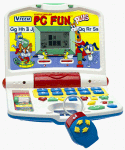
The play at a glance
A little laptop with shapes at your fingertips
Open the white case and the PC Fun Plus presents a small screen above rows of bright buttons. A blue mouse sits beside it, with yellow arrows pointing in four directions. Its playful desk-like arrangement invites a player to choose, answer and watch what happens on the LCD.
A different kind of choice in each activity
VTech’s guide describes eight activities spanning words, missing letters, order, matching, counting, shape sequences, arithmetic and music. The sliding selector chooses the activity. The mouse uses directional buttons and an Enter button to select answers, while dedicated number and shape buttons give the player other ways to respond.
For a closer look at the play, consider two examples. In the matching activity, six cards appear on screen and the player chooses pairs. In shape sequencing, three shapes appear in order, then disappear; the player enters the remembered sequence with the shape buttons. A successful answer can produce a monkey-catching-a-banana animation.
Music and Sound gives the shape buttons seven musical notes. Number buttons select melodies, while the separate Melody button chooses one randomly. Repeat revisits a prompt, and Help provides support in question activities.
Try shape-station dispatch
Make a little transport office on paper. This original activity takes the toy’s shape-and-sequence idea into a story the players can change.
- Draw three stations on a large sheet: Circle Cove, Triangle Tower and Square Street. Give each station a matching symbol.
- Draw a passenger and decide where they want to go. Perhaps a moon baker needs to deliver a triangular cake to Triangle Tower.
- Make a ticket strip with a repeating route: circle, triangle, square, circle, triangle, square. Point to each stop as you announce the journey.
- Cover one symbol with a blank card. Ask the dispatcher to fill in the missing stop and explain the repeating pattern.
- For the return trip, invent a new pattern and a reason for it. The train might visit Circle Cove twice because two passengers are waiting.
Switch the dispatcher and passenger roles. Use large paper cards, or draw every part on one sheet. Keep the toy on a dry surface if it shares the pretend office.
The historical record
Original Toysit coverage
The complete earlier product account and commentary are preserved below as historical coverage.
Little Smart PC Fun Plus by VTech Industries
Preschool Learning Activities: Introduces object, letters, befor/after, numbers, counting, addition/ subtraction, matching and more. 10 number buttons and 7 shape buttons make answering questions fun. 4-directional cursor mouse introduces computer skills. 10 melodies and 7 music notes enhance musical discovery. Music button plays familiar melodies consecutively. Reward animations encourage play. User Friendly Features: Large, LCD screen displays exciting animations. 4-directional cursor mouse enhances interactive play. Repeat and help buttons reinforce learning. Friendly voice encourages play. Automatic shut-off preserves battery life.
Educational toys have come a long way since the simple mechanical abacuses and flashcard sets of yesteryear. The rise of electronics transformed learning toys into interactive experiences that teach a wide range of skills. In the 1960s and 70s, early electronic learning aids like Little Professor math tutors let kids practice subjects through quizzes and word problems. The Speak & Spell introduced in the late 1970s combined digital voice synthesis with word games. Later, the emergence of handheld LCD games created portability and allowed learning on the go with games like Math Whiz. In the 2000s, technology like touch screens made educational toys more intuitive and dynamic, as seen in LeapFrog’s LeapPad learning tablets. Today’s learning toys incorporate sophisticated software, wireless connectivity, adaptive learning, and app integration to customize content and track progress. And AI-enabled toys like Cozmo engage kids through intelligent interaction. Electronic learning toys continue to evolve, finding new ways to educate and entertain generations of tech-savvy children.
Sources and editorial notes
VTech’s 20-page Little Smart PC Fun Plus guide, 91-01119-006 L, supplied the activity and control text. Its introduction diagram was visually inspected through ManualOwl and matches the pictured layout. Automated PDF downloads returned 403, although the text was accessible through the web reader. This is the Plus model. The old musical-button description is preserved; the guide describes random selection for the Melody button. No physical testing or learning-outcome assessment was performed.
- Original Toysit image — Existing same-site image reviewed and retained unchanged.
- VTech Little Smart PC Fun Plus user’s manual — Manufacturer-authored guide, 20 PDF pages: introduction, controls and activity text reviewed; direct automated download was blocked.
- PC Fun Plus introduction diagram, ManualOwl mirror — Archived manufacturer diagram inspected visually to compare the folding case, selector, buttons and mouse with the Toysit photograph.
- Original Toysit coverage — Complete historical account retained, including its original claims and wording.

Images and descriptions are retained as historical material. How Toysit covers toys.
Created for Toysit by Tabbloza — the artwork in our header.