
From the Toysit archive
Children’s Beginner Laptop Computer
Explore the archived beginner laptop and its likely Accelerator Next connection, separating keyboard and cursor controls from general computer claims.
The play at a glance
A toy keyboard, a menu and a choice
The archived beginner laptop offers a compact picture of early computer play: find a key, select a category and respond to the screen. Its original 25-activity description is much narrower than the later essay about children using modern laptops. Keeping those two accounts separate makes the page more useful.
A likely model match, with a useful distinction
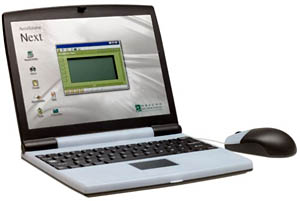
The Accelerator Next guide describes 25 activities in Word, Mathematics, Memory, Logic, Game and Music, matching the structure of Toysit’s original account. It lists a keyboard, directional cursor pad and separate stationary mouse. This offers an explanation for the mouse in the photograph alongside the older copy’s “touchpad” wording, without treating those terms as interchangeable.
In that guide, the pad has directional controls. The mouse’s middle control moves the highlight, while its side buttons submit a selection. These are model-specific controls, not evidence of a modern laptop’s touch-sensitive trackpad.
Built-in activities have defined boundaries
The manual also describes an expansion stick for extra activity content. That accessory is distinct from ordinary PC storage or an app store. Its mention does not prove that an old unit still has the stick or needs it for every activity.
The general essay preserved below discusses word processing, internet research and other computer uses. None follows simply from a toy having a QWERTY keyboard and a hinged screen. For a particular unit, identify what its own menu actually offers before describing it as a computer for schoolwork.
Find a key before asking for speed
Start with a familiar letter, perhaps the first letter of a name. Look for it, point to it and describe its neighbors. Locating a symbol, entering an answer and reading feedback are separate steps; an adult can help with one while leaving the others to the child.
If identifying a secondhand example, photograph its model label, keyboard and accessories together. The likely Accelerator Next connection is a research lead, not a substitute for matching the actual unit before following power or accessory instructions.
Draw a keyboard treasure map
Copy a short row of letter keys onto paper. Choose one as the treasure and give a clue using position: “one place to the right of R,” for example. Let the listener point before naming the letter. Then change the treasure and exchange roles.
Add a second row when the first is comfortable. This independent Toysit activity explores symbols and position; it is not a claim that using the toy teaches touch typing.
The historical record
Original Toysit coverage
The complete original coverage remains below. Its first paragraph describes a 25-activity toy; the later essay discusses general laptops and software, which should not be read as specifications for the photographed device.
Word, math, memory, logic, game, and music activities
A perfect laptop for the next generation. 25 amazing activities and games, including: Word, Math, Memory, Logic, Game, and Music. Real QWERTY Keyboard. Learn real PC skills. Super slim styling, touch pad control, digital sound and fantastic animations.
Introducing children to a starter laptop computer can be a valuable educational experience that equips them with essential PC skills and prepares them for the digital world. A carefully chosen laptop can offer a range of benefits for young learners:
Basic Computer Literacy: A starter laptop provides children with hands-on experience in using a computer, teaching them fundamental skills such as navigating the operating system, using a keyboard and mouse, and understanding basic computer functions.
Introduction to Software: With a laptop, children can explore a variety of software applications tailored to their age and learning level. They can become familiar with word processing, creating presentations, and exploring educational apps that promote creativity and critical thinking.
Online Research Skills: Learning to search the internet responsibly and efficiently is a crucial skill. A starter laptop allows children to practice online research under parental guidance, enhancing their ability to find accurate and reliable information.
Keyboard Proficiency: Early exposure to a laptop helps children develop keyboarding skills, an essential skill for communication and future academic and professional endeavors. This proficiency can also boost their overall digital fluency.
Visual Literacy: Many educational resources and activities on laptops involve visual content, fostering children's visual literacy by teaching them to interpret and create images, graphics, and multimedia presentations.
Problem-Solving: Using a laptop encourages children to solve technical issues that may arise, such as troubleshooting software glitches or learning to connect peripherals like printers. These problem-solving experiences build their confidence and analytical skills.
Critical Thinking: Engaging with educational software and interactive content on a laptop promotes critical thinking and decision-making as children navigate through activities and games that challenge their cognitive abilities.
Creativity and Expression: A laptop provides tools for children to express their creativity through digital art, writing, and multimedia projects. This fosters self-expression and allows them to showcase their unique talents.
Preparation for Digital Learning: As technology becomes integral to education, having exposure to a laptop prepares children for digital learning environments, whether they're participating in online classes, completing assignments, or engaging in educational platforms.
Parental Supervision: A starter laptop allows parents to guide their children's online experiences, ensuring they access appropriate content and fostering responsible internet behavior.
Adapting to Technological Change: Introducing children to a laptop at an early age helps them adapt to evolving technology trends and enhances their overall digital literacy, a valuable skill in today's tech-driven world.
A starter laptop for children offers a range of benefits by teaching essential PC skills, promoting digital literacy, and preparing them for the technological demands of the future. It provides a platform for learning, creativity, and exploration while ensuring children develop the foundational skills needed for success in the digital age.
Sources and editorial notes
The visible Next marking and the original activity count and categories point toward Oregon Scientific’s Accelerator Next. Its manufacturer-authored manual was read as indexed text on Manualzz, but direct retrieval and diagram review were unavailable. Without an underside model label, the match remains provisional. The manual supports both a directional cursor pad and a separate mouse; it does not establish a modern touchpad or general PC software. No unit was tested.
- Oregon Scientific Accelerator Next instruction manual — Manufacturer-authored guide on a third-party host; indexed text inspected as a likely model match.
Images and descriptions are retained as historical material. How Toysit covers toys.
Created for Toysit by Tabbloza — the artwork in our header.