
From the Toysit archive
LeapFrog Leapster
Revisit the 2003 Leapster launch: a touch pen, game buttons and cartridge-based activities, with an edition checklist for understanding an older handheld.
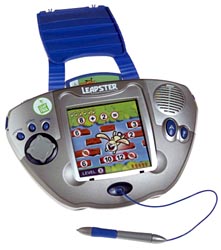
The play at a glance
A handheld with more than one way to answer
The original Leapster combined a touch-sensitive screen with physical game controls. A pen could select or draw directly on the display, while buttons could move through a game. Toysit’s October 8, 2003 report captures how that combination was introduced for the coming holiday season.
Start with the pen and the buttons
LeapFrog’s guide distinguishes the pen for drawing, selecting and dragging from the directional pad and A/B game buttons. Home, hint and pause controls provide other ways to navigate. These are separate inputs: knowing an answer and carrying out the required screen action are not always the same task.
When sharing an old game, watch one turn together. What is the child asked to notice? Does the answer require pointing, moving a character or drawing? Explaining the control can be more useful than repeating the question.
Four advertised roles do not mean four included libraries
The launch report described games, electronic books, digital art and interactive video as uses of the platform. Its cartridge section matters: do not read that list as a promise that every story, video or art lesson was included with the handheld.
The later Leapster guide describes Rabbit River activities and the Color/Colour Corral art studio as included in its version. That is evidence about the guide’s package, not proof of the software inside every first-release unit. Inspect the actual menu and the titles supplied with a particular set.
Keep the launch dates in their original context
This page was published on October 8, 2003. It announced an October 30 Times Square store event and nationwide retail availability in November. Those are the report’s announced plans; they do not establish a universal first-sale date for every market or revision.
Identify the exact handheld before matching accessories or cartridges. A similar family name on a Leapster, L-Max, Leapster 2, Explorer or GS is not by itself evidence that a specific accessory or game will fit. Nothing in this profile promises downloads or compatibility with a current computer.
Try one picture with two kinds of control
Draw a small map with a house, a tree and a pond. First, let a partner point directly to a destination. Then try giving directions from the house: two spaces right, one space up. Use a paper marker to follow the route.
Talk about when pointing is easier and when a sequence of moves is useful. This separate paper game makes the difference between direct selection and directional control easy to explore without needing a working handheld.
The historical record
Original Toysit coverage
The full October 8, 2003 launch report is preserved, including its quotations, anticipated retail dates, awards and educational claims. These statements describe the announcement at that time, not current availability or new testing.
Educational game player, electronic book reader, digital art studio, and interactive video player
As the excitement and anticipation of the holiday season nears, parents are already getting jumpy about finding the Leapster Multimedia Learning System that hits store shelves at the end of this month. LeapFrog Enterprises, a leading designer, developer and marketer of innovative technology-based educational products, created the Leapster platform as an educational game player, electronic book reader, digital art studio and interactive video player to provide an innovative approach to learning and fun by teaching essential school skills in ways that kids love to play -- with a cool-looking handheld electronic device.
"The Leapster will be one of the holiday gifts that parents of 4-8 year-olds will be clamoring to find this year," said Jim Silver, co-publisher of Toy Wishes. "With its full-color screen and game console format, it will be a big hit with kids who love electronic games, art, video and books, while parents will love the Leapster's many different educational aspects. Once again, LeapFrog has developed an item that lets kids learn while they play."
"The Leapster handheld features both a touch-sensitive screen and different function buttons for enhanced fun and learning," said Mike Wood, CEO of LeapFrog. "We believe that the Leapster platform is one of the most innovative products in company history."
"The first time my child tried the Leapster several months ago, she was hooked," said Dr. Jillian Barrett. "Since then, she has been begging me almost daily to get her a Leapster, claiming that she 'needs it.'"
Parents will be able to first purchase the Leapster Multimedia Learning System on October 30, with exclusive availability at Toys "R" Us in Times Square, New York City. LeapFrog will host an event that morning with a special presentation at the store.
Engaging activities for children and parents at the event include appearances by SpongeBob and Dora, two of the Nickelodeon characters featured in Leapster software titles. The Leapster system will become available at major retailers nationwide including Target, Wal-Mart and Kmart in November.
The Leapster system was recognized by Toy Wishes as a HOT DOZEN selection at the Holiday Preview event today in New York City, following All-Star distinction in the Toy Wishes Holiday Guide.
The Leapster system utilizes multi-sensory interactive experiences to provide children ages 4-8 years with personalized learning experiences that automatically adjust to their ability level. Each of the four key functions of the Leapster system -- educational game player, electronic book reader, digital art studio and interactive video player -- provides hours of opportunity for exploring new ways to learn valuable skills.
Leapster Cartridges
With action-packed educational video games that automatically adjust to a child's ability level, the Leapster platform teaches essential school skills such as reading, math and critical thinking for pre-K through second grade levels.
A variety of titles from the LeapFrog library will be vibrantly brought to life on the Leapster system with vivid animation and interactive games. As children play, they can learn literary skills and story comprehension while developing vocabulary and phonemic awareness.
The Leapster system also transforms into a digital art studio that encourages creative thinking and imaginative expression. Dozens of art tools enable children to draw, write and create anything they can imagine right on the Leapster handheld. Step-by-step lessons build confidence and inspire new ideas.
The Leapster system even takes video viewing to exciting new levels by enabling children to play built-in educational games while watching animated videos that develop fundamental reading and math skills. Children can stop the action at their own discretion when they wish to participate in the interactive full-color videos.
Sources and editorial notes
The original dated report and photograph are the main evidence for the launch. LeapFrog’s manufacturer-hosted Leapster parent guide provides family-level context; its control diagram, startup and art sections were reviewed visually. It contains later titles and cannot establish the exact contents of every 2003 package. No hardware, software or learning outcomes were tested. The paper activity is a Toysit suggestion.
- LeapFrog Leapster parent guide (PDF) — Original Leapster family controls and activities; a later guide revision, not an exact launch-package inventory.
Images and descriptions are retained as historical material. How Toysit covers toys.
Created for Toysit by Tabbloza — the artwork in our header.