
From the Toysit archive
Pixter Digital Handheld Computer
Explore the Pixter drawing family: stylus marks, shapes, stamps, erasing and saving, with guidance for identifying an older unit and a paper design challenge.
The play at a glance
Choose a tool, then make a mark
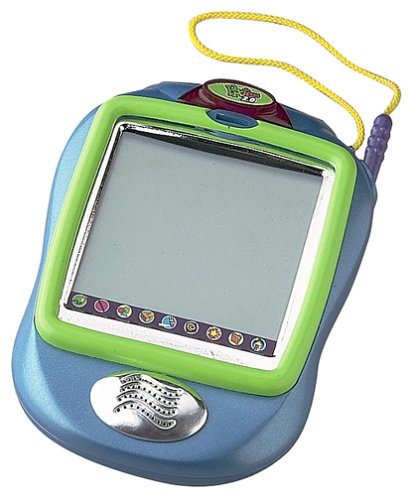
Pixter made a drawing surface into a small electronic workspace. A child could choose a tool and then decide what to make with it. This page introduces that drawing idea across the earlier family; the retained photograph appears to show the later Pixter 2.0 housing, rather than establishing which model first accompanied the article.
Four decisions inside a drawing
The earlier Pixter guide describes freehand marks, straight lines, shapes and stamps. These offer different starting points: a line follows your hand, a shape supplies an outline, and a stamp repeats a ready-made image. Try noticing which part of a picture the player invented and which part came from a tool.
A useful first project is one small scene. Choose a subject, add one detail, then change something that did not work as expected. The point can be the revision itself; a screen full of effects is not required.
Saving deserves its own moment
The 73974 guide describes a single saved-picture slot: saving again replaces what was there. Partial erasing and clearing a whole screen are also different choices. Before handing over a found unit with an existing picture, establish whether that picture matters and read the instructions for its model.
Let the maker decide what to keep. Describing an intended change before doing it can be more useful than discovering afterward that a favorite detail has disappeared.
Identify the unit before adding accessories
- Record the model label and compare the controls with its manual.
- Keep the supplied stylus with the handheld; the earlier guide warns against ordinary pens and pencils on its screen.
- Check each cartridge’s platform markings separately from its character or subject.
A familiar Pixter name does not settle software compatibility. The separate Pixter 2 profile covers the Color software distinction. The old list’s parental-control and durability claims should not substitute for actual instructions or inspection of a particular unit.
Make three versions of one little house
On paper, draw three empty rectangles. Turn the first into a house using only lines, the second using circles and squares, and the third using repeated symbols of your own design. Compare what stayed the same and what changed.
This is an independent Toysit drawing activity. It invites the same choice between freehand marks and repeatable shapes without requiring a working electronic screen.
The historical record
Original Toysit coverage
The original feature list is retained below. Its claims about parental controls, interchangeable faceplates, educational coverage and resistance to drops are not newly verified specifications for the pictured unit.
Pixter - the digital handheld computer that lets you create and eliminate.
The Pixter digital handheld computer was a popular children's toy that combined learning and entertainment.
- Touch Screen Interface: The Pixter featured a touch screen that allowed children to interact with games and activities using a stylus.
- Monochrome Display: The original Pixter came with a monochrome LCD screen, providing a clear and simple visual experience for young users.
- Educational Games: Pre-installed and cartridge-based games focused on educational themes such as math, spelling, logic, and creativity.
- Art and Drawing Tools: The device included drawing tools that allowed children to create and color pictures, fostering artistic expression.
- Music and Sound Effects: The Pixter offered engaging sound effects and background music to enhance the interactive experience.
- Expandable Content: With the use of plug-in cartridges, the Pixter's content could be expanded, offering a variety of additional games and activities.
- Portable Design: Its handheld design made the Pixter easy to carry, allowing children to take it on the go.
- Parental Controls: Parents could control and monitor the content, ensuring age-appropriate games and activities for their children.
- Customizable Appearance: Some versions of the Pixter allowed for customization with interchangeable faceplates, letting children personalize their device.
- Battery-Operated: The Pixter ran on batteries, making it convenient for travel and play without the need for constant charging.
- Durable Construction: Built with children in mind, the Pixter was designed to withstand rough handling and drops, ensuring longevity.
Sources and editorial notes
The original January 3, 2002 date and August 11, 2023 update are retained. Mattel’s 73974 guide documents the earlier drawing family; its hardware and activity diagrams were compared with the Pixter 2.0 guide. The photograph resembles the latter’s housing and signal dome, but its underside model label is unavailable. This is a family introduction, not an exact-model identification or hands-on test.
- Pixter 73974 owner’s manual (PDF) — Earlier-family drawing tools, save behavior and care guidance.
- Pixter 2.0 owner’s manual (PDF) — Later housing and additional sharing controls.
Images and descriptions are retained as historical material. How Toysit covers toys.
Created for Toysit by Tabbloza — the artwork in our header.