
From the Toysit archive
Scene It? DVD Trivia Game
Check the disc, menus, remote and shared screen before playing the original Scene It? movie game, then choose a board length and team format.
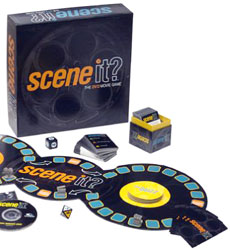
The play at a glance
Prepare the screen as carefully as the board
The original Scene It? combines a tabletop route with movie questions on cards and a DVD. The disc is part of the game system: its menus select challenges and provide timing, so working playback matters before anyone begins a turn.
Start with a short equipment check and a clear view of the screen for everyone. Then decide whether to play individually or in teams.
Do a short playback check first
Use the original game disc with a suitable DVD player and connected display. Before arranging a full game, confirm that the disc loads and that you can select menu items, hear the sound and return to the game menu. A device playing ordinary video does not by itself prove that these interactive menus will work.
- Disc
- Check that the disc belongs to the movie-game edition in the box.
- Controls
- Confirm that the available remote or playback controls can navigate and activate the menu choices.
- Sound and view
- Let everyone check the picture and volume from the seats they will actually use.
- Table
- Place the board where players can reach it without repeatedly blocking the screen.
If a menu or disc fails, resolve that before starting. This page does not promise that a console, computer, streaming device or modern player supports the game. Check the actual equipment’s documentation rather than assuming an adapter or application will supply the missing behavior.
Choose the length and the remote operator
The C0885 rules support two to four players or teams. Extend the Flextime board for longer play or fold it into a circle for a shorter route. One person operates the DVD remote; the main menu includes a How to Play demonstration.
Agree on teams before choosing movers. A team can discuss how it will give one clear answer and avoid competing voices from its own members. Sharing a mover does not require everyone to know the same movies.
Choose someone comfortable with the menus to operate the remote for the first session. That role helps keep the transitions between board, cards and screen orderly; it should not become a reason to skip another player’s chance to see or hear the challenge.
Know which kind of turn is happening
In the standard sequence, roll both dice, move by the numbered die and take the category challenge. My Play is for the rolling player; All Play opens the on-screen challenge to everyone. The reference cards identify the categories, including the card-based questions.
For a card question, another player reads the relevant prompt and the remote operator starts the timer. Before a new challenge, say who may answer. This small habit prevents a quick answer from someone outside a My Play turn from spoiling the question.
Keep finished cards in the prescribed rotation and use the game’s menus for the appropriate challenge. The set combines several kinds of prompts; it is not simply a race to identify every movie image that appears.
Keep the ending and edition together
Reaching the end of the path does not automatically win. The rules use All Play to Win and, if needed, Final Cut challenges. Read those sections before the first player arrives there.
Keep the DVD, numbered and category dice, movers, reference cards, Buzz cards and trivia cards with this edition. A Disney, Music, Sports or later movie version may have different questions, categories or rules.
After a session, note any playback problem and which equipment was used. That is more useful for the next gathering than assuming a successful test on one player establishes compatibility everywhere. No clips, trivia questions or answers need to be copied to keep that record.
The historical record
Original Toysit coverage
Both original paragraphs are preserved below. The novelty claim about being the only game with movie clips and the description of DVD technology as ultra-popular belong to the earlier coverage, not a current market comparison or compatibility claim.
Game with trivia questions about movies
Scene It? is all about movie magic. Unsurpassed stars. Unforgettable moments. Great lines and wonderful laughs. It's the only game that comes with real movie clips, on-screen challenges and popular movie trivia. Scenes from Hollywood's greatest movies draw everyone together around the TV for action-packed fun. Players advance around the Flextime board by outdoing friends and family in the uniquely fun activities that follow each clip. The game is jam-packed with hundreds of on-screen puzzlers in eleven unique categories, including Distorted Reality, Spellbinders, Invisibles, Rising Stars and Sound Clips. This innovative game combines ultra-popular DVD technology with board play to create the ideal party game for friends and family.
Combining trivia with multimedia clips as clues adds a dynamic, engaging layer to the game that appeals to a broader range of senses and skills. Multimedia clues can include short video clips, audio snippets, or even animated graphics, which bring the questions to life in a way that simple text cannot. These clips can add context, offer hints, or simply make the trivia more entertaining and memorable. Players are likely to find the experience more immersive, as they not only have to rely on their factual knowledge but also on their ability to interpret visual and auditory cues. This multi-layered approach to trivia can be especially compelling in a group setting, where the varied types of clues can cater to different strengths and interests, making the game more inclusive and exciting for everyone involved.
Sources and editorial notes
Reviewed October 16, 2026 using Mattel’s C0885 product record and four-page C0885-0920 rule sheet. The original movie-game branding, Flextime board and listed components correspond to the archived image. Mattel dates C0885 to 2003; that is product history, not an inferred Toysit publication date. The manual was visually inspected in full. Its cover says 13–Adult while the service record says Adult; consult the actual package and content for the group. No DVD, remote, player or current device compatibility was physically tested. The archived ASIN 0000000000 remains an internal placeholder and is not a purchase link.
- Mattel: Scene It? The DVD Game, C0885 — Original movie-game identification and linked rules.
- Mattel: original Scene It? rules (PDF) — C0885-0920, including Flextime setup, DVD menus, challenge types and winning conditions.
Images and descriptions are retained as historical material. How Toysit covers toys.
Created for Toysit by Tabbloza — the artwork in our header.