
From the Toysit archive
V-Tech Skill Builder Handheld Computer
Explore the V-Tech handheld and keyboard dock, with careful SkillStarter identification, local infrared versus PC connections, and a paper message activity.
The play at a glance
A handheld with two ways to enter an idea
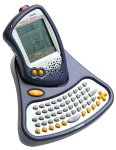
The original photograph pairs a small handheld screen with a keyboard dock. That combination makes this a useful example of choosing an input: touch a selection or type an entry. Toysit’s historical title says Skill Builder; VTech’s relevant documentation calls its system SkillStarter Handheld.
Touching and typing
The SkillStarter guide documents a stylus, an on-screen keyboard and a physical keyboard dock. It also separates choosing an entry from confirming it. These are features of that documented system; identify the model before assuming every detail applies to a unit described as Skill Builder.
When sharing a device, notice where the effort goes. Is the player deciding what to say, finding a letter, or moving between screens? Let them describe the intended entry before helping with the controls.
Three kinds of activity to keep separate
- On the handheld: the guide lists built-in word, number, organizer and creative activities.
- Between nearby units: infrared communication is described for compatible XL Series devices.
- Through a PC: synchronization uses the separate vPort accessory and desktop software.
A nearby infrared exchange is not internet messaging. The manual’s old download instructions do not establish a working present-day service or modern computer compatibility.
Keep the parts and identity together
Record the handheld’s model label, the dock and any accessories as separate items. The photograph can help recognize the overall arrangement, but it does not reveal the underside label or prove that a loose accessory is compatible.
The earlier essay traces a broad history of educational technology. Read it as background rather than a specification sheet: a toy can offer interesting choices without understanding language, personalizing a curriculum or connecting to a classroom platform.
Send a message with a shared symbol key
On paper, agree on four symbols and their meanings: perhaps a circle for “meet,” a triangle for “tree,” a star for “bring” and a square for “book.” Use them to write a short message, pass it to a partner, and ask the partner to read it back.
Revise the key when something is unclear. This original Toysit activity explores how sender and receiver need the same conventions; it is not a reproduction of the handheld’s infrared protocol or a built-in game.
The historical record
Original Toysit coverage
The original product paragraph and educational-electronics essay are preserved below. Their claims about school success and later AI, virtual reality and connected classrooms are not evidence of features or outcomes for this handheld.
Learning companion with easy to use touch-screen, built in stylus, and docking station with keyboard
Portable handheld learning companion complete with easy to use touch-screen, built in stylus and docking station with keyboard for easier at home input. More than 20 game style activities build core skills for school success, focusing on: phonics, spelling, vocabulary, telling time, addition and subtraction. Additional word games and arithmetic problems can be downloaded from a secure VTech website with the optional vPort accessory (sold seperately). Includes school tools such as: calculator, organizer and unit converter. Features creative games such as: music composer, artwork studio and Creation Station, where children make and share their own personal, animated characters. Fun two-player games can be played across devices with wireless infrared communication
The evolution of educational electronics has been a transformative journey, revolutionizing the way education is approached and experienced. In the early days, the focus was largely on simple electronic devices like calculators and electronic spelling aids. The 1980s and 1990s saw the introduction of educational computer software, such as "Math Blaster" and "Reader Rabbit," that made learning more interactive and engaging. The rise of the Internet further accelerated this trend, offering a plethora of online resources and courses. Then came smartphones and tablets, enabling educational apps and games that offer personalized, interactive experiences, from learning languages with apps like Duolingo to exploring physics through games like Angry Birds. Nowadays, we have complex AI-driven learning platforms, Virtual Reality (VR) experiences for immersive learning, and IoT-enabled smart classrooms that cater to a diverse range of learning styles. These advances have democratized education, making it more accessible and tailored to individual needs.
Sources and editorial notes
VTech’s SkillStarter Handheld manual was read through its indexed PDF text, including controls, infrared communication, vPort and activities. Direct download failed and its diagrams were not visually inspected. The keyboard-dock description fits the source, but the photograph’s underside model label is unavailable, so the title discrepancy remains explicit. No power specifications or exact-revision setup instructions are transferred. No device, software or connection was tested.
- VTech SkillStarter Handheld manual (PDF) — Manufacturer document; indexed text verified, direct retrieval failed during review.
Images and descriptions are retained as historical material. How Toysit covers toys.
Created for Toysit by Tabbloza — the artwork in our header.