
From the Toysit archive
XaviX Bowling
Explore XaviX Bowling’s green controller and television lane, with an original lane-design activity and preserved historical coverage.
The play at a glance
A green ball and a lane on the screen
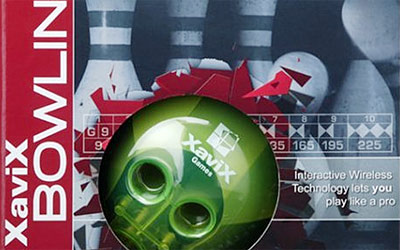
XaviX Bowling’s package brings the lane forward: a bright green ball controller sits beneath white pins, red arrows and a row of scores. Its three finger holes make the bowling theme visible before the television is switched on. The play idea pairs a bowling motion with a result on the screen.
Picture the lane
The package artwork compresses a whole bowling visit into a small scene: the ball in front, pins at the far end and a score strip recording the turns. The controller’s green surface contrasts with the white pins, giving the two ends of the imagined lane their own colors.
With a complete, correctly matched set, players can watch the on-screen result and talk about what caught their attention. Keep hold of the electronic ball controller throughout play; it is not a ball to release or roll across the room. Use the exact model’s instructions for retention, grip, sensor position and clear playing space before operating an older set.
Try the lane designer’s break
At the end of a frame, set the controller down and become the designer of an imaginary bowling alley. This original Toysit drawing game also works on its own, using the package picture as a starting point.
- Draw a long lane with a little backdrop behind the pins. Give it one memorable landmark: a lighthouse, a giant sunflower or a station clock.
- Ask a partner to name the lane. “Last Train Lane” and “Sunflower Seven” suggest very different places.
- Write a one-sentence welcome announcement. The lighthouse lane might greet a visiting crew; the station lane might invite everyone aboard for the next frame.
- Add a tiny detail for the next visitor to discover, such as a cat in a window or a ticket tucked beside the clock.
- Swap drawings and let each designer describe the other person’s alley as if introducing it to a friend.
Keep the imagined backdrop on paper. The names, decorations and announcements belong to this activity; they are not game settings. Move the paper aside before returning to controller play.
A different kind of scorecard
Instead of recording points, make three spaces labeled lane name, landmark and visitor. Fill one line for each new drawing. By the end, the group has a small guidebook to bowling alleys that could exist in a story: one beside the sea, another in a garden and another beneath a busy station.
The historical record
Original Toysit coverage
The complete earlier product account and commentary are preserved below as historical coverage.
Virtual sports system determines if you roll a strike or angle the ball enough to pick up your winning spare in the final frame
XaviX Port determines the angle of your roll so that you control the amount of hook on each release. Realistic graphics and stereo sound put you in the bowling alley. Create up to 8 players, and customize your game with different techniques and hooking styles. Choose from 3 modes: Against the Clock, Panel Crusher, and Moving Pins. XaviX Games Technology provides real game objects that control the action. With the XaviX Bowling Ball, wireless motion recognition determines if you roll a strike or angle the ball enough to pick up your winning spare in the final frame. Create up to 8 players and different bowling techniques and hooking styles.
Bowling video games have always been a popular virtual recreation of the beloved lane sport. They capture the fun and competitive spirit of bowling in the digital realm.
- Early bowling games like PBA Bowling and Bowling on the Atari 2600 simplified bowling to pushing a button.
- As technology advanced, video bowling games incorporated 3D graphics and motion controls to simulate real bowling movements.
- Players can join leagues, customize bowling balls and alleys, and access arcade power-ups and moves.
- Games like the Wii Sports bowling mimicked throwing the ball with natural motions using motion control wands.
- Online bowling games now allow virtual matches and tournaments against players worldwide.
- The latest bowling titles feature realistic physics, ball spin controls, and social multiplayer options.
For bowling fans, video bowling delivers that lane experience at home with competitive fun and ever-improving realism.
Sources and editorial notes
The original package image and complete older account anchor this profile. The full SSD Bowling instructions could not be recovered: manual listings loaded, while scan requests returned access errors or a placeholder. The eight-player wording, named modes, hook controls and realism claims remain in historical coverage; eight stored identities versus match participation is unresolved. Sensor placement, grip and region must be checked against the owner’s matched guide. The later bowling-game survey remains historical commentary. No physical testing or recall clearance is claimed.
- Original Toysit image — Existing same-site image reviewed and retained unchanged.
- XaviX Bowling manual listing — Listing identifies a 21-page user guide; the complete instruction scans were not available for review. Consult a matched original guide before operation.
- Original Toysit coverage — Complete historical account retained, including its original claims and wording.

Images and descriptions are retained as historical material. How Toysit covers toys.
Created for Toysit by Tabbloza — the artwork in our header.