
From the Toysit archive
Pixter 2
Revisit Pixter 2.0’s drawing tools and nearby infrared picture sharing, with a two-unit checklist, software distinctions and a paper drawing exchange.
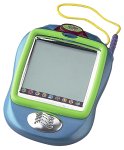
The play at a glance
A drawing you could send across the room
Pixter 2.0 added a way to pass a picture or message to another Pixter 2.0 nearby. That makes it an interesting toy for shared drawing: one person creates something, another receives it, and the picture becomes a reason to talk. Its infrared link connects nearby units; it is not internet messaging.
Drawing and sending are separate actions
The manual describes drawing tools, fill effects and typed captions, followed by a separate send control. The receiver accepts the incoming message on its own screen. Making a picture does not automatically share it.
That pause is useful in shared play. Ask the maker what the recipient should notice, and let the recipient describe what they see before explaining the intended idea. A surprising interpretation can become the next drawing prompt.
What the local link needs
- Two Pixter 2.0 units, with their signal domes facing one another.
- An unobstructed path between them; the guide specifies no more than five feet.
- A receiver ready to accept the picture or message.
The guide also advises avoiding bright light for best performance. These are documented conditions, not a test of any surviving pair. Start by identifying both units rather than assuming another handheld with a Pixter logo can receive the message.
Keep the software families distinct
Mattel’s support record says Color software is for Color Pixter, not the original Pixter, Pixter Plus or Pixter 2.0. The archived phrase “all Pixter software” is therefore too broad for choosing cartridges across generations.
The 2.0 manual also describes one saved picture at a time. Decide what to preserve before saving over an existing drawing; a pile of cartridges is not an archive of everything once drawn on the handheld.
Exchange a picture with one missing detail
Each person draws an imaginary vehicle on paper, leaving one part unfinished. Exchange the sheets, add the missing detail, then return them and explain the addition. A boat may gain wings; a bicycle may acquire a picnic basket.
This original activity keeps the back-and-forth idea without depending on infrared hardware. Agree first that each person may change the other’s picture.
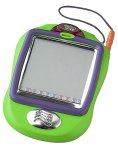
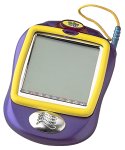
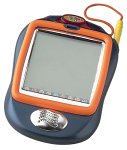
More original Pixter 2 photographs
The historical record
Original Toysit coverage
The original product description is preserved below, including its broad software-compatibility claim. The current context distinguishes the Color software family and explains the discrepancy between the retained page date and the manufacturer’s release record.
Pixter 2 the Latest and Best in the Pixter Line
Pixter 2.0 is just like the original Pixter but with even more cool features. It includes a wireless link to other Pixter 2s. Digital drawing tools let kids create a picture or compose a message and the wireless infrared technology lets them send it to their friends. It's just as easy to receive pictures and messages, too. The touch sensitive LCD screen and drawing stylus encourage endless creativity and imagination. Kids can draw pictures, paint them with a touch of a button, add special effects and digital stamps, erase a lot or a little, create funny faces, connect-the-dots, even save their favorite creations. All with fun sound effects and music. It's compatible with all Pixter software. Pixter is a hand-held, electronic toy that puts the power of digital creativity in the palms of kids' hands.
Sources and editorial notes
Toysit’s source records January 3, 2002; Mattel’s B0657 record lists a 2003 release. The source date is preserved as recorded, not treated as a confirmed launch date. The B0655–B0658 manual’s housing and signal-dome diagram match the visible family of the four photographs; individual underside labels were not available. No two-unit transfer or cartridge was tested.
- Pixter 2.0 owner’s manual (PDF) — Drawing, one-picture storage and infrared send/receive controls.
- Mattel Pixter 2.0 product record — Release-year record and Color software compatibility distinction.
Images and descriptions are retained as historical material. How Toysit covers toys.
Created for Toysit by Tabbloza — the artwork in our header.